
Screen Mirroring Cast to TV
com.soomapps.screenmirroring
by Softoria LLC
Screenshots


Ad slot: Top Leaderboard
About this app
Screen Mirroring Cast to TV is a technique, which allows you to mirror your smartphone on the TV screen. You can easily access all of your games, photos, videos and other applications on a big screen using this screen mirroring - miracast App.
If your eyes are drained from looking at your small cellular phone, you will get a great big screen experience by connecting your phone to TV, Chromecast, Firestick, Roku stick & Anycast via this miracast - Castto app!
Mirroring your mobile screen on your TV can be useful when you're showing off photos from a recent trip, playing a game or giving a demonstration. With this Screen Mirroring App, you'll be able to duplicate your Android phone's screen on TV.
This Screen Mirroring App allows you to easily connect your phone/tablet and your TV. It provides you a secure connection to protect your data, files and applications. This miracast - Castto app is simple, easy to use and most importantly a free app!
With this screencast App, you can stream to TV from phone without limitations. It helps you instantly stream movies, music and photos to your TV! This is one of the best miracast app for android users.
Screen mirroring is useful for streaming movies, videos, access photos and apps on the TV screen. You can easily connect your smartphone with your TV wirelessly. You can search for your favorite TV shows and series and easily stream them anytime on your TV screen.
Watching videos on your phone or tablet is great, streaming them on your big TV screen? Better yet. This’s the best miracast app to view your phone on your TV. If you are searching for How to screencast Without Hdmi then this is the best app, you will find!
Little smartphone and tablet screens are good on the run, but when you’re in your family area then why not use your TV’s much larger screen instead? Sharing your phone screen With the Television now is easier with this screencast App.
If you are tired of searching the greatest Apps for casting your small screens into larger screens to get awesome experiences, here is the best and most user-friendly miracast App. All you need is to make sure that your smartphone/tablet and your TV are connected to the same WIFI network in order for this screen mirroring- Castto to work successfully.
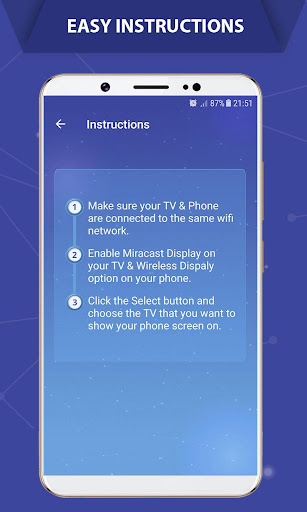
Please follow the steps bellow to display your mobile screen on your TV:
1- Make sure your TV and your Phone are Connected to the same wifi network
2- Enable Miracast Display on your TV
3- Enable Wireless Dispaly option on your phone
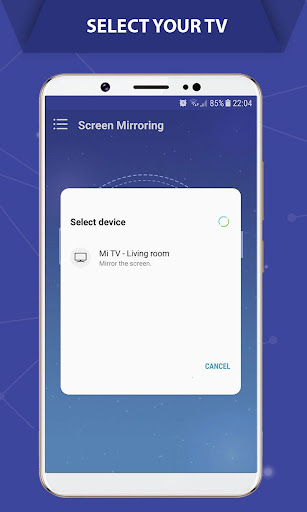
4- Click Select button and choose your TV
5- Enjoy!
Screen Mirroring is supported by all Android devices and Android Versions. If you face any problems with your device, feel free to contact us!
PLEASE CONTACT US at [email protected] for any issue or feature request prior to leave a bad comment, we would be pleased to provide you any help!
If your eyes are drained from looking at your small cellular phone, you will get a great big screen experience by connecting your phone to TV, Chromecast, Firestick, Roku stick & Anycast via this miracast - Castto app!
Mirroring your mobile screen on your TV can be useful when you're showing off photos from a recent trip, playing a game or giving a demonstration. With this Screen Mirroring App, you'll be able to duplicate your Android phone's screen on TV.
This Screen Mirroring App allows you to easily connect your phone/tablet and your TV. It provides you a secure connection to protect your data, files and applications. This miracast - Castto app is simple, easy to use and most importantly a free app!
With this screencast App, you can stream to TV from phone without limitations. It helps you instantly stream movies, music and photos to your TV! This is one of the best miracast app for android users.
Screen mirroring is useful for streaming movies, videos, access photos and apps on the TV screen. You can easily connect your smartphone with your TV wirelessly. You can search for your favorite TV shows and series and easily stream them anytime on your TV screen.
Watching videos on your phone or tablet is great, streaming them on your big TV screen? Better yet. This’s the best miracast app to view your phone on your TV. If you are searching for How to screencast Without Hdmi then this is the best app, you will find!
Little smartphone and tablet screens are good on the run, but when you’re in your family area then why not use your TV’s much larger screen instead? Sharing your phone screen With the Television now is easier with this screencast App.
If you are tired of searching the greatest Apps for casting your small screens into larger screens to get awesome experiences, here is the best and most user-friendly miracast App. All you need is to make sure that your smartphone/tablet and your TV are connected to the same WIFI network in order for this screen mirroring- Castto to work successfully.
Please follow the steps bellow to display your mobile screen on your TV:
1- Make sure your TV and your Phone are Connected to the same wifi network
2- Enable Miracast Display on your TV
3- Enable Wireless Dispaly option on your phone
4- Click Select button and choose your TV
5- Enjoy!
Screen Mirroring is supported by all Android devices and Android Versions. If you face any problems with your device, feel free to contact us!
PLEASE CONTACT US at [email protected] for any issue or feature request prior to leave a bad comment, we would be pleased to provide you any help!
App Information
Version Name
2.6.9
Version Code
90
File Size
12.9 MB
Minimum OS
Android 7.0+
Target SDK
Android 33
Developer
Softoria LLC
Contact
Website
Content Rating
Everyone
Package Name
com.soomapps.screenmirroringPermissions Required
This app may request the following permissions:
Recent Reviews

Lakecia Allison (AquaQueen)
3.0★
Perfect! No ads. No gimmicks. As I used it, I waited for it to pause and a pay pop up come on the screen. That never happened! I would like to donate if needed or possible though because it is hard finding the perfect app with no ads, gimmicks, or unnecessary fees. UPDATE: Throughout the movies or videos, it becomes distorted and blurs on and off. So annoying! Fix please!

A Google user
4.0★
I absolutely love this app!! I've been useing it for years, and it's always worked perfect except for one thing recently... for some reason I can't get the volume to go past like the lowest setting. Even when I turn my TV volume up to its max, I can still barely hear anything coming out of speakers. Which is unusual because like I said, it's been working perfectly fine for years but now all the sudden, it won't let me get the volume above anything I can hear! Like it almost is completely muted..
A Google user
2.0★
You don't need this app. I'll save you the space (and amount of ads this app will pop up..) by telling you how to do this without the app. Go to your settings ->Bluetooth and device connections -> connection preferences -> cast. The app simply opens this up for you. I left this at two stars because I know some people aren't really good at going through their settings, but I've provided the steps above.

Dan The Man
1.0★
First off, it doesn't even work. Every 2 clicks you will get a pop up ad. When you have the app open and you press the button on your phone to see all of your apps in the background, this apps icon is the same as the settings icon, weird. When you go to uninstall the app, it will force open on you, even if you previously closed it and didn't have it open in the first place. The app opened itself when I went to uninstall, nothing should be more of a red flag.

Giorgos T
5.0★
Works amazingly. You can even choose specific app and not entire phone. Rotation works also. Great app.

kamel
5.0★
Awesome casting app. Although the casting was kinda laggy and low quality, it was probably from my phone. This app is very simple, works for all devices and is free and has small and short ads. I give it a 5 for being free, being very simple, and having small and short ads.
Ad slot: In-Content