Retro Mode - Icon Pack (Light) icon

Phone

Retro Mode - Icon Pack (Light)

Personalization Moertel Pixel Art ⭐ 4.90 10,000+
Version 2.1.0 Everyone

Screenshots

Retro Mode - Icon Pack (Light) screenshot
Permissions Explained 11 permissions requested View details

This app requests 11 permissions. The table below explains what each permission may allow and what users should review before installing.

Status Permission What it means Why it may be used User safety note
ℹ️ Review Read The Contents Of Your Usb Storage read the contents of your USB storage This is an Android permission or app-specific permission requested by the app. The app may use this permission for features related to its category, device support, background behavior, storage, connectivity, or system integration. Review this permission before installing, especially if it does not match the app’s expected purpose.
ℹ️ Review Modify Or Delete The Contents Of Your Usb Storage modify or delete the contents of your USB storage This is an Android permission or app-specific permission requested by the app. The app may use this permission for features related to its category, device support, background behavior, storage, connectivity, or system integration. Review this permission before installing, especially if it does not match the app’s expected purpose.
ℹ️ Review View Network Connections view network connections This is an Android permission or app-specific permission requested by the app. The app may use this permission for features related to its category, device support, background behavior, storage, connectivity, or system integration. Review this permission before installing, especially if it does not match the app’s expected purpose.
ℹ️ Review Full Network Access full network access This is an Android permission or app-specific permission requested by the app. The app may use this permission for features related to its category, device support, background behavior, storage, connectivity, or system integration. Review this permission before installing, especially if it does not match the app’s expected purpose.
ℹ️ Review Run At Startup run at startup This is an Android permission or app-specific permission requested by the app. The app may use this permission for features related to its category, device support, background behavior, storage, connectivity, or system integration. Review this permission before installing, especially if it does not match the app’s expected purpose.
ℹ️ Review Set Wallpaper set wallpaper This is an Android permission or app-specific permission requested by the app. The app may use this permission for features related to its category, device support, background behavior, storage, connectivity, or system integration. Review this permission before installing, especially if it does not match the app’s expected purpose.
ℹ️ Review Control Vibration control vibration This is an Android permission or app-specific permission requested by the app. The app may use this permission for features related to its category, device support, background behavior, storage, connectivity, or system integration. Review this permission before installing, especially if it does not match the app’s expected purpose.
ℹ️ Review Modify System Settings modify system settings This is an Android permission or app-specific permission requested by the app. The app may use this permission for features related to its category, device support, background behavior, storage, connectivity, or system integration. Review this permission before installing, especially if it does not match the app’s expected purpose.
ℹ️ Review Google Play License Check Google Play license check This is an Android permission or app-specific permission requested by the app. The app may use this permission for features related to its category, device support, background behavior, storage, connectivity, or system integration. Review this permission before installing, especially if it does not match the app’s expected purpose.
ℹ️ Review Read Google Service Configuration read Google service configuration This is an Android permission or app-specific permission requested by the app. The app may use this permission for features related to its category, device support, background behavior, storage, connectivity, or system integration. Review this permission before installing, especially if it does not match the app’s expected purpose.
ℹ️ Review Receive Data From Internet receive data from Internet This is an Android permission or app-specific permission requested by the app. The app may use this permission for features related to its category, device support, background behavior, storage, connectivity, or system integration. Review this permission before installing, especially if it does not match the app’s expected purpose.

About Retro Mode - Icon Pack (Light)

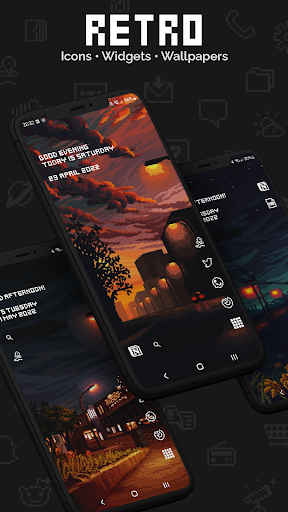
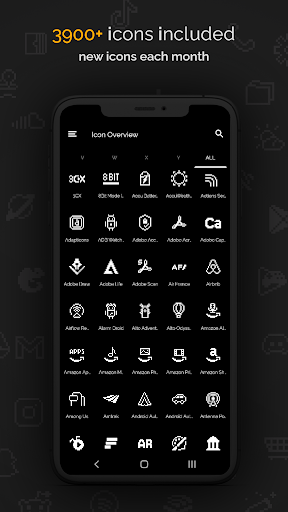
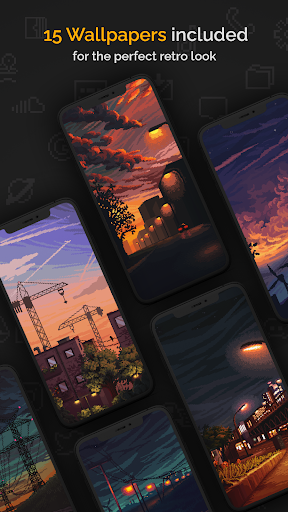
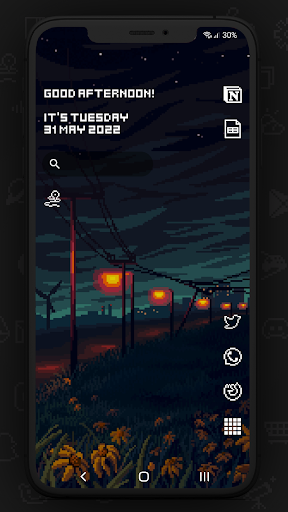
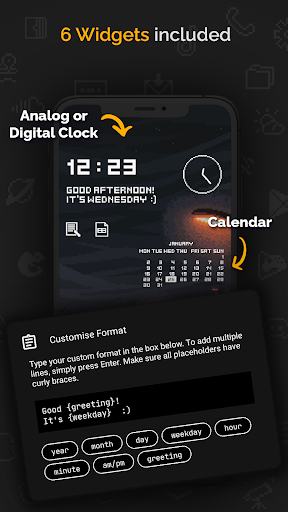
Proudly made in Hamburg ❤️ by pixel artist Moertel The most complete pixel art icon pack on the Play Store - updated monthly. Embark on a digital road trip to the 90s and enjoy your phone like never before. F E A T U R E S • 4050 icons included • 15 wallpapers included • 6 widgets included • Widgets: Digital clock (Android 10+) • Widgets: Analog clock • Widgets: Date • Widgets: Greeting with time of day • Widgets: Calendar • Widgets: Text shortcut • 20+ launchers supported (list below) • Updated monthly with new icons and features D E S I G N • Crisp pixel art design in plain white • No shadows, no outlines W I D G E T S • Text in widgets is freely configurable (up to 500 characters) • Choose from 8 placeholders (day, month, year, hour, minute, am/pm, greeting, weekday) T U T O R I A L Curious how this works in practice? Full demo: https://moertel.app/howto R E Q U I R E M E N T S Pixel, Motorola and Xiaomi users - you need one of the launchers below because your stock launcher does not support third-party icon packs. I recommend Nova - it's free! To apply the icon pack, you must have one of these launchers installed: Action • ADW • BlackBerry • CM Theme • ColorOS (12+) • Flick • Go EX • Holo • Holo HD • Hyperion • KISS • Lawnchair • LG Home • Lucid • Neo • Niagara • Nothing • Nougat • Nova (recommended) • OneUI 4.0 (with Theme Park) • OxygenOS • POCO 2.0 (note that MIUI and POCO 3+ are not supported) • Posidon • Smart • Solo • Square Unsure whether you can use the icon pack? Send me an email: [email protected] I C O N R E Q U E S T S 5 free icon requests are included in the app. I draw about 100 new icons each month based on the most popular ones. If you want be absolutely sure your app is included in the following month's update, or if you've run out of requests, you can buy additional requests right from within the app. I draw all icons pixel by pixel on a tiny 20x20 pixel canvas and then upscale them so they look amazingly crisp on your homescreen or app drawer. You can be sure I'm using all my skill to make cute and readable icons you'll enjoy looking at! S U P P O R T Any questions? Reach out to me anytime! I'm happy to hear from you and any feedback or suggestions you might have. In any case: Thanks for checking out my icon pack :) • Email me at [email protected] • https://twitter.com/moertel C H A N G E L O G • May 2024: 30 new icons • April 2024: 20 new icons • March 2024: 100 new icons • February 2024: 100 new icons • January 2024: 100 new icons • December 2023: 60 new icons, 1 new widget • November 2023: 102 new icons • October 2023: 106 new icons • September 2023: 101 new icons • August 2023: 133 new icons, 2 new wallpapers • July 2023: 116 new icons • June 2023: 180 new icons, 2 new wallpapers • May 2023: 280 new icons, 1 new wallpaper • April 2023: 340 new icons, 1 new wallpaper • March 2023: 315 new icons, 1 new widget • February 2023: 160 new icons • January 2023: 157 new icons, 1 new widget • December 2022: 125 new icons…

What Retro Mode - Icon Pack (Light) Is Used For

Retro Mode - Icon Pack (Light) appears to be a personalization app for changing the look of an Android home screen. Based on the metadata, it provides a large set of pixel-art style icons, plus matching wallpapers and widgets, so users may use it to create a coordinated retro or 90s-inspired layout on their phone.

This type of app is commonly used with a compatible launcher, since icon packs usually need launcher support to apply icons across the home screen and app drawer. The metadata also mentions wallpaper setting, network access, and startup behavior, which fits an app that can download updates, apply visual themes, and keep widgets or icon resources current. It is aimed at phone use rather than tablet, TV, or car displays, and it may be especially relevant for users who like customizing icons, clocks, calendars, and shortcut widgets in one place.

Common uses

  • Applies a themed icon set to supported Android launchers
  • Provides pixel-art icons for the home screen and app drawer
  • Includes wallpapers that can match the icon style
  • Offers widgets such as clock, date, calendar, greeting, and text shortcut
  • May let users request additional icons through in-app options
  • Requires a compatible launcher to use the icon pack features
  • Best suited for phone home-screen customization rather than general productivity
Best for:
home screen customization icon pack users widget setup retro style fans phone app

App Details

Package:
app.moertel.retro.iconpack.light
Developer:
Moertel Pixel Art
Version:
2.1.0
Updated:
Jul 9, 2025
Min Android:
9
Age Rating:
Everyone
Contains Ads:
No
In-App Purchases:
Yes

Official Listing

  • Official listing available on Google Play
  • Package name: app.moertel.retro.iconpack.light
  • Age rating: Everyone

Explore More

Browse more apps in Personalization or explore the Phone hub .

Related Personalization Apps

How to Download Retro Mode - Icon Pack (Light)

If this app is not hosted directly on APKApps official link, then for the safest and most up-to-date version, install it from its official Google Play listing.