PhotoDoc icon

Phone

PhotoDoc

Medical Wiseminer Informática Ltda ⭐ 0.00 10,000+
Version 3.5.6 Everyone

Screenshots

PhotoDoc screenshot
PhotoDoc screenshot
PhotoDoc screenshot
PhotoDoc screenshot
PhotoDoc screenshot
PhotoDoc screenshot
PhotoDoc screenshot
PhotoDoc screenshot
PhotoDoc screenshot
PhotoDoc screenshot
PhotoDoc screenshot
PhotoDoc screenshot
PhotoDoc screenshot
PhotoDoc screenshot
PhotoDoc screenshot
Permissions Explained 10 permissions requested View details

This app requests 10 permissions. The table below explains what each permission may allow and what users should review before installing.

Status Permission What it means Why it may be used User safety note
ℹ️ Review Read The Contents Of Your Usb Storage read the contents of your USB storage This is an Android permission or app-specific permission requested by the app. The app may use this permission for features related to its category, device support, background behavior, storage, connectivity, or system integration. Review this permission before installing, especially if it does not match the app’s expected purpose.
ℹ️ Review Modify Or Delete The Contents Of Your Usb Storage modify or delete the contents of your USB storage This is an Android permission or app-specific permission requested by the app. The app may use this permission for features related to its category, device support, background behavior, storage, connectivity, or system integration. Review this permission before installing, especially if it does not match the app’s expected purpose.
ℹ️ Review Take Pictures And Videos take pictures and videos This is an Android permission or app-specific permission requested by the app. The app may use this permission for features related to its category, device support, background behavior, storage, connectivity, or system integration. Review this permission before installing, especially if it does not match the app’s expected purpose.
ℹ️ Review Record Audio record audio This is an Android permission or app-specific permission requested by the app. The app may use this permission for features related to its category, device support, background behavior, storage, connectivity, or system integration. Review this permission before installing, especially if it does not match the app’s expected purpose.
ℹ️ Review View Network Connections view network connections This is an Android permission or app-specific permission requested by the app. The app may use this permission for features related to its category, device support, background behavior, storage, connectivity, or system integration. Review this permission before installing, especially if it does not match the app’s expected purpose.
ℹ️ Review Full Network Access full network access This is an Android permission or app-specific permission requested by the app. The app may use this permission for features related to its category, device support, background behavior, storage, connectivity, or system integration. Review this permission before installing, especially if it does not match the app’s expected purpose.
ℹ️ Review Control Vibration control vibration This is an Android permission or app-specific permission requested by the app. The app may use this permission for features related to its category, device support, background behavior, storage, connectivity, or system integration. Review this permission before installing, especially if it does not match the app’s expected purpose.
ℹ️ Review Prevent Device From Sleeping prevent device from sleeping This is an Android permission or app-specific permission requested by the app. The app may use this permission for features related to its category, device support, background behavior, storage, connectivity, or system integration. Review this permission before installing, especially if it does not match the app’s expected purpose.
ℹ️ Review Read Google Service Configuration read Google service configuration This is an Android permission or app-specific permission requested by the app. The app may use this permission for features related to its category, device support, background behavior, storage, connectivity, or system integration. Review this permission before installing, especially if it does not match the app’s expected purpose.
ℹ️ Review Receive Data From Internet receive data from Internet This is an Android permission or app-specific permission requested by the app. The app may use this permission for features related to its category, device support, background behavior, storage, connectivity, or system integration. Review this permission before installing, especially if it does not match the app’s expected purpose.

About PhotoDoc

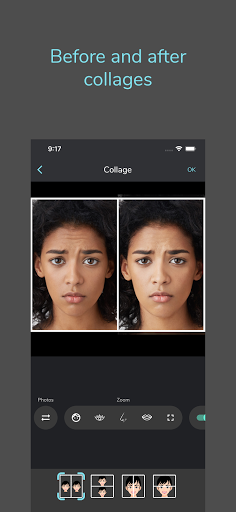
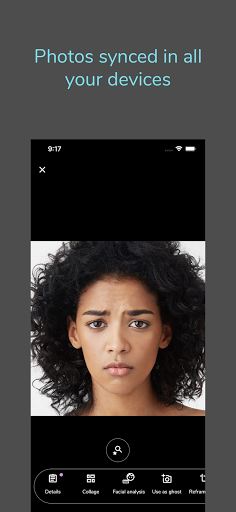
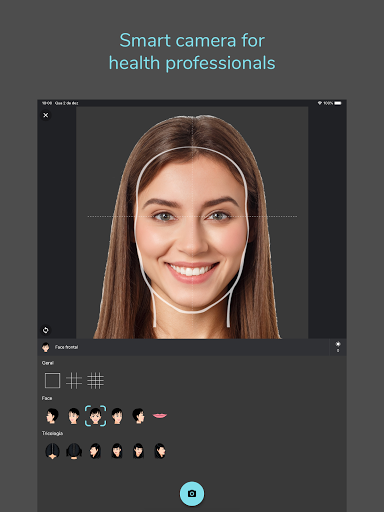
PhotoDoc is the ideal solution for healthcare professionals who need to take and manage a large number of photos and videos of their patients, in a safe, practical and intelligent way. Smart camera: - Take standardized photos and short videos of your patients with the exclusive framing templates, avoiding distortions. - Use the sensor that demonstrates the angle of the device to take accurate photos. - Take a second photo based on the shadow of a previous photo (ghost photo). Before and after collages: - Make before and after collages directly in the app. - Choose between different types of layout and define the borders' size and color. - Use the exclusive smart zoom feature, which allows you to zoom directly into the main parts of the face, making collage generation much easier. - Apply AI filters to photos like "remove background" and "level eyes". Facial analysis with artificial intelligence: - Make sophisticated facial analysis and study the harmony of the face based on lines and proportions automatically calculated by the app. - Horizontal thirds, vertical fifths and eye / mouth ratio are some of the supported facial analyzes. Secure and organized: - Photos are stored securely in the PhotoDoc cloud and are not available in the device's photo gallery. In this way, your patients' photos are separated from your personal photos and do not take up space. - The photos are organized in a list of patients in a practical and simple way, without wasting time. When the patient returns, a simple search by name is enough and you have immediate access to your previous photos. - Add categories and notes to photos and apply filters by category to the list of patients and photos. - You can protect access to the app with biometrics and PIN authentication. This way, whenever the app is opened, after a time without use (configurable), a new authentication will be necessary. Photos synced across all your devices: - Use PhotoDoc on as many devices as you want, simultaneously. Just install the app on all your devices and sign in with the same account. - Take photos with your phone and instantly see them on other devices, like tablets and computers. - You will no longer have to worry about saving and organizing files, PhotoDoc already does this in an integrated manner, with complete data security. Subscription plans: - PhotoDoc can be used in the Trial version with a limitation on the number of photos and features. - To increase storage capacity and have more features, make a monthly subscription to one of the available plans, through the app itself. Terms and Conditions: https://photodoc.app/en/terms_and_conditions.html Privacy Policy: https://photodoc.app/en/privacy_policy.html

What PhotoDoc Is Used For

PhotoDoc appears to be a medical photography app designed for healthcare professionals who need to capture, organize, and compare patient images over time. Based on the metadata, it is commonly used for taking standardized photos and short videos during consultations, then keeping those records tied to specific patients for later review.

The app also seems built for before-and-after comparisons and facial analysis workflows, which may be useful in clinics that document treatment progress. On phones, the camera-focused tools and framing aids suggest a practical use case for consistent image capture in exam rooms or during patient follow-ups. Because it can take pictures, record audio, and access network features, it may support image capture, cloud syncing, and device-to-device access. The metadata also indicates options like biometric and PIN protection, patient lists, notes, and categories, which suggests the app is meant for organized clinical record handling rather than casual photo use.

Common uses

  • Capture standardized patient photos and short videos
  • Organize images by patient, category, and notes
  • Compare before-and-after photos in collages
  • Use framing and angle aids for consistent shots
  • Review facial analysis measurements for clinical documentation
  • Sync patient media across devices through the app account
  • Lock access with PIN or biometric authentication
Best for:
healthcare professionals patient photo records clinic documentation before-and-after comparisons phone camera workflow

App Details

Package:
app.photodoc.application
Category:
Medical
Developer:
Wiseminer Informática Ltda
Version:
3.5.6
Updated:
Mar 9, 2026
Min Android:
7.0
Age Rating:
Everyone
Contains Ads:
No
In-App Purchases:
Yes

Official Listing

  • Official listing available on Google Play
  • Package name: app.photodoc.application
  • Age rating: Everyone

Explore More

Browse more apps in Medical or explore the Phone hub .

Related Medical Apps

My Heart: Blood Pressure Log icon

My Heart: Blood Pressure Log

Medical Klimaszewski Szymon

Your portable blood pressure tracker. Record, monitor, and analyze BP anytime.

Version Google-7.4.0 11.8 MB ⭐ 4.20 10,000,000+ installs
Meds & Pill Reminder MyTherapy icon

Meds & Pill Reminder MyTherapy

Medical MyTherapy

Our health app helps with a medication reminder, pill counter & mood tracker

Version 3.259.3 85.7 MB ⭐ 4.60 5,000,000+ installs
Anatomy 3D Atlas icon

Anatomy 3D Atlas

Medical Catfish Animation Studio

Learn human anatomy interactively

Version 7.0.6 10.7 MB ⭐ 4.20 5,000,000+ installs

How to Download PhotoDoc

If this app is not hosted directly on APKApps official link, then for the safest and most up-to-date version, install it from its official Google Play listing.