RoutineFlow: Routine for ADHD icon

Phone

RoutineFlow: Routine for ADHD

Productivity System Two GmbH ⭐ 4.30 500,000+
Version 1.0.6 Everyone

Screenshots

RoutineFlow: Routine for ADHD screenshot
Permissions Explained 9 permissions requested View details

This app requests 9 permissions. The table below explains what each permission may allow and what users should review before installing.

Status Permission What it means Why it may be used User safety note
ℹ️ Review View Network Connections view network connections This is an Android permission or app-specific permission requested by the app. The app may use this permission for features related to its category, device support, background behavior, storage, connectivity, or system integration. Review this permission before installing, especially if it does not match the app’s expected purpose.
ℹ️ Review Full Network Access full network access This is an Android permission or app-specific permission requested by the app. The app may use this permission for features related to its category, device support, background behavior, storage, connectivity, or system integration. Review this permission before installing, especially if it does not match the app’s expected purpose.
ℹ️ Review Run At Startup run at startup This is an Android permission or app-specific permission requested by the app. The app may use this permission for features related to its category, device support, background behavior, storage, connectivity, or system integration. Review this permission before installing, especially if it does not match the app’s expected purpose.
ℹ️ Review Control Vibration control vibration This is an Android permission or app-specific permission requested by the app. The app may use this permission for features related to its category, device support, background behavior, storage, connectivity, or system integration. Review this permission before installing, especially if it does not match the app’s expected purpose.
ℹ️ Review Prevent Device From Sleeping prevent device from sleeping This is an Android permission or app-specific permission requested by the app. The app may use this permission for features related to its category, device support, background behavior, storage, connectivity, or system integration. Review this permission before installing, especially if it does not match the app’s expected purpose.
ℹ️ Review Google Play License Check Google Play license check This is an Android permission or app-specific permission requested by the app. The app may use this permission for features related to its category, device support, background behavior, storage, connectivity, or system integration. Review this permission before installing, especially if it does not match the app’s expected purpose.
ℹ️ Review Read Google Service Configuration read Google service configuration This is an Android permission or app-specific permission requested by the app. The app may use this permission for features related to its category, device support, background behavior, storage, connectivity, or system integration. Review this permission before installing, especially if it does not match the app’s expected purpose.
ℹ️ Review Bind To A Notification Listener Service bind to a notification listener service This is an Android permission or app-specific permission requested by the app. The app may use this permission for features related to its category, device support, background behavior, storage, connectivity, or system integration. Review this permission before installing, especially if it does not match the app’s expected purpose.
ℹ️ Review Receive Data From Internet receive data from Internet This is an Android permission or app-specific permission requested by the app. The app may use this permission for features related to its category, device support, background behavior, storage, connectivity, or system integration. Review this permission before installing, especially if it does not match the app’s expected purpose.

About RoutineFlow: Routine for ADHD

RoutineFlow is an ADHD planner and organizer that puts your success on autopilot by building a consistent daily routine with you. With this routine timer you can not only create a morning routine but organize your schedule for the entire week. See for yourself using a smart routine timer can be a game-changer for managing ADHD or autism. Five reasons for why you should use an ADHD planner: 1. Get more done by tracking your routine every day 2. Establish powerful routines that stick even if you have ADHD as an adult 3. Wake up excited by having a morning routine 4. Stop ADHD procrastination with guided routine playlists 5. Having an ADHD planner helps you stay on track for your routine Create a routine with a timer for each task. Quickly enter flow state or ADHD hyperfocus and get in the zone while completing your morning routine. If you are doing cognitive behavioral therapy (CBT), RoutineFlow is useful for establishing a simple routine. According to Atomic Habits, routines are context dependent, especially if you have ADHD. That’s why RoutineFlow helps you build on existing good habits and overwrites bad habits by setting a context for each routine. You always know what’s happening before your routine, which is really important for your focus. This is even more true if you have problems as an adult with ADHD without a planner for your daily habits. To help neurodivergent folks or those with ADHD & autism, we also gamify the process of completing a routine by using an immersive timer, so you can challenge yourself to race the clock. When starting to use this app for building a routine to manage ADHD or to manage autism, there are tons of templates available, like a morning routine or a study routine. Tailored ADHD routines are planned for the future. Choose one of the templates or start from scratch by creating a custom routine. Features: -AI Task Breakdown for ADHD and autism -A beautiful visual ADHD planner for your week -Track every habit or routine you have -Create multi-step habits, for example a morning routine -Beat ADHD adult related problems with gamification -Assign a timer and an emoji to each task -Get notified whenever it is time to complete a routine -No more getting distracted even if you have ADHD -Finish each task laser focused with a timer -Visualize your habit progress with beautiful statistics -Analytics for time blindness if you have ADHD -Clean dark mode I’m an ADHD solo developer building apps, not a big company. That’s why it’s super motivating for me to hear from you, if you like my ADHD organizer. Simply reach out at [email protected]. If you became more productive, reduced task overwhelm or managed your ADHD or autism better with RoutineFlow, please leave a good review on the Play Store, it really helps me a lot :)

What RoutineFlow: Routine for ADHD Is Used For

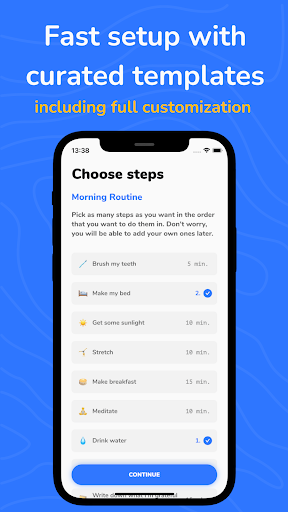
RoutineFlow: Routine for ADHD appears to be a productivity app for planning and following daily routines on a phone. Based on the metadata, it is aimed at people who want structured support for morning routines, weekly schedules, and habit tracking, especially in an ADHD or autism context. The app’s routine timer, templates, and step-by-step setup suggest it may be used to break larger tasks into smaller actions and help users stay oriented through a planned sequence.

It also seems designed for time-based routine management, with features like task timers, reminders or notifications, and a visual weekly planner. The listed permissions, such as network access, startup behavior, vibration, and notification-listener support, fit an app that may deliver alerts, sync routine-related data, and keep routine timing active in the background. In practical use, this kind of app is often chosen for morning routines, study routines, habit tracking, and guided task sequences when someone wants a more structured day.

Common uses

  • Create morning or daily routines with timed steps
  • Track habits and repeatable tasks over the week
  • Use templates to set up common routine types
  • Break larger goals into smaller guided actions
  • Follow notifications or timers to stay on schedule
  • Plan routines on a phone for personal productivity
  • Use visual scheduling to organize routine blocks
Best for:
ADHD routines habit tracking daily planning time-based task lists phone productivity

App Details

Package:
app.routineflow.routineflow
Category:
Productivity
Developer:
System Two GmbH
Version:
1.0.6
Updated:
Mar 25, 2026
Min Android:
8.0
Age Rating:
Everyone
Contains Ads:
No
In-App Purchases:
Yes

Official Listing

  • Official listing available on Google Play
  • Package name: app.routineflow.routineflow
  • Age rating: Everyone

Explore More

Browse more apps in Productivity or explore the Phone hub .

Related Productivity Apps

Tasks: To Do List & Reminders icon

Tasks: To Do List & Reminders

Productivity Pocket Brilliance Limited

Stay on top of your to-dos with Google Tasks, part of Google Workspace.

Version 3.30.4 11.2 MB ⭐ 4.80 5,000,000+ installs

How to Download RoutineFlow: Routine for ADHD

If this app is not hosted directly on APKApps official link, then for the safest and most up-to-date version, install it from its official Google Play listing.