Symfonium: Music player & cast icon

Phone

Symfonium: Music player & cast

Music & Audio Tolriq • Genimee ⭐ 4.70 100,000+
Version Varies with device Everyone

Screenshots

Symfonium: Music player & cast screenshot
Permissions Explained 11 permissions requested View details

This app requests 11 permissions. The table below explains what each permission may allow and what users should review before installing.

Status Permission What it means Why it may be used User safety note
ℹ️ Review Read The Contents Of Your Usb Storage read the contents of your USB storage This is an Android permission or app-specific permission requested by the app. The app may use this permission for features related to its category, device support, background behavior, storage, connectivity, or system integration. Review this permission before installing, especially if it does not match the app’s expected purpose.
ℹ️ Review Modify Or Delete The Contents Of Your Usb Storage modify or delete the contents of your USB storage This is an Android permission or app-specific permission requested by the app. The app may use this permission for features related to its category, device support, background behavior, storage, connectivity, or system integration. Review this permission before installing, especially if it does not match the app’s expected purpose.
ℹ️ Review View Wi Fi Connections view Wi-Fi connections This is an Android permission or app-specific permission requested by the app. The app may use this permission for features related to its category, device support, background behavior, storage, connectivity, or system integration. Review this permission before installing, especially if it does not match the app’s expected purpose.
ℹ️ Review View Network Connections view network connections This is an Android permission or app-specific permission requested by the app. The app may use this permission for features related to its category, device support, background behavior, storage, connectivity, or system integration. Review this permission before installing, especially if it does not match the app’s expected purpose.
ℹ️ Review Pair With Bluetooth Devices pair with Bluetooth devices This is an Android permission or app-specific permission requested by the app. The app may use this permission for features related to its category, device support, background behavior, storage, connectivity, or system integration. Review this permission before installing, especially if it does not match the app’s expected purpose.
ℹ️ Review Change Network Connectivity change network connectivity This is an Android permission or app-specific permission requested by the app. The app may use this permission for features related to its category, device support, background behavior, storage, connectivity, or system integration. Review this permission before installing, especially if it does not match the app’s expected purpose.
ℹ️ Review Allow Wi Fi Multicast Reception allow Wi-Fi Multicast reception This is an Android permission or app-specific permission requested by the app. The app may use this permission for features related to its category, device support, background behavior, storage, connectivity, or system integration. Review this permission before installing, especially if it does not match the app’s expected purpose.
ℹ️ Review Connect And Disconnect From Wi Fi connect and disconnect from Wi-Fi This is an Android permission or app-specific permission requested by the app. The app may use this permission for features related to its category, device support, background behavior, storage, connectivity, or system integration. Review this permission before installing, especially if it does not match the app’s expected purpose.
ℹ️ Review Full Network Access full network access This is an Android permission or app-specific permission requested by the app. The app may use this permission for features related to its category, device support, background behavior, storage, connectivity, or system integration. Review this permission before installing, especially if it does not match the app’s expected purpose.
ℹ️ Review Control Vibration control vibration This is an Android permission or app-specific permission requested by the app. The app may use this permission for features related to its category, device support, background behavior, storage, connectivity, or system integration. Review this permission before installing, especially if it does not match the app’s expected purpose.
ℹ️ Review Prevent Device From Sleeping prevent device from sleeping This is an Android permission or app-specific permission requested by the app. The app may use this permission for features related to its category, device support, background behavior, storage, connectivity, or system integration. Review this permission before installing, especially if it does not match the app’s expected purpose.

About Symfonium: Music player & cast

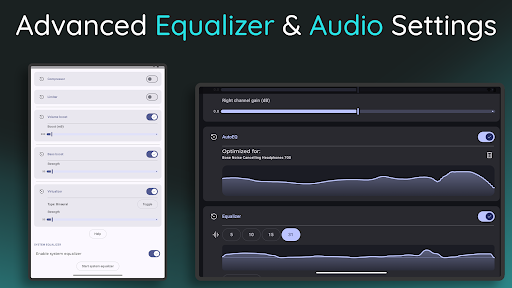
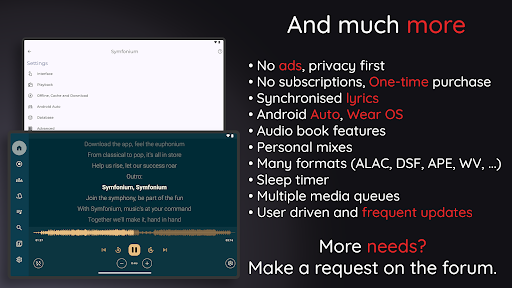
Symfonium is a simple, modern and beautiful music player that lets you enjoy all your music from different sources in one place. Whether you have songs on your local device, cloud storage, or media servers, you can easily access them with Symfonium and play them on your device or cast them to Chromecast, UPnP or DLNA devices. This is a paid app with a free trial. Enjoy uninterrupted listening, regular updates and enhanced privacy without any ads or hidden fees. It does not allow you to play or download media that you do not own. Symfonium is also more than just a music player, it is a smart and powerful app that offers many features to enhance your music experience, such as: • Local music player: Scan all your media files (internal storage or SD card) to build a perfect music library. • Cloud music player: Stream your music from cloud storage providers (Google Drive, Dropbox, OneDrive, Box, WebDAV, Samba/SMB). • Media server player: Connect and stream from Plex, Emby, Jellyfin, Subsonic, OpenSubsonic and Kodi servers. • Offline playback: Cache your media for offline listening (manually or with automatic rules). • Advanced music player: Enjoy high-quality music with gapless playback, skip silence, volume boost, replay gain and support for most formats like ALAC, FLAC, OPUS, AAC, DSD/DSF, AIFF, WMA, MPC, APE, TTA, WV, VORBIS, MP3, MP4/M4A, … • Incredible sound: Fine-tune your sound with preamp, compressor, limiter and 5, 10, 15, 31, or up to 256 EQ bands in expert mode. Use AutoEQ, which offers more than 4200 optimized profiles tailored for your headphone model. Automatically switch between multiple equalization profiles based on the connected device. • Playback cache: Avoid music interruptions due to network issues. • Android Auto: Fully embrace Android Auto with access to all of your media and many customisations. • Personal mixes: Rediscover your music and create your own mixes based on your listening habits and preferences. • Smart filters and playlists: Organize and play your media based on any combination of criteria. • Customizable interface: Fully personalize every aspect of the Symfonium interface to make it your own very personal music player. • Audiobooks: Enjoy your audiobooks with features like playback speed, pitch, skip silence, resume points, … • Lyrics: Display the lyrics of your songs and sing in perfect harmony with synchronized lyrics. • Adaptive widgets: Control your music from your home screen with several beautiful widgets. • Multiple media queues: Switch between audiobooks, playlists and albums with ease while keeping your playback speed, shuffle mode and position for each queue. • Wear OS companion app. Copy music to your watch and play without your phone. (Including tile) • And much more: Material You, custom themes, favorites, ratings, Internet radios, advanced tag support, offline first, composer support for classical music lovers, transcoding when casting to Chromecast, file mode, artist images and biography scraping…

What Symfonium: Music player & cast Is Used For

Symfonium appears to be a music player for Android phones that brings together audio from several places in one app. Based on the metadata, people may use it to listen to songs stored on the device, streamed from cloud storage, or accessed from supported media servers. It also includes casting support, so it may be useful when you want to play music on Chromecast, UPnP, or DLNA-compatible devices instead of only on the phone.

The app seems aimed at users who manage larger personal music libraries and want more control over playback and organization. Its listed features suggest common use cases such as offline listening, playlist and filter-based sorting, and sound adjustments like equalizer settings and replay gain. The permissions point to local storage access and network connectivity, which matches an app that scans media files, streams content, and maintains playback while connected to Wi-Fi or Bluetooth devices.

Because it mentions Android Auto support, Symfonium may also be used in the car for listening to a personal music collection. Overall, it looks most relevant for people who keep music across multiple sources and want a single app for browsing, playing, and casting that library.

Common uses

  • Play music stored on the phone or SD card
  • Stream personal music from cloud storage services
  • Connect to supported media servers for playback
  • Cast audio to Chromecast, UPnP, or DLNA devices
  • Use offline caching to listen with limited connectivity
  • Organize tracks with playlists, filters, and listening-based mixes
  • Adjust playback and audio settings for more control
Best for:
Music collectors Cast playback Android Auto users Offline listening Audio tuning

App Details

Package:
app.symfonik.music.player
Category:
Music & Audio
Developer:
Tolriq • Genimee
Version:
Varies with device
Updated:
Mar 6, 2026
Min Android:
Varies with device
Age Rating:
Everyone
Contains Ads:
No
In-App Purchases:
Yes

Official Listing

  • Official listing available on Google Play
  • Package name: app.symfonik.music.player
  • Age rating: Everyone

Explore More

Browse more apps in Music & Audio or explore the Phone hub .

Related Music & Audio Apps

TIDAL Music: HiFi sound icon

TIDAL Music: HiFi sound

Music & Audio TIDAL

Offline and always ad-free - stream in the highest quality available.

Version Varies with device 84.8 MB ⭐ 4.00 10,000,000+ installs

How to Download Symfonium: Music player & cast

If this app is not hosted directly on APKApps official link, then for the safest and most up-to-date version, install it from its official Google Play listing.