About PolarAligner Pro (Astro Tool)
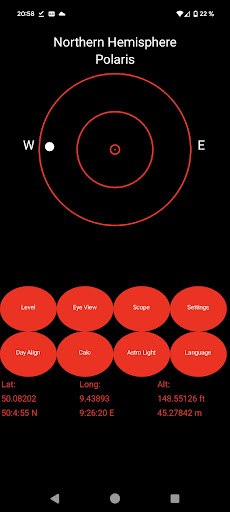
Attention: Unfortunately, the app keeps getting bad reviews because the compass or spirit level doesn't work. This is then because the device does not have a compass sensor or a tilt sensor. An understanding from the buyer is very rare. A refund is of course possible. So please convince yourself before buying whether your device has the following sensors. -Compass sensor -Tilt sensor -GPS manual: https://www.kechkoindustries.de/polaraligner-pro The Polar-Aligner is a simple astronomical application for the northern and southern hemisphere to help you to align your mount easily. It includes basic tools for leveling your equatorial mount (spirit level) and to adjust it to north (compass). Choose the Settings for the conpass. -magnetic North -manual declination for True North -automatic declination for True North (offline calculation, no Internet needed) You can calibrate your spirit level with a real spiritlevel and have the highest accuracy for a smartphone. The daylight alignment is included for north and south hemisphere. The GPS gives you the most accurate information about your location with the altitude and calculate the position of Polaris and show you graphically the Polaris position, the Hourangle, exact location .... You get also information about Drift-Alignment. The tool helps you to get the right direction for the alignment. With the calculator, you can get the calculated result to align your mount with a small error. There are many Polarscopes for: IOptron Meade Orion Sky Adventurer Skywatcher Astrophysics Takahashi Bresser Vixen Celestron If you miss a scope, write us!
What PolarAligner Pro (Astro Tool) Is Used For
PolarAligner Pro appears to be a phone app for astronomy setup, especially for aligning an equatorial mount before observing or photographing the night sky. Based on the metadata, it is used to help users point the mount toward north or the south celestial alignment direction, level the mount, and estimate the position of Polaris or related alignment references. It is aimed at both northern and southern hemisphere use, which suggests it may be useful for amateur astronomers who want a quicker alignment workflow in the field.
The app’s permissions and feature notes indicate that it may use GPS and network-based location to calculate location-specific alignment details such as altitude, Polaris position, and hour angle. It also mentions compass and tilt-sensor support, plus calibration of a virtual spirit level, so the app appears to depend on device sensors for its leveling and direction tools. The metadata also notes that some features may not work on devices without a compass or tilt sensor, so it seems best suited to phones that include those hardware sensors. Overall, it looks like a practical astronomy utility for mount setup, drift-alignment guidance, and basic location-based alignment calculations.
Common uses
- Helps align an equatorial telescope mount for observing or imaging
- Uses phone sensors to assist with leveling and north/south orientation
- May calculate Polaris or alignment positions from your current location
- Supports GPS-based location details for more precise setup information
- Includes tools for drift-alignment reference and mount adjustment
- Can be used in both northern and southern hemisphere setups
- Depends on compass, tilt, and location features that may vary by device
App Details
Package:
appinventor.ai_kechko.Polaralignment
Developer:
Kechkoindustries
Version:
8.3
Updated:
Nov 1, 2025
Min Android:
4.0
Age Rating:
Everyone
Contains Ads:
No
In-App Purchases:
No
Official Listing
-
Official listing available on
Google Play
-
Package name:
appinventor.ai_kechko.Polaralignment
-
Age rating:
Everyone
Related Tools Apps
Tools
•
Innovative Connecting
Enjoy fast streaming, secure & private internet with super unlimited VPN Turbo
Version 4.2.9.8
25.3 MB
⭐ 4.70
100,000,000+ installs
Tools
•
AVG Mobile
Scam & Malware protection, Virus Cleaner, Hack Alerts, App Locker, Photo Vault
Version 26.6.0
56.3 MB
⭐ 4.60
100,000,000+ installs
Tools
•
Avast Software
Android Mobile Security with Antivirus, Virus cleaner, App Lock & Phone cleaner
Version 26.2.3.260318122
56.8 MB
⭐ 4.60
100,000,000+ installs
Tools
•
F-Secure Corporation
Antivirus, Virus Cleaner & Malware Scan | Mobile Security & Hacker Protection
Version 10.57-ff32089
17.9 MB
⭐ 4.20
100,000,000+ installs
Tools
•
Flextech Inc.
Get 1TB Cloud Storage Space with One-Click. Unlock AI Tools in One Smart Space.
Version 4.13.7
112.7 MB
⭐ 4.40
100,000,000+ installs
Tools
•
Secure Signal Inc.
Access favorite websites and apps more securely on the go.
Version 4.3.11
5.6 MB
⭐ 4.70
100,000,000+ installs
How to Download PolarAligner Pro (Astro Tool)
If this app is not hosted directly on APKApps official link,
then for the safest and most up-to-date version, install it from its official Google Play listing.