ARSpiders.com: Spider on Face icon

Phone

ARSpiders.com: Spider on Face

Entertainment Linda Schnetzinger ⭐ 4.60 10,000+
Version 1.4.2 Teen

Screenshots

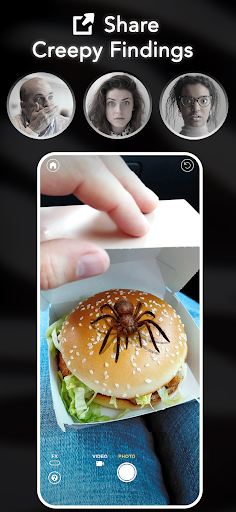
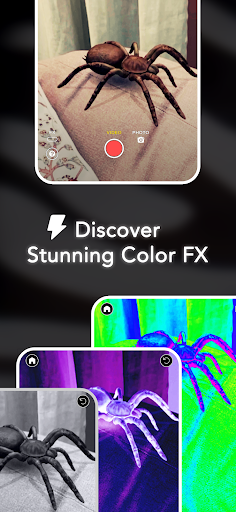
ARSpiders.com: Spider on Face screenshot
Permissions Explained 7 permissions requested View details

This app requests 7 permissions. The table below explains what each permission may allow and what users should review before installing.

Status Permission What it means Why it may be used User safety note
ℹ️ Review Read The Contents Of Your Usb Storage read the contents of your USB storage This is an Android permission or app-specific permission requested by the app. The app may use this permission for features related to its category, device support, background behavior, storage, connectivity, or system integration. Review this permission before installing, especially if it does not match the app’s expected purpose.
ℹ️ Review Modify Or Delete The Contents Of Your Usb Storage modify or delete the contents of your USB storage This is an Android permission or app-specific permission requested by the app. The app may use this permission for features related to its category, device support, background behavior, storage, connectivity, or system integration. Review this permission before installing, especially if it does not match the app’s expected purpose.
ℹ️ Review Take Pictures And Videos take pictures and videos This is an Android permission or app-specific permission requested by the app. The app may use this permission for features related to its category, device support, background behavior, storage, connectivity, or system integration. Review this permission before installing, especially if it does not match the app’s expected purpose.
ℹ️ Review Record Audio record audio This is an Android permission or app-specific permission requested by the app. The app may use this permission for features related to its category, device support, background behavior, storage, connectivity, or system integration. Review this permission before installing, especially if it does not match the app’s expected purpose.
ℹ️ Review View Network Connections view network connections This is an Android permission or app-specific permission requested by the app. The app may use this permission for features related to its category, device support, background behavior, storage, connectivity, or system integration. Review this permission before installing, especially if it does not match the app’s expected purpose.
ℹ️ Review Full Network Access full network access This is an Android permission or app-specific permission requested by the app. The app may use this permission for features related to its category, device support, background behavior, storage, connectivity, or system integration. Review this permission before installing, especially if it does not match the app’s expected purpose.
ℹ️ Review Control Vibration control vibration This is an Android permission or app-specific permission requested by the app. The app may use this permission for features related to its category, device support, background behavior, storage, connectivity, or system integration. Review this permission before installing, especially if it does not match the app’s expected purpose.

About ARSpiders.com: Spider on Face

No Ads! Everything Included for Free (No In-App Purchases!) Are your friends afraid of creepy spiders or scorpions? Or are you brave enough to face your fears? Surprise and scare your friends with the ultimate AR spider prank camera – realistic 3D spiders crawling on your face, wall, floor, or table. Perfect for anyone who loves AR filters, pranks, and realistic horror camera effects. Key Features: 1. Place Spiders & Co via AR (Augmented Reality): Watch ultra-realistic 3D spiders, tarantulas, or scorpions crawl anywhere around you – even on your face. 2. Interactive Gameplay: Control your creepy-crawlies and make them “attack” for a shocking prank effect. 3. Capture and Share: Record scary photos and prank videos to shock your friends. 4. Camera FX: Add cinematic effects like Color Correction, Vignette, and Film Grain for a realistic horror look. Advantages: • No Ads or In-App Purchases: Everything is unlocked and ready to use – enjoy the full experience for free. • Offline Mode: Works perfectly even without an internet connection. • Spider Selfie Mode: Create ultra-realistic spider selfies for social media or to prank your friends. (Note: Requires a device with TrueDepth API support for spider selfies.) • High-Quality AR: Realistic 3D effects powered by advanced AR technology. Attention: This app can be scary – perfect for pranking friends, testing your courage, or even helping overcome arachnophobia. Experience realistic spiders in full 3D AR and share the fright! More creatures are coming soon – vote and send your feedback.

What ARSpiders.com: Spider on Face Is Used For

ARSpiders.com: Spider on Face appears to be an entertainment app built around augmented-reality spider pranks. Based on the metadata, people commonly use it to place realistic 3D spiders, tarantulas, or scorpions into a camera view so they can appear on a face, wall, floor, or table. It is framed as a prank and scare app rather than a utility app, so its main use case is creating short-lived joke moments, spooky effects, or horror-style AR clips on a phone.

The app’s camera and media permissions suggest it may be used to take photos, record video, and capture audio while generating these effects. It also mentions offline use, so it may work without an internet connection after launch. The permissions for storage access likely support saving or editing captured prank media, while network permissions may be used for app-related connectivity. This kind of app is generally best suited for casual social use, such as making prank videos, experimenting with AR face effects, or creating creepy-looking clips for sharing.

Common uses

  • Place AR spiders, tarantulas, or scorpions into the camera view for prank effects.
  • Use the app to create scare-based photos or short videos.
  • Record audio and video while capturing the AR scene, based on the listed permissions.
  • Save or edit captured media using storage access on the device.
  • Use offline mode when a connection is not available, according to the description.
  • Try the face-effect mode if the device supports the required camera features mentioned in the metadata.
Best for:
Prank videos AR effects Scary camera effects Social sharing Phone app

App Details

Package:
at.schnetzinger.arspidersandco
Category:
Entertainment
Developer:
Linda Schnetzinger
Version:
1.4.2
Updated:
Oct 19, 2025
Min Android:
10
Age Rating:
Teen
Contains Ads:
No
In-App Purchases:
No

Official Listing

  • Official listing available on Google Play
  • Package name: at.schnetzinger.arspidersandco
  • Age rating: Teen

Explore More

Browse more apps in Entertainment or explore the Phone hub .

Related Entertainment Apps

PlantSnap: Plant Identifier icon

PlantSnap: Plant Identifier

Education PlantSnap, Inc.

AI plant identification & care app. Identify plants, leaves, trees & flowers.

Version 7.6.2 19.0 MB ⭐ 3.70 10,000,000+ installs

How to Download ARSpiders.com: Spider on Face

If this app is not hosted directly on APKApps official link, then for the safest and most up-to-date version, install it from its official Google Play listing.