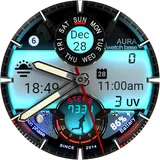
About WB Digital Base 2 Watch Face
⚠️ Important: This watch face is compatible only with devices running on Wear OS 5 and higher. ⚠️ Critical Compatibility Alert: Due to known software conflicts, this watch face is not compatible with the Samsung Galaxy Watch 6 model. Purchase is not recommended. ______________________ Your ultimate data dashboard has arrived. Experience the perfect fusion of classic analog style and a high-tech digital display with our hyper-realistic watch face, offering a stunning LED-illuminated night mode and all the health and weather data you need. ⓘ Features: - 10 Day Color Themes - 9 Day Color Themes - AOD display - 2 Editable Complications - Health Data: Steps and Heart rate - Month, Date & Day of the Week - Battery Indicator - Moon Phases Indicator - Unread Messages Indicator - UV Index - Steps Tracker - Heart Rate ________ * NOTE The watch face automatically adjusts temperature units (Celsius or Fahrenheit) to match your watch/phone settings. No manual changes needed - just set your preference in your device settings. ________ ⓘ How to: To customize your watch face, touch and hold on the screen, then tap on customize. ⚠️ Switching Between Day & Night Themes > When you enable NIGHT themes, to get back to DAY themes you MUST switch off the night themes first by selecting the first option in the Night themes. ________ ⓘ Installation How to install: https://watchbase.store/static/ai/ After installation: https://watchbase.store/static/ai/ai.html If you have any issues installing the watch face, please note that we have no control over the installation process or any other Google Play / Watch processes. The most common issue that people face is after they buy the watch face and install it, they can't see/find it. In order to apply the watch face after you install it, touch and hold on the main screen (your current watch face) the swipe left to look for it. If you can't see it, tap on the " + " sign at the end (add a watch face) and find our watch face there. We use a companion app for the phone to make the installation process easier. If you buy our watch face, tap on the install button (on the phone app) you must check your watch.. a screen will appear with the watch face.. tap install again and wait for the installation to finish. If you already bought the watch face and it still asks you to buy it again on the watch, don't worry you will not be charged twice. This is a common synchronisation issue, just wait a little or try to restart your watch. Another solution for installing the watch face is to try to install it from a browser, logged with your account (Google Play account that you use on the watch). ______________ JOIN WatchBase. Facebook Group (General watch faces group): https://www.facebook.com/groups/1170256566402887/ Facebook: https://www.facebook.com/WatchBase Instagram: https://www.instagram.com/watch.base/ TikTok: https://www.tiktok.com/@live.wowpapers SUBSCRIBE to our YouTube channel: https://www.youtube.com/c/WATCHBASE
What WB Digital Base 2 Watch Face Is Used For
WB Digital Base 2 Watch Face appears to be a Wear OS personalization app for replacing the default watch face on a compatible smartwatch. Based on the metadata, it is designed for users who want a digital dashboard style layout with an analog-inspired look, so the main use is customizing the home screen of the watch rather than providing a standalone phone function.
The listing suggests it is commonly used to show time and date information along with wearable-focused data such as steps, heart rate, battery level, unread messages, moon phase, and UV index. It also mentions customizable color themes, always-on display support, and editable complications, which may make it useful for people who want quick glanceable information on their watch face. The companion phone app appears to help with installation, but the actual experience is centered on the watch itself. Compatibility notes in the metadata indicate it is intended for Wear OS 5 and higher and may not work with the Samsung Galaxy Watch 6 model.
Common uses
- Customize a Wear OS watch with a digital analog-style face
- Show glanceable health and weather-related data on the watch screen
- Track essentials like time, date, steps, heart rate, and battery
- Use themed day and night styles for different lighting conditions
- Take advantage of always-on display support on the watch
- Add or edit complications for the information you want to see first
- Install and manage the watch face through the companion phone app
App Details
Package:
aura.digital.baseii
Developer:
WatchBase Aura
Version:
Varies with device
Updated:
Dec 10, 2025
Min Android:
Varies with device
Age Rating:
Everyone
Contains Ads:
No
In-App Purchases:
No
Official Listing
-
Official listing available on
Google Play
-
Package name:
aura.digital.baseii
-
Age rating:
Everyone
Related Personalization Apps
Personalization
•
Zedge
Discover millions of background wallpapers & ringtones or make your own with AI.
Version 9.14.2
55.5 MB
⭐ 4.70
500,000,000+ installs
Personalization
•
LBE Tech
Run multiple accounts of the same app on a single device
Version 4.0.9557
34.4 MB
⭐ 4.10
100,000,000+ installs
Personalization
•
Nexileap
6000+ Emojis, Custom Keyboard, Fonts, Themes, Genmoji AI Generator,Stickers,GIFs
Version 3.6.3.1
36.7 MB
⭐ 4.70
100,000,000+ installs
Personalization
•
Nebuchadnezzar DOO
Check Wallcraft Live 4D Wallpaper - 4k HD wallpapers & stunning 3D backgrounds!
Version Varies with device
29.6 MB
⭐ 4.60
100,000,000+ installs
Personalization
•
Delicate theme for Android App
Install our stylish keyboard with Neon Love Theme now!
Version 10.7.2.0323
33.2 MB
⭐ 4.60
100,000,000+ installs
Personalization
•
Battery Stats Saver
Ultimate Gallery Lock App - Hide Pictures, Videos and Lock Apps Instantly!
Version 2.1.12
24.6 MB
⭐ 4.60
100,000,000+ installs
How to Download WB Digital Base 2 Watch Face
If this app is not hosted directly on APKApps official link,
then for the safest and most up-to-date version, install it from its official Google Play listing.