Dev Tools Pro(Developer Tools) icon

Phone

Dev Tools Pro(Developer Tools)

Tools Trinea ⭐ 4.90 10,000+
Version 9.1.2-gp Everyone

Screenshots

Dev Tools Pro(Developer Tools) screenshot
Permissions Explained 14 permissions requested View details

This app requests 14 permissions. The table below explains what each permission may allow and what users should review before installing.

Status Permission What it means Why it may be used User safety note
ℹ️ Review Approximate Location (network Based) approximate location (network-based) This is an Android permission or app-specific permission requested by the app. The app may use this permission for features related to its category, device support, background behavior, storage, connectivity, or system integration. Review this permission before installing, especially if it does not match the app’s expected purpose.
ℹ️ Review Read Phone Status And Identity read phone status and identity This is an Android permission or app-specific permission requested by the app. The app may use this permission for features related to its category, device support, background behavior, storage, connectivity, or system integration. Review this permission before installing, especially if it does not match the app’s expected purpose.
ℹ️ Review Read The Contents Of Your Usb Storage read the contents of your USB storage This is an Android permission or app-specific permission requested by the app. The app may use this permission for features related to its category, device support, background behavior, storage, connectivity, or system integration. Review this permission before installing, especially if it does not match the app’s expected purpose.
ℹ️ Review Modify Or Delete The Contents Of Your Usb Storage modify or delete the contents of your USB storage This is an Android permission or app-specific permission requested by the app. The app may use this permission for features related to its category, device support, background behavior, storage, connectivity, or system integration. Review this permission before installing, especially if it does not match the app’s expected purpose.
ℹ️ Review View Wi Fi Connections view Wi-Fi connections This is an Android permission or app-specific permission requested by the app. The app may use this permission for features related to its category, device support, background behavior, storage, connectivity, or system integration. Review this permission before installing, especially if it does not match the app’s expected purpose.
ℹ️ Review View Network Connections view network connections This is an Android permission or app-specific permission requested by the app. The app may use this permission for features related to its category, device support, background behavior, storage, connectivity, or system integration. Review this permission before installing, especially if it does not match the app’s expected purpose.
ℹ️ Review Expand/collapse Status Bar expand/collapse status bar This is an Android permission or app-specific permission requested by the app. The app may use this permission for features related to its category, device support, background behavior, storage, connectivity, or system integration. Review this permission before installing, especially if it does not match the app’s expected purpose.
ℹ️ Review Full Network Access full network access This is an Android permission or app-specific permission requested by the app. The app may use this permission for features related to its category, device support, background behavior, storage, connectivity, or system integration. Review this permission before installing, especially if it does not match the app’s expected purpose.
ℹ️ Review Run At Startup run at startup This is an Android permission or app-specific permission requested by the app. The app may use this permission for features related to its category, device support, background behavior, storage, connectivity, or system integration. Review this permission before installing, especially if it does not match the app’s expected purpose.
ℹ️ Review Draw Over Other Apps draw over other apps This is an Android permission or app-specific permission requested by the app. The app may use this permission for features related to its category, device support, background behavior, storage, connectivity, or system integration. Review this permission before installing, especially if it does not match the app’s expected purpose.
ℹ️ Review Prevent Device From Sleeping prevent device from sleeping This is an Android permission or app-specific permission requested by the app. The app may use this permission for features related to its category, device support, background behavior, storage, connectivity, or system integration. Review this permission before installing, especially if it does not match the app’s expected purpose.
ℹ️ Review Install Shortcuts install shortcuts This is an Android permission or app-specific permission requested by the app. The app may use this permission for features related to its category, device support, background behavior, storage, connectivity, or system integration. Review this permission before installing, especially if it does not match the app’s expected purpose.
ℹ️ Review Uninstall Shortcuts uninstall shortcuts This is an Android permission or app-specific permission requested by the app. The app may use this permission for features related to its category, device support, background behavior, storage, connectivity, or system integration. Review this permission before installing, especially if it does not match the app’s expected purpose.
ℹ️ Review Read Google Service Configuration read Google service configuration This is an Android permission or app-specific permission requested by the app. The app may use this permission for features related to its category, device support, background behavior, storage, connectivity, or system integration. Review this permission before installing, especially if it does not match the app’s expected purpose.

About Dev Tools Pro(Developer Tools)

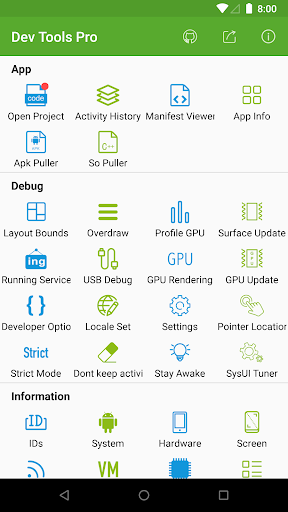
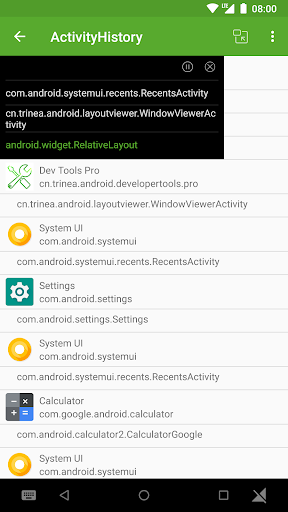
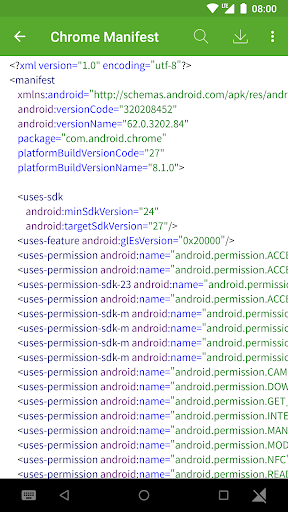
Android Dev Tools Pro is a powerful, productive, automation, essential Android Development Assistant, It can improve your development productivity. It can be used to decompile other app, view layout detail info of other app, view color of screen(color sampler or eyedropper), view the latest open source projects, view activity history, view manifest of any apps, view recently used or installed apps, extract apk or so, debug applications, view phone hardware and software-related information and so on, the more features will be added later. including: ► Decompile other app View app's java file, resource and other file easily, support share files ► App Layout Inspector Tool View or export layout or view info of other app, can show view id, width height, parent and child view, coordinate of view. ► View screen color Similar to color sampler tool or eyedropper, you can view or copy the color and coordinate of any other App easily, and more ARGB and CMYK ► View the latest open source projects daily A well-selected daily Android open source project. ► View activity history View the appName, packageName, title, icon, start time of the activity opened, also include current activity, top activity. support open in small window mode. ► View manifest of any apps View manifest of any apps, search any content of manifest, save manifest to sdcard in text or html. ► App Management—View info of apps You can manage your app easily. View apps installed, recently used apps, recently installed apps in grid mode. View app package name, version, uid, apk dir, so dir, data dir, first install and last upgrade time, component info and so on. ► Extract apk or so of apps Extract any app's source apk or so file. ► Open or close the options in the developer options quickly What used to take seconds is reduced to one click! it includes show screen layout, debug gpu overdraw, show layout updates, forced GPU rendering, show GPU view updates, show GPU Rendering, show pointer position, strict mode, don't keep activities, stay awake, Running Service. Note: This part of the function is to solve the cumbersome operation of the developer option through the automated way, if you are tired of the cumbersome operation of the developer option also, then this tool is for you. If you need a tool different from the system developer option, this is not what you want, don't install it, thanks. ► View the system info quickly includes system version information, hardware information, screen information, CPU information, virtual machine information, network-related information, Device ID information. ► Open other common features quickly includes settings, System UI Tuner, language switching, developer options, my applications. Shortcuts: (1) You can add tool shortcuts to the desktop by long pressing the tool icon; (2) You can add tool widgets to the desktop; (3) You can start the tool through the shortcut quickly on Android 7.1, long pressing the application icon in the desktop; (4) You can add…

What Dev Tools Pro(Developer Tools) Is Used For

Dev Tools Pro appears to be an Android utility for developers and advanced users who need quick access to app inspection and debugging tools. Based on the metadata, it may be used to examine installed apps, view manifest details, inspect layouts, review activity history, and extract APK or shared library files for analysis. The app category and listed features suggest it is aimed at development workflow support rather than everyday consumer use.

It also seems designed to reduce manual steps inside Android’s developer options by providing one-tap access to settings such as screen layout, GPU overlays, pointer position, and running service views. The permissions mentioned, such as network access, USB storage access, drawing over other apps, and running at startup, fit tools that display system information, save files, or provide on-screen overlays. Because it is a phone app, it may be most useful on Android phones used for app testing, UI checking, and device diagnostics.

Common uses

  • Inspect installed apps and view package details
  • Review app manifests and search manifest content
  • Analyze layouts, view IDs, sizes, and view hierarchy
  • Check activity history and current/top activity info
  • Sample screen colors and copy color values
  • Extract APK or .so files for analysis
  • Quickly toggle certain developer options and debug settings
Best for:
Developers Power users App testers Android debugging Device inspection

App Details

Package:
cn.trinea.android.developertools.pro
Category:
Tools
Developer:
Trinea
Version:
9.1.2-gp
Updated:
Dec 7, 2025
Min Android:
5.0
Age Rating:
Everyone
Contains Ads:
No
In-App Purchases:
No

Official Listing

  • Official listing available on Google Play
  • Package name: cn.trinea.android.developertools.pro
  • Age rating: Everyone

Explore More

Browse more apps in Tools or explore the Phone hub .

Related Tools Apps

Express Scripts icon

Express Scripts

Medical Express Scripts, Inc.

Manage your prescriptions and pharmacy care anytime, anywhere.

Version 12.14.0 14.8 MB ⭐ 4.75 1,000,000+ installs

How to Download Dev Tools Pro(Developer Tools)

If this app is not hosted directly on APKApps official link, then for the safest and most up-to-date version, install it from its official Google Play listing.