About Strobe Tuner Pro: Guitar Tuner
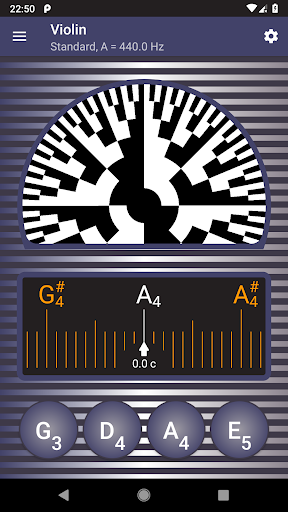
Strobe Tuner Pro is the only tuner that shows the real stroboscopic effect on your device. It is extremely accurate, suitable for guitar, violin, bass, ukulele, viola, cello, banjo or shamisen. By purchasing it, you can save hundreds of dollars for a physical strobe tuner. Professionals appreciate the Strobe Tuner Pro's accuracy, beginners quickly learn to tune instruments properly. Strobe Tuner Pro is easy to use thanks to an additional chromatic tuner that helps you when your instrument is way out of tune. The chromatic and strobe tuners are independent, but both use the same input from the built-in microphone of your phone or tablet for their advanced algorithms. Chromatic tuner The chromatic tuner accurately detects the frequency of the tone played on your instrument, and shows it on the chromatic scale. The target strings are highlighted on the scale, and you can see how far is the tone from being in tune. When you get close enough, you can use the strobe tuner for fine tuning. Strobe tuner When the pattern is rotating to the right, it means the tone is too high, and you need to tune down. When it is rotating to the left, just tune up. The slower the pattern moves, the better is your instrument tuned. If you are in doubt how to use the tuner, please read the built-in help, and see the examples of the tuning process. The algorithms of both tuners are independent - the chromatic tuner uses the Fast Fourier Transformation, but the algorithm in the strobe tuner is much closer to what you can find in oscilloscopes, and is computed directly on the GPU of your phone or tablet. Tuning by ear You can also play the reference tones using the buttons at the bottom of the screen. The tone is synthesized, and respects the setting of the concert pitch. Instruments The tuner has been tested with many guitars, violins, basses, ukuleles, violas, cellos and banjos, and we constantly grow our test coverage with new recordings of the instruments. You can switch between the guitar and the violin tuning in the settings. Metronome The tuner also features a built-in metronome, combined with a chromatic tuner. This makes practicing much easier - you can control the metronome and check the intonation at the same time. Features: • Professional guitar tuner • Other instruments: Violin, bass, ukulele, viola, cello, banjo, shamisen • Manual mode that works exactly as a physical strobe tuner • Metronome • Suitable for beginners too • Awesome precision • Advanced noise cancellation - works even with a metronome on • The most favorite alternate guitar, ukulele, banjo and shamisen tunings • Easy to use • Extreme accuracy • Plays reference tones • First-start tutorial to understand the usage • Built-in help to understand the app better • Two independent tuning algorithms: chromatic tuner using the Fourier transformation and strobe tuner emulating the stroboscopic effect • Quick, precise, and accurate tuner • Concert pitch frequency setting • Note naming: English, European…
What Strobe Tuner Pro: Guitar Tuner Is Used For
Strobe Tuner Pro: Guitar Tuner appears to be a music practice app for tuning string instruments on an Android phone or tablet. Based on the metadata, it is commonly used by musicians who need pitch detection for instruments such as guitar, violin, bass, ukulele, viola, cello, banjo, or shamisen. It includes both a chromatic tuner and a strobe-style tuner, which suggests it may be useful for quick tuning as well as more precise fine-tuning.
The app uses the device microphone to listen to played notes, so it is designed for situations where you can play an instrument directly into the phone or tablet. The mention of a built-in metronome and reference tones suggests it may also support practice sessions, helping users keep time and check tuning by ear. The permissions for audio recording and preventing sleep are consistent with continuous listening during tuning and practice, but they do not indicate anything beyond those functions based on the metadata.
Common uses
- Tune string instruments using the device microphone
- Check pitch with a chromatic tuner before fine-tuning
- Use the strobe-style display for more precise adjustments
- Play reference tones to tune by ear
- Practice with the built-in metronome
- Switch between instrument-specific tuning setups
- Use during lessons, rehearsals, or home practice
App Details
Package:
com.a4tune.strobe
Developer:
A4tune Labs
Version:
8.0.4
Updated:
Nov 16, 2025
Min Android:
6.0
Age Rating:
Everyone
Contains Ads:
No
In-App Purchases:
No
Official Listing
-
Official listing available on
Google Play
-
Package name:
com.a4tune.strobe
-
Age rating:
Everyone
Related Music & Audio Apps
Music & Audio
•
TonalEnergy, Inc
Version 1.9.23
⭐ 4.40
100,000+ installs
Education
•
Musora Media Inc.
Version 3.0.7
⭐ 4.40
100,000+ installs
Music & Audio
•
n-Track
Version 10.5.46
⭐ 4.60
10,000+ installs
How to Download Strobe Tuner Pro: Guitar Tuner
If this app is not hosted directly on APKApps official link,
then for the safest and most up-to-date version, install it from its official Google Play listing.