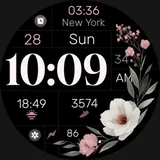
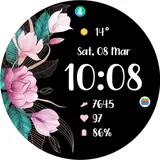
About TVV Spring 2 Watch Face
- Compatible with WEAR OS devices with API LEVEL 33+ - For complications: 1. Touch and hold the display 2. Tap on customize option - It contains: - Digital Clock - 12h/24h - based on phone settings - Date - Battery Percentage - Heart Rate - Steps - 1 Changeable Complication - 2 Changeable Shortcuts - 4 Preset Shortcuts - tap to open app • Battery • Calendar • Heart Rate • Steps - Always on Display (AOD) - 2 styles About Heart Rate: - The watch measures the heart rate automatically every 10 minutes. - Heart Rate app shortcut only for compatible devices. About Always on Display (AOD) - AOD Styles are not previewed in the same way as backgrounds and colors, but can be changed following the same steps. Important Note: - Certain devices may not support all the features and 'Open App' action.
What TVV Spring 2 Watch Face Is Used For
TVV Spring 2 Watch Face appears to be a Wear OS watch face app for customizing the look and quick-access functions on a compatible smartwatch. Based on the metadata, it is designed for devices running Wear OS API level 33 or higher and focuses on showing time, date, battery level, heart rate, and steps in a digital layout. The app also supports 12-hour or 24-hour time based on the phone’s settings, which makes it useful for users who want a readable, personalized watch display.
It may also be used as a small control hub on the wrist, since it includes one changeable complication, two changeable shortcuts, and preset shortcuts for battery, calendar, heart rate, and steps. The always-on display options suggest it is meant for everyday smartwatch use, including quick glances and light interaction rather than full app navigation. Some features, such as heart rate tracking or app-opening shortcuts, may depend on the watch model and compatibility.
Common uses
- Customize a Wear OS watch face with a digital time display
- Check basic health and activity info like heart rate and steps
- Use date and battery indicators for quick at-a-glance viewing
- Set shortcuts to open supported apps or watch functions
- Adjust complications and colors through the watch customization menu
- Use always-on display styles for low-interaction viewing
- Best on compatible Wear OS watches running API level 33+
How to Download TVV Spring 2 Watch Face
If this app is not hosted directly on APKApps official link,
then for the safest and most up-to-date version, install it from its official Google Play listing.