Alien Watch icon

Phone

Alien Watch

Simulation Andrej Vujić ⭐ 4.10 10,000+
Version Varies with device Everyone

Screenshots

Alien Watch screenshot
Permissions Explained 9 permissions requested View details

This app requests 9 permissions. The table below explains what each permission may allow and what users should review before installing.

Status Permission What it means Why it may be used User safety note
ℹ️ Review Take Pictures And Videos take pictures and videos This is an Android permission or app-specific permission requested by the app. The app may use this permission for features related to its category, device support, background behavior, storage, connectivity, or system integration. Review this permission before installing, especially if it does not match the app’s expected purpose.
ℹ️ Review View Network Connections view network connections This is an Android permission or app-specific permission requested by the app. The app may use this permission for features related to its category, device support, background behavior, storage, connectivity, or system integration. Review this permission before installing, especially if it does not match the app’s expected purpose.
ℹ️ Review Full Network Access full network access This is an Android permission or app-specific permission requested by the app. The app may use this permission for features related to its category, device support, background behavior, storage, connectivity, or system integration. Review this permission before installing, especially if it does not match the app’s expected purpose.
ℹ️ Review Run At Startup run at startup This is an Android permission or app-specific permission requested by the app. The app may use this permission for features related to its category, device support, background behavior, storage, connectivity, or system integration. Review this permission before installing, especially if it does not match the app’s expected purpose.
ℹ️ Review Control Vibration control vibration This is an Android permission or app-specific permission requested by the app. The app may use this permission for features related to its category, device support, background behavior, storage, connectivity, or system integration. Review this permission before installing, especially if it does not match the app’s expected purpose.
ℹ️ Review Prevent Device From Sleeping prevent device from sleeping This is an Android permission or app-specific permission requested by the app. The app may use this permission for features related to its category, device support, background behavior, storage, connectivity, or system integration. Review this permission before installing, especially if it does not match the app’s expected purpose.
ℹ️ Review Google Play License Check Google Play license check This is an Android permission or app-specific permission requested by the app. The app may use this permission for features related to its category, device support, background behavior, storage, connectivity, or system integration. Review this permission before installing, especially if it does not match the app’s expected purpose.
ℹ️ Review Read Google Service Configuration read Google service configuration This is an Android permission or app-specific permission requested by the app. The app may use this permission for features related to its category, device support, background behavior, storage, connectivity, or system integration. Review this permission before installing, especially if it does not match the app’s expected purpose.
ℹ️ Review Receive Data From Internet receive data from Internet This is an Android permission or app-specific permission requested by the app. The app may use this permission for features related to its category, device support, background behavior, storage, connectivity, or system integration. Review this permission before installing, especially if it does not match the app’s expected purpose.

About Alien Watch

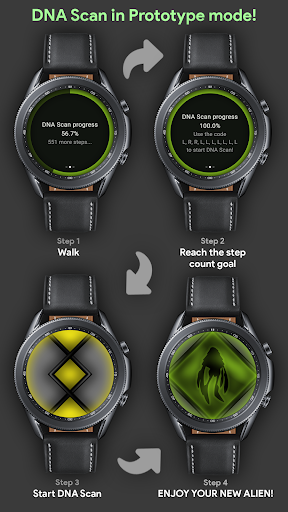
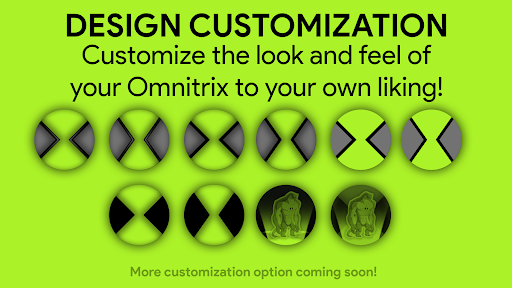
* Features: DNA Scan, Master Control, Ultimatrix (Recalibrated), Omniverse, Life Form Lock, Albedo, Randomizer, Self Destruction, Fusion Transformations, 3D transformations, Voice Commands... more coming very soon! GUIDE: https://omnitrix-watch.web.app/documents/how-to-use.html. DISCLAIMER: In order to use all features which are advertised on Google Play and YouTube you need to have both the Android and Wear OS version of the app! You can use the Wear OS version without the Android version, but the Android version is 100% dependent on the Wear OS version. You need to own a Wear OS device. The original Alien Watch (Omnitrix) app from Galaxy Watch is now available on your Wear OS smart watch and it's better than ever! Enjoy an authentic and realistic Ben 10 and Omnitrix experience on your Wear OS watch. Revive your favorite childhood memories and cartoon heroes directly from your wrist. This app is made for true Ben 10 fans! How do you use the app? Please check the OFFICIAL GUIDE on the Alien Watch website for information on how to use the app: https://omnitrix-watch.web.app/documents/how-to-use.html. You will find all information you need there, including the ACTIVATION CODES for all features. If you have trouble getting any of the features to work please let me know. Transform your smartwatch into the ultimate Alien Watch! Access multiple modes, customize features, and immerse yourself in the world of aliens. Alien Watch includes 3 main modes: Prototype mode, Recalibrated mode and Omniverse mode. Each of these modes has interesting sub-modes. PROTOTYPE mode includes DNA Scan, Master Control, Self Destruction, Voice Commands, and Virtual Reality transformations (allows you to view aliens in 3D when transforming)! DNA SCAN can be used to unlock more aliens in Prototype mode. You can use DNA Scan in two different ways. The first one is to unlock aliens by walking and completing step count goals. If you don't want to walk you can force the activation of DNA Scan by using a code. Once you complete DNA Scan (unlock all aliens) by walking you will be able to submit your result to the Leaderboard in the Alien Watch Companion app for Android. FUSION TRANSFORMATIONS are also included in Prototype mode. RECALIBRATED (includes Ultimatrix mode) mode includes Master Control, Self Destruction, Ultimate Transformations (Ultimatrix mode), Azmuth Easter Egg and it supports color customization! You can pick one of 12 available colors, including ALBEDO mode! RECALIBRATED mode has custom voice sound effects for almost all aliens! When performing transformations (both regular and Ultimate transformations) aliens will scream their name. OMNIVERSE mode includes the Randomizer function (gives you a random alien every 15 seconds) and it also supports color customization! Omniverse mode supports another cool features which gives an awesome look to your watch: ALBEDO mode. With the latest update you can keep Alien Watch as a screen saver (temporary watch face) by doing the…

What Alien Watch Is Used For

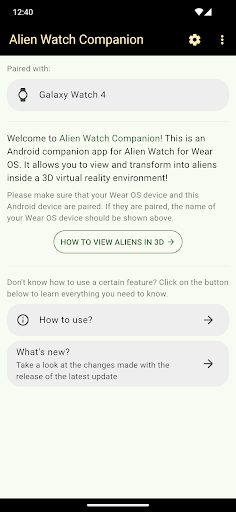
Alien Watch appears to be a simulation app themed around the Ben 10/Omnitrix universe, designed for use with a Wear OS watch and connected Android phone app. Based on the metadata, people commonly use it to simulate an alien-watch interface, switch between different modes, and trigger transformation-style effects from a smartwatch. The app description also points to guide-based setup and activation codes, which suggests it is used as a companion-style experience rather than a standalone utility.

The listed permissions and app type fit that context. Network access and Google license checks may be used for companion features, online content, or feature activation, while vibration and prevent-sleep permissions likely support watch feedback and keeping the simulation active. The metadata also mentions camera access, voice commands, and 3D transformations, so some users may use it for interactive effects, visual mockups, or themed play on a phone paired with Wear OS. Because the Android version is described as dependent on the Wear OS version, it seems most relevant for users who already own a compatible smartwatch and want a phone-linked companion app.

Common uses

  • Simulating an Omnitrix-style watch interface on a Wear OS device
  • Using themed transformation modes and alien-themed controls
  • Accessing companion features that may depend on a paired Android app
  • Triggering vibration, voice, or visual effects during use
  • Exploring setup guides and activation-code based features
  • Trying watch-based 3D or interactive simulation effects
  • Using the app as a Ben 10-themed fan experience
Best for:
Wear OS users Ben 10 fans Watch simulation Phone companion app Themed interaction

App Details

Package:
com.andrej.simulator
Category:
Simulation
Developer:
Andrej Vujić
Version:
Varies with device
Updated:
Jul 9, 2025
Min Android:
Varies with device
Age Rating:
Everyone
Contains Ads:
No
In-App Purchases:
No

Official Listing

  • Official listing available on Google Play
  • Package name: com.andrej.simulator
  • Age rating: Everyone

Explore More

Browse more apps in Simulation or explore the Phone hub .

Related Simulation Apps

How to Download Alien Watch

If this app is not hosted directly on APKApps official link, then for the safest and most up-to-date version, install it from its official Google Play listing.