Fake GPS Go Pro Location Spoof icon

Phone

Fake GPS Go Pro Location Spoof

Tools AndroiDSC ⭐ 4.80 1,000+
Version 2.2.0-pro Everyone

Screenshots

Fake GPS Go Pro Location Spoof screenshot
Permissions Explained 7 permissions requested View details

This app requests 7 permissions. The table below explains what each permission may allow and what users should review before installing.

Status Permission What it means Why it may be used User safety note
ℹ️ Review Approximate Location (network Based) approximate location (network-based) This is an Android permission or app-specific permission requested by the app. The app may use this permission for features related to its category, device support, background behavior, storage, connectivity, or system integration. Review this permission before installing, especially if it does not match the app’s expected purpose.
ℹ️ Review Precise Location (gps And Network Based) precise location (GPS and network-based) This is an Android permission or app-specific permission requested by the app. The app may use this permission for features related to its category, device support, background behavior, storage, connectivity, or system integration. Review this permission before installing, especially if it does not match the app’s expected purpose.
ℹ️ Review Mock Location Sources For Testing mock location sources for testing This is an Android permission or app-specific permission requested by the app. The app may use this permission for features related to its category, device support, background behavior, storage, connectivity, or system integration. Review this permission before installing, especially if it does not match the app’s expected purpose.
ℹ️ Review View Network Connections view network connections This is an Android permission or app-specific permission requested by the app. The app may use this permission for features related to its category, device support, background behavior, storage, connectivity, or system integration. Review this permission before installing, especially if it does not match the app’s expected purpose.
ℹ️ Review Full Network Access full network access This is an Android permission or app-specific permission requested by the app. The app may use this permission for features related to its category, device support, background behavior, storage, connectivity, or system integration. Review this permission before installing, especially if it does not match the app’s expected purpose.
ℹ️ Review Draw Over Other Apps draw over other apps This is an Android permission or app-specific permission requested by the app. The app may use this permission for features related to its category, device support, background behavior, storage, connectivity, or system integration. Review this permission before installing, especially if it does not match the app’s expected purpose.
ℹ️ Review Prevent Device From Sleeping prevent device from sleeping This is an Android permission or app-specific permission requested by the app. The app may use this permission for features related to its category, device support, background behavior, storage, connectivity, or system integration. Review this permission before installing, especially if it does not match the app’s expected purpose.

About Fake GPS Go Pro Location Spoof

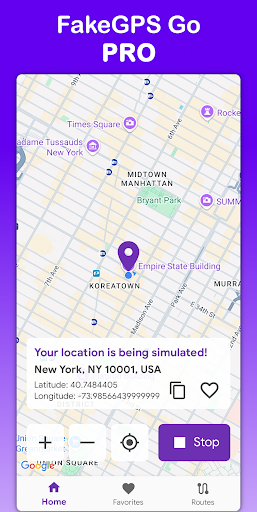
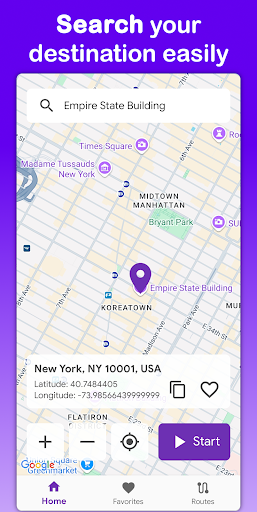
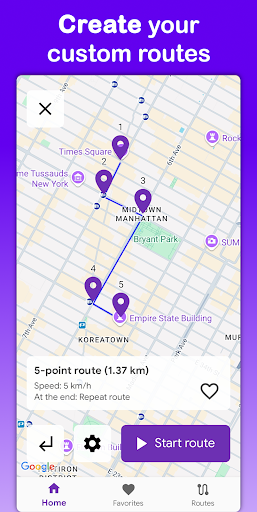
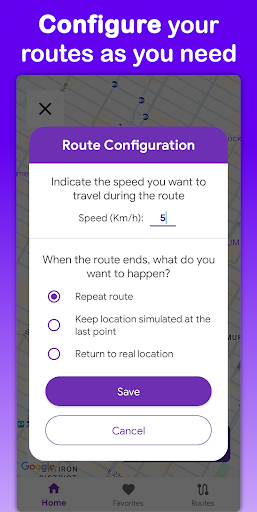
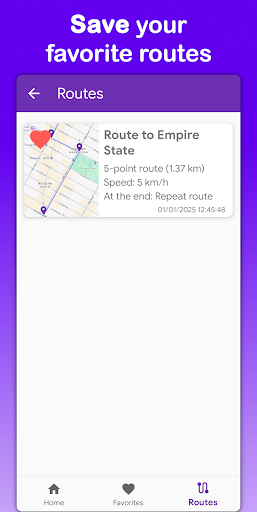
Fake GPS Go Pro – Fake GPS and location spoofing with routes and joystick Fake GPS Go Pro is a fake GPS (mock location) app that lets you spoof your location instantly, create custom routes and move with a floating joystick anywhere in the world. Built for testers, developers and users who need to test services and apps without being physically there. No root required. 🔑 Main features 📍 Instant location spoofing Pick any place on the map and set a simulated location in seconds. 🎮 Joystick to move your location Enable the floating joystick to move your spoofed position in real time while using other apps compatible with mock location. 🗺️ Simulate movement with routes Create custom routes by placing points on the map. Adjust speed and movement to simulate realistic travel with fake GPS. ⭐ Save favorite locations and routes Reuse your most frequent places and routes without reconfiguring every time. 🌍 Multilingual support Available in English, Spanish, French, Portuguese, German, Italian, Hindi and Indonesian. 🚫 No root required Enjoy powerful location spoofing on most devices by simply enabling developer options (mock location). 🚀 Pro version without limits No ads. No interruptions. Full access to all fake GPS, routes and joystick features. Why choose Fake GPS Go Pro? ✔ Accurate and stable fake GPS ✔ Real-time joystick movement ✔ Customizable routes and speeds ✔ Clean and intuitive interface ✔ Lightweight and battery-friendly ✔ 100% ad-free in the Pro version 📌 Important Fake GPS Go Pro is intended for development, testing and simulation purposes only. Users are responsible for their own usage.

What Fake GPS Go Pro Location Spoof Is Used For

Fake GPS Go Pro Location Spoof appears to be a tools app for setting a simulated location on an Android phone. Based on the metadata, it is commonly used when someone needs an app to report a different GPS position than the one the device is actually in, such as for testing location-based apps or checking how services behave in different places.

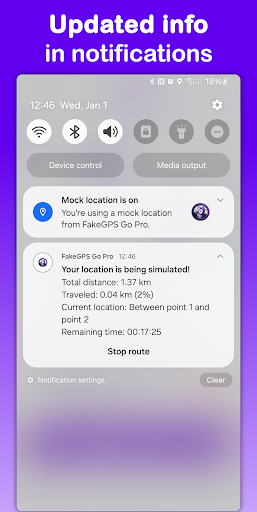
The app description mentions instant location spoofing, custom routes, and a floating joystick for moving the simulated position over time. That suggests it may be used to create a stationary fake location or a more realistic travel path. The mock location permission and developer-options setup indicate it is intended to work with Android’s testing features rather than as a general navigation app. Permissions like draw over other apps and prevent device from sleeping also fit the idea of keeping the on-screen control visible while the spoofed location is running in the background.

Common uses

  • Set a simulated GPS position on a phone
  • Create custom movement routes for location testing
  • Use a floating joystick to adjust spoofed movement
  • Save commonly used fake locations and routes
  • Check how apps behave with mock location enabled
  • Run location simulation while using other compatible apps
  • Keep the spoofing session active in the background
Best for:
testers developers location simulation phone app mock location setup

App Details

Package:
com.androidsc.fakegpsgo.pro
Category:
Tools
Developer:
AndroiDSC
Version:
2.2.0-pro
Updated:
Mar 19, 2026
Min Android:
6.0
Age Rating:
Everyone
Contains Ads:
No
In-App Purchases:
No

Official Listing

  • Official listing available on Google Play
  • Package name: com.androidsc.fakegpsgo.pro
  • Age rating: Everyone

Explore More

Browse more apps in Tools or explore the Phone hub .

Related Tools Apps

How to Download Fake GPS Go Pro Location Spoof

If this app is not hosted directly on APKApps official link, then for the safest and most up-to-date version, install it from its official Google Play listing.