Sintra: AI Employees icon

Phone

Sintra: AI Employees

Business sintra.ai ⭐ 4.60 10,000+
Version 2.8.2 Everyone

Screenshots

Sintra: AI Employees screenshot
Permissions Explained 14 permissions requested View details

This app requests 14 permissions. The table below explains what each permission may allow and what users should review before installing.

Status Permission What it means Why it may be used User safety note
ℹ️ Review Read The Contents Of Your Usb Storage read the contents of your USB storage This is an Android permission or app-specific permission requested by the app. The app may use this permission for features related to its category, device support, background behavior, storage, connectivity, or system integration. Review this permission before installing, especially if it does not match the app’s expected purpose.
ℹ️ Review Modify Or Delete The Contents Of Your Usb Storage modify or delete the contents of your USB storage This is an Android permission or app-specific permission requested by the app. The app may use this permission for features related to its category, device support, background behavior, storage, connectivity, or system integration. Review this permission before installing, especially if it does not match the app’s expected purpose.
ℹ️ Review Take Pictures And Videos take pictures and videos This is an Android permission or app-specific permission requested by the app. The app may use this permission for features related to its category, device support, background behavior, storage, connectivity, or system integration. Review this permission before installing, especially if it does not match the app’s expected purpose.
ℹ️ Review Record Audio record audio This is an Android permission or app-specific permission requested by the app. The app may use this permission for features related to its category, device support, background behavior, storage, connectivity, or system integration. Review this permission before installing, especially if it does not match the app’s expected purpose.
ℹ️ Review View Wi Fi Connections view Wi-Fi connections This is an Android permission or app-specific permission requested by the app. The app may use this permission for features related to its category, device support, background behavior, storage, connectivity, or system integration. Review this permission before installing, especially if it does not match the app’s expected purpose.
ℹ️ Review View Network Connections view network connections This is an Android permission or app-specific permission requested by the app. The app may use this permission for features related to its category, device support, background behavior, storage, connectivity, or system integration. Review this permission before installing, especially if it does not match the app’s expected purpose.
ℹ️ Review Full Network Access full network access This is an Android permission or app-specific permission requested by the app. The app may use this permission for features related to its category, device support, background behavior, storage, connectivity, or system integration. Review this permission before installing, especially if it does not match the app’s expected purpose.
ℹ️ Review Change Your Audio Settings change your audio settings This is an Android permission or app-specific permission requested by the app. The app may use this permission for features related to its category, device support, background behavior, storage, connectivity, or system integration. Review this permission before installing, especially if it does not match the app’s expected purpose.
ℹ️ Review Run At Startup run at startup This is an Android permission or app-specific permission requested by the app. The app may use this permission for features related to its category, device support, background behavior, storage, connectivity, or system integration. Review this permission before installing, especially if it does not match the app’s expected purpose.
ℹ️ Review Draw Over Other Apps draw over other apps This is an Android permission or app-specific permission requested by the app. The app may use this permission for features related to its category, device support, background behavior, storage, connectivity, or system integration. Review this permission before installing, especially if it does not match the app’s expected purpose.
ℹ️ Review Control Vibration control vibration This is an Android permission or app-specific permission requested by the app. The app may use this permission for features related to its category, device support, background behavior, storage, connectivity, or system integration. Review this permission before installing, especially if it does not match the app’s expected purpose.
ℹ️ Review Prevent Device From Sleeping prevent device from sleeping This is an Android permission or app-specific permission requested by the app. The app may use this permission for features related to its category, device support, background behavior, storage, connectivity, or system integration. Review this permission before installing, especially if it does not match the app’s expected purpose.
ℹ️ Review Google Play License Check Google Play license check This is an Android permission or app-specific permission requested by the app. The app may use this permission for features related to its category, device support, background behavior, storage, connectivity, or system integration. Review this permission before installing, especially if it does not match the app’s expected purpose.
ℹ️ Review Receive Data From Internet receive data from Internet This is an Android permission or app-specific permission requested by the app. The app may use this permission for features related to its category, device support, background behavior, storage, connectivity, or system integration. Review this permission before installing, especially if it does not match the app’s expected purpose.

About Sintra: AI Employees

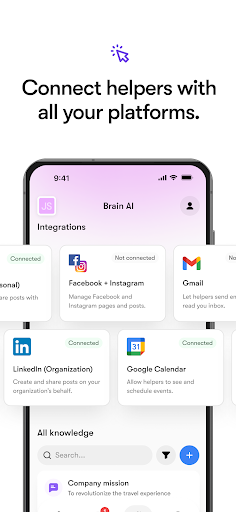
Meet Sintra – your all-in-one AI assistant for business. Sintra is an AI assistant designed to automate work, improve productivity, and act as your business manager — through a simple chat-based workspace. Trusted by over 6,000 businesses, Sintra brings together AI assistant tools, automation, and content creation to reduce manual work and improve productivity by keeping everything organized in one place. YOUR AI ASSISTANTS Sintra includes multiple specialized AI assistants, each focused on a specific function, working together to boost your productivity. Cassie – Customer support assistant with email inbox automation Seomi – SEO Strategist Buddy – Business Development Partner Emmie – Email Marketing Specialist Dexter – Data Analyst Penn – Creative Copywriter Commet – eCommerce Manager Gigi – Personal Growth Coach Milli – Sales Expert Vizzy – Executive assistant with built-in AI note taker Scouty – HR & Recruitment Pro Soshie – AI Social Media Manager with AI image generator and post scheduling automation WHY CHOOSE SINTRA AI POWERFUL AI AUTOMATIONS • Auto-post social media content created with the AI image generator using Soshie • Automated replies to comments and email inbox messages with Cassie • Capture meeting notes in real time using Vizzy’s AI note taker • Set up once, benefit every day SMART BRAIN AI • Personalized AI assistant memory and responses for each workspace, tailored to your team’s needs • Context-aware chatbot replies shared across all AI assistants • Brand-consistent content across email, social media, and chat • Secure management of business knowledge SEAMLESS INTEGRATIONS Connect your favorite platforms to Sintra and automate your work: • Social Media: Facebook, Instagram, LinkedIn • Productivity: Gmail, Outlook, Google Calendar • Storage: Google Drive, Google Sheets Your AI assistant integrates directly with your existing tools. DAILY BUSINESS INSPIRATION • 12 custom business ideas every day • One-click execution with automation • Industry-specific content aligned with your goals • Over 1,800 ready-to-use activities every month Perfect for founders, content creators, and teams focused on productivity and growth. FLEXIBLE WORKSPACES • Switch easily between personal and business accounts • Take care of various brands with separate workspaces and visuals created with the AI image generator • Keep notes, content, and automation separated per workspace • Access everything on desktop and mobile FEATURES AT A GLANCE • AI assistant for everyday tasks • Real-time AI chat and automation • AI image generator for on-brand social media visuals • AI note taker for capturing notes during calls • Dedicated workspaces for different brands • Visual content creation powered by the AI image generator • Tools designed to improve productivity across daily workflows • Enterprise-grade security and privacy GET STARTED TODAY • Quick setup and onboarding • Free 7-day trial with yearly plan • Plans starting from $39/month SECURITY & PRIVACY • No…

What Sintra: AI Employees Is Used For

Sintra: AI Employees appears to be a business-focused AI assistant app for managing routine work from a chat-based workspace. Based on the metadata, it is built to help users organize tasks, automate repeated actions, and create or manage business content in one place. It may be useful for people who want a central tool for support, marketing, sales, and general productivity rather than separate apps for each job.

The listed AI assistants suggest common use cases such as drafting emails, handling customer support messages, planning social media posts, generating copy, reviewing data, and supporting recruiting or sales workflows. The integration mentions Gmail, Outlook, Google Calendar, Google Drive, Google Sheets, Facebook, Instagram, and LinkedIn, which indicates it may fit teams that work across email, calendars, and social platforms.

Relevant permissions like network access, storage access, audio recording, and camera use suggest the app may support online workflows, file handling, meetings, or media capture features. Because it can run at startup and draw over other apps, it appears designed for ongoing business use on a phone rather than occasional use only.

Common uses

  • Automating repetitive business tasks and workflows
  • Drafting and organizing email or chat responses
  • Creating and scheduling social media content
  • Capturing meeting notes or audio-based work input
  • Managing business development, sales, or support tasks
  • Connecting workspace tools like calendar, drive, and email
  • Keeping content and team context in one chat-based app
Best for:
Founders Small teams Content creators Sales work Support teams Productivity users

App Details

Package:
com.anonymous.sintramobile
Category:
Business
Developer:
sintra.ai
Version:
2.8.2
Updated:
Mar 24, 2026
Min Android:
7.0
Age Rating:
Everyone
Contains Ads:
No
In-App Purchases:
Yes

Official Listing

  • Official listing available on Google Play
  • Package name: com.anonymous.sintramobile
  • Age rating: Everyone

Explore More

Browse more apps in Business or explore the Phone hub .

Related Business Apps

LinkedIn: Community & Network icon

LinkedIn: Community & Network

Business LinkedIn

Smarter career moves start here. AI job alerts, insights & the right tools.

Version 4.1.1185.1 90.3 MB ⭐ 4.10 1,000,000,000+ installs
Zoom Workplace icon

Zoom Workplace

Business zoom.com
Version Varies with device 181.9 MB ⭐ 4.10 1,000,000,000+ installs
Microsoft Teams icon

Microsoft Teams

Business Microsoft Corporation

Chat, meet, and collaborate to achieve more together, all in one place on Teams

Version 1416/1.0.0.2026044202 346.8 MB ⭐ 4.70 500,000,000+ installs
Adobe Scan AI PDF Scanner, OCR icon

Adobe Scan AI PDF Scanner, OCR

Business Adobe

Scan and save to multiple files types like PDF, Microsoft Word, JPEG and more.

Version Varies with device 79.3 MB ⭐ 4.70 100,000,000+ installs
File Commander Manager & Vault icon

File Commander Manager & Vault

Business MobiSystems

File manager | Explorer for cloud storage files & folders | Hide private photos.

Version Varies with device 23.1 MB ⭐ 4.20 100,000,000+ installs

How to Download Sintra: AI Employees

If this app is not hosted directly on APKApps official link, then for the safest and most up-to-date version, install it from its official Google Play listing.