Dr.EV-For your Tesla icon

Phone

Dr.EV-For your Tesla

Auto & Vehicles Battermachine ⭐ 2.00 5,000+
Version 2.3.50 Everyone

Screenshots

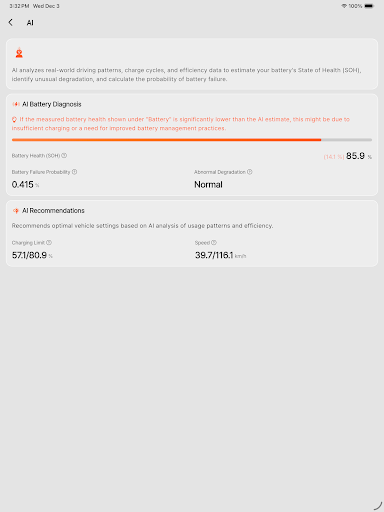
Dr.EV-For your Tesla screenshot
Permissions Explained 12 permissions requested View details

This app requests 12 permissions. The table below explains what each permission may allow and what users should review before installing.

Status Permission What it means Why it may be used User safety note
ℹ️ Review Read Phone Status And Identity read phone status and identity This is an Android permission or app-specific permission requested by the app. The app may use this permission for features related to its category, device support, background behavior, storage, connectivity, or system integration. Review this permission before installing, especially if it does not match the app’s expected purpose.
ℹ️ Review Read The Contents Of Your Usb Storage read the contents of your USB storage This is an Android permission or app-specific permission requested by the app. The app may use this permission for features related to its category, device support, background behavior, storage, connectivity, or system integration. Review this permission before installing, especially if it does not match the app’s expected purpose.
ℹ️ Review Modify Or Delete The Contents Of Your Usb Storage modify or delete the contents of your USB storage This is an Android permission or app-specific permission requested by the app. The app may use this permission for features related to its category, device support, background behavior, storage, connectivity, or system integration. Review this permission before installing, especially if it does not match the app’s expected purpose.
ℹ️ Review View Wi Fi Connections view Wi-Fi connections This is an Android permission or app-specific permission requested by the app. The app may use this permission for features related to its category, device support, background behavior, storage, connectivity, or system integration. Review this permission before installing, especially if it does not match the app’s expected purpose.
ℹ️ Review View Network Connections view network connections This is an Android permission or app-specific permission requested by the app. The app may use this permission for features related to its category, device support, background behavior, storage, connectivity, or system integration. Review this permission before installing, especially if it does not match the app’s expected purpose.
ℹ️ Review Full Network Access full network access This is an Android permission or app-specific permission requested by the app. The app may use this permission for features related to its category, device support, background behavior, storage, connectivity, or system integration. Review this permission before installing, especially if it does not match the app’s expected purpose.
ℹ️ Review Run At Startup run at startup This is an Android permission or app-specific permission requested by the app. The app may use this permission for features related to its category, device support, background behavior, storage, connectivity, or system integration. Review this permission before installing, especially if it does not match the app’s expected purpose.
ℹ️ Review Control Vibration control vibration This is an Android permission or app-specific permission requested by the app. The app may use this permission for features related to its category, device support, background behavior, storage, connectivity, or system integration. Review this permission before installing, especially if it does not match the app’s expected purpose.
ℹ️ Review Prevent Device From Sleeping prevent device from sleeping This is an Android permission or app-specific permission requested by the app. The app may use this permission for features related to its category, device support, background behavior, storage, connectivity, or system integration. Review this permission before installing, especially if it does not match the app’s expected purpose.
ℹ️ Review Google Play License Check Google Play license check This is an Android permission or app-specific permission requested by the app. The app may use this permission for features related to its category, device support, background behavior, storage, connectivity, or system integration. Review this permission before installing, especially if it does not match the app’s expected purpose.
ℹ️ Review Read Google Service Configuration read Google service configuration This is an Android permission or app-specific permission requested by the app. The app may use this permission for features related to its category, device support, background behavior, storage, connectivity, or system integration. Review this permission before installing, especially if it does not match the app’s expected purpose.
ℹ️ Review Receive Data From Internet receive data from Internet This is an Android permission or app-specific permission requested by the app. The app may use this permission for features related to its category, device support, background behavior, storage, connectivity, or system integration. Review this permission before installing, especially if it does not match the app’s expected purpose.

About Dr.EV-For your Tesla

Welcome to Dr.EV — Tesla Battery Management App Dr.EV is your intelligent companion for optimizing electric vehicle (EV) battery performance and longevity. Our innovative app is designed to keep you informed and in control of your EV’s battery health, driving habits, and charging efficiency. Harnessing the power of cutting-edge AI, Dr.EV provides real-time battery analysis, delivering precise health reports with easy-to-understand metrics such as State of Charge (SoC), Expected Range, and Overall Battery Health Percentage. Our advanced diagnostic tools detect anomalies, predict State of Health (SoH), and offer actionable insights to enhance battery efficiency and lifespan. With Dr.EV, you no longer have to worry about battery management. Our intelligent system guides you on optimal driving and charging strategies, ensuring maximum performance and durability — so you can focus on the road while we take care of your battery. Powered by Innovation: Dr.EV is built on proprietary AI algorithms and battery analytics. Our research has been featured in leading scientific journals and industry conferences. Learn more about our technology → https://www.sciencedirect.com/science/article/pii/S2666546823000915 Key Features of Dr.EV 1. Smart Battery Management Guide • Provides clear, real-time guidance and proactive notifications to help users effortlessly manage battery health. • Utilizes advanced algorithms to automatically detect and alert users of unusual pack behavior and potential issues. • Empowers users with actionable recommendations for battery maintenance, optimal charging practices, and improved driving habits without requiring technical expertise. 2. Battery Health Insights (Hybrid Algorithm: AI + Dr.EV Patented Algorithm) • Employs a hybrid algorithm approach combining Dr.EV's patented algorithm and AI-based methods to accurately calculate the battery State of Health (SoH) and estimate remaining mileage. • Continuously processes real-time voltage, current, and temperature data to provide ongoing accurate insights. • Performs weekly AI-driven analyses and result corrections for robust battery health assessments. • Visualizes personalized battery health trend charts influenced by real driving and charging behaviors. 3. AI-Powered Safety Detection • Detects early signs of battery pack issues, abnormal degradation, and unusual behavior using AI. • Runs weekly AI safety checks for balanced protection and performance. 4. Intelligent Charging Monitor • Monitors key charging parameters like voltage, current, temperature, and efficiency in real time. • Alerts users to issues like overcurrent or overheating and offers customizable charging modes (e.g., Short Trip, Max Range). 5. Real-Time Driving and Charging Analytics • Tracks motor power output, torque, vehicle speed, and charging behavior during critical phases. • Recommends safer and more efficient habits to prevent cell imbalance or overheating. 6. Comprehensive Historical Timeline • Archives…

What Dr.EV-For your Tesla Is Used For

Dr.EV-For your Tesla appears to be a phone app for Tesla owners who want to monitor and manage EV battery behavior. Based on the metadata, it focuses on battery health, state of charge, expected range, and related driving or charging insights. It may be useful for people who want a clearer view of how their battery is performing over time and what factors could affect longevity.

The app also appears to use network access and startup/background permissions to provide ongoing updates, alerts, or analysis rather than only one-time checks. Its description suggests battery diagnostics, trend tracking, and recommendations for charging and driving habits. In practical use, that means it may fit drivers who want battery status summaries, anomaly detection, and guidance on charging efficiency from a mobile device.

Common uses

  • Check battery health and state of charge from a phone
  • Review estimated range and health percentage
  • Track battery trends over time
  • Look for unusual battery behavior or alerts
  • Get charging and driving guidance based on battery data
  • Use as a companion app for EV battery monitoring
  • Receive ongoing updates through network-connected analysis
Best for:
Tesla owners EV battery monitoring Charging guidance Driving efficiency tracking Phone app use

App Details

Package:
com.battermachine.drev
Developer:
Battermachine
Version:
2.3.50
Updated:
Mar 27, 2026
Min Android:
7.0
Age Rating:
Everyone
Contains Ads:
No
In-App Purchases:
Yes

Official Listing

  • Official listing available on Google Play
  • Package name: com.battermachine.drev
  • Age rating: Everyone

Explore More

Browse more apps in Auto & Vehicles or explore the Phone hub .

Related Auto & Vehicles Apps

Car Scanner ELM OBD2 icon

Car Scanner ELM OBD2

Auto & Vehicles CAR SCANNER LLC

Trip computer+car diagnostic tool with widest variety of features and dashboard!

Version 2.1.3 77.2 MB ⭐ 4.70 10,000,000+ installs
Radar GO-X: HUD, GPS, Maps icon

Radar GO-X: HUD, GPS, Maps

Auto & Vehicles Appwest Limited

Find radar, speed camera, flight tracker. Use hud, location tracker, speedometer

Version 5.37.2 55.7 MB ⭐ 4.10 10,000,000+ installs
Infocar - OBD2 ELM Scanner icon

Infocar - OBD2 ELM Scanner

Auto & Vehicles Infocar Co., Ltd.

Infocar is a smart vehicle management app

Version 2.29.1 49.3 MB ⭐ 3.90 10,000,000+ installs
OBD2 Car Scanner - EOBD Facile icon

OBD2 Car Scanner - EOBD Facile

Auto & Vehicles Outils OBD Facile

Measure Torque and be your own mechanic with an ELM 327 OBD2 car code reader.

Version 3.84.1158 45.5 MB ⭐ 4.30 5,000,000+ installs
Fuelio: gas log & gas prices icon

Fuelio: gas log & gas prices

Auto & Vehicles Sygic.

Car management, gas prices, consumption, expenses, mileage log, GPS tracker

Version 9.20.1 21.0 MB ⭐ 4.30 5,000,000+ installs

How to Download Dr.EV-For your Tesla

If this app is not hosted directly on APKApps official link, then for the safest and most up-to-date version, install it from its official Google Play listing.