Volume Control per app icon

Phone

Volume Control per app

Tools Yogesh Dama ⭐ 2.90 10,000+
Version Varies with device Everyone

Screenshots

Volume Control per app screenshot
Permissions Explained 9 permissions requested View details

This app requests 9 permissions. The table below explains what each permission may allow and what users should review before installing.

Status Permission What it means Why it may be used User safety note
ℹ️ Review Retrieve Running Apps retrieve running apps This is an Android permission or app-specific permission requested by the app. The app may use this permission for features related to its category, device support, background behavior, storage, connectivity, or system integration. Review this permission before installing, especially if it does not match the app’s expected purpose.
ℹ️ Review View Network Connections view network connections This is an Android permission or app-specific permission requested by the app. The app may use this permission for features related to its category, device support, background behavior, storage, connectivity, or system integration. Review this permission before installing, especially if it does not match the app’s expected purpose.
ℹ️ Review Full Network Access full network access This is an Android permission or app-specific permission requested by the app. The app may use this permission for features related to its category, device support, background behavior, storage, connectivity, or system integration. Review this permission before installing, especially if it does not match the app’s expected purpose.
ℹ️ Review Change Your Audio Settings change your audio settings This is an Android permission or app-specific permission requested by the app. The app may use this permission for features related to its category, device support, background behavior, storage, connectivity, or system integration. Review this permission before installing, especially if it does not match the app’s expected purpose.
ℹ️ Review Run At Startup run at startup This is an Android permission or app-specific permission requested by the app. The app may use this permission for features related to its category, device support, background behavior, storage, connectivity, or system integration. Review this permission before installing, especially if it does not match the app’s expected purpose.
ℹ️ Review Control Vibration control vibration This is an Android permission or app-specific permission requested by the app. The app may use this permission for features related to its category, device support, background behavior, storage, connectivity, or system integration. Review this permission before installing, especially if it does not match the app’s expected purpose.
ℹ️ Review Prevent Device From Sleeping prevent device from sleeping This is an Android permission or app-specific permission requested by the app. The app may use this permission for features related to its category, device support, background behavior, storage, connectivity, or system integration. Review this permission before installing, especially if it does not match the app’s expected purpose.
ℹ️ Review Modify System Settings modify system settings This is an Android permission or app-specific permission requested by the app. The app may use this permission for features related to its category, device support, background behavior, storage, connectivity, or system integration. Review this permission before installing, especially if it does not match the app’s expected purpose.
ℹ️ Review Update Component Usage Statistics update component usage statistics This is an Android permission or app-specific permission requested by the app. The app may use this permission for features related to its category, device support, background behavior, storage, connectivity, or system integration. Review this permission before installing, especially if it does not match the app’s expected purpose.

About Volume Control per app

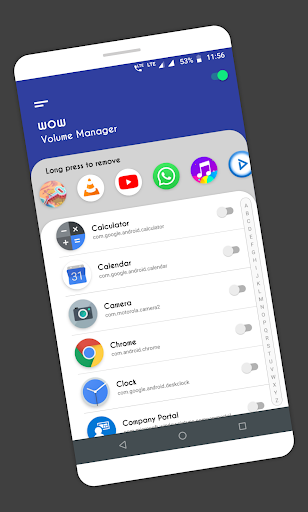
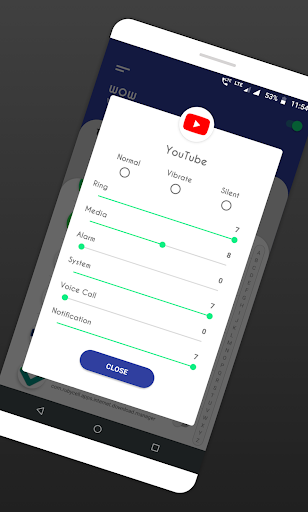
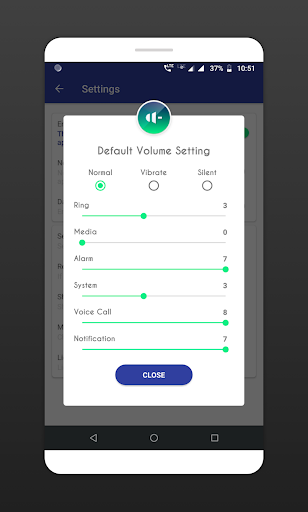
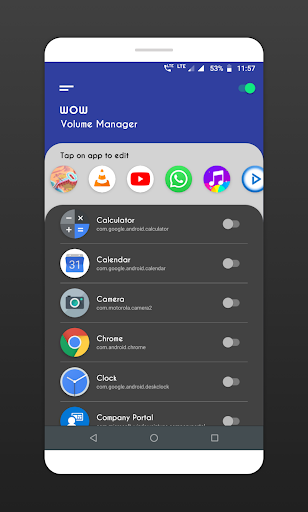
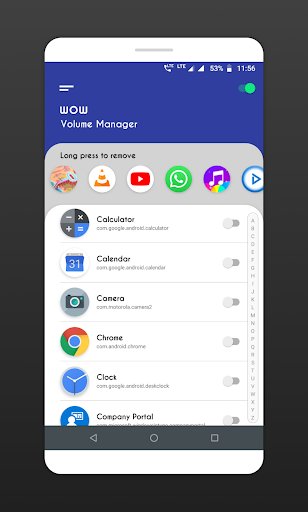
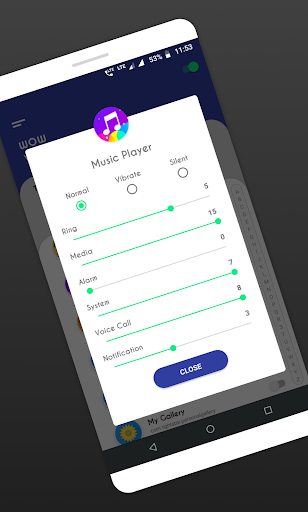
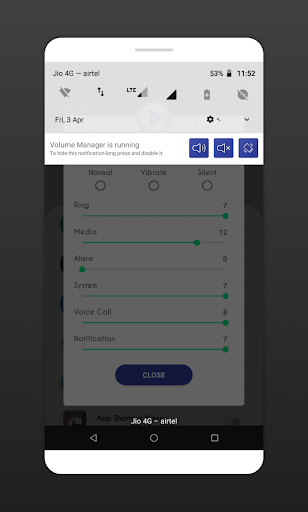
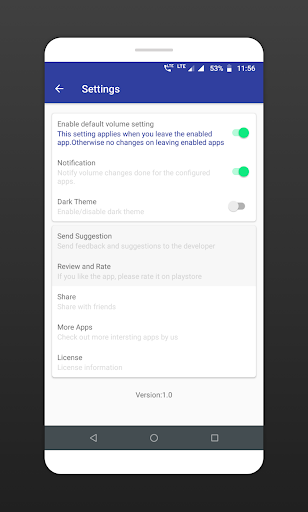
Volume manager / Sound manager app to automate volume levels & ringer modes based on the app you open. Easily automate volume levels using per app volume control options. WOW Volume Manager makes its easy to control different volume levels for android such as Ring, music, alarm, incall voice, notification etc. App also offers automate ringer modes, such as silent, vibrate or normal mode based on the app you open. Note: app can change volume levels only if you open the app which you configured. there is no possibility in android to change volume levels for background running apps. only apps those are on foreground and open by user, only for those app automate volume control can work. How to use: 1. App shows list of installed apps & system apps from your device. enable auto volume control for the app you want, turn switch ON at right side of app name. 2. App shows Ringer mode, Silent, Vibrate, Normal with different volume levels. Choose the mode or set the volume levels for the app you selected. That's all, easy and quick. 3. If you select silent or vibrate modes, you can not change volume levels under it. Features: ◇ Enable apps for auto volume control. ◇ Automatically changes the volume levels or ringer mode when you open the app. ◇ Default volume settings for apps those are not configured. ◇ Clean and easy UI to configure quickly. App need following permissions to complete the task, please allow these permissions for the app when you first time open the app. Permissions: Do Not Disturb: permission need to change volume modes. Usage access: permission needed to check currently running app for applying volume level changes. Note: ✔ Please make sure Volume Manager is ON, Check the switch at right top corner. ✔ App also provides default volume setting for the apps those are not configured, so when you leave any app, the default settings gets applied. find this in app setting screen. ✔ By default, this default volume setting is OFF, this means, volume settings will remain same after leaving the app you enabled. Please try app and let us know, what more we can do to improve the app and to make app more useful to all users. If you like the app, please leave your review and rating on playstore. Thank you.

What Volume Control per app Is Used For

Volume Control per app appears to be a tools app for managing audio behavior on a phone based on which app is currently open. Based on the metadata, it is used to set different volume levels for things like ring, music, alarm, calls, and notifications, and to switch ringer modes such as silent, vibrate, or normal for specific apps.

It may be useful if you want your phone to behave differently in different situations, such as lowering media volume for one app and keeping notifications muted for another. The app’s permissions and description suggest it needs access to running-app information and audio settings so it can detect the foreground app and apply the chosen volume profile. It also mentions startup behavior and system-setting changes, which indicates it is intended for ongoing automation rather than one-time adjustments. The app’s per-app control is described as working when the selected app is open in the foreground, so it seems focused on active-use volume management on Android phones.

Common use cases may include setting quieter volumes for entertainment apps, keeping communication apps at a comfortable level, or restoring a default volume profile after leaving an app if that option is enabled.

Common uses

  • Set different volume levels for specific apps
  • Automate silent, vibrate, or normal ringer modes
  • Adjust media, alarm, call, and notification audio profiles
  • Apply volume behavior only when a chosen app is open
  • Use default volume settings when leaving configured apps
  • Manage sound behavior from a phone-based tools app
  • Requires access to running apps and audio settings to function
Best for:
Per-app volume control Ringer mode automation Android phone users Audio profile management

App Details

Package:
com.bhanu.wowvolumescheduler
Category:
Tools
Developer:
Yogesh Dama
Version:
Varies with device
Min Android:
Varies with device
Age Rating:
Everyone
Contains Ads:
No
In-App Purchases:
No

Official Listing

  • Official listing available on Google Play
  • Package name: com.bhanu.wowvolumescheduler
  • Age rating: Everyone

Explore More

Browse more apps in Tools or explore the Phone hub .

Related Tools Apps

How to Download Volume Control per app

If this app is not hosted directly on APKApps official link, then for the safest and most up-to-date version, install it from its official Google Play listing.