About Starry Bloom
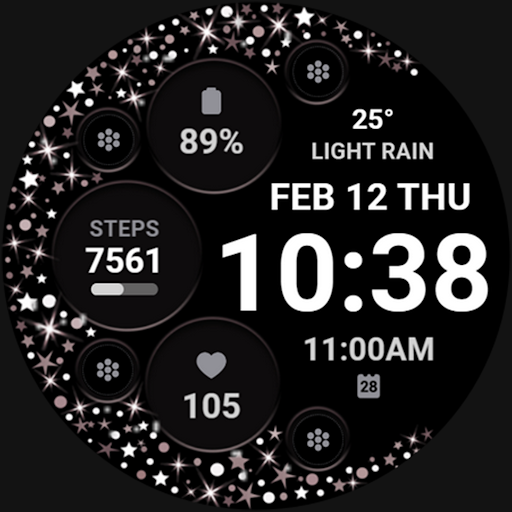
📍INSTALLATION NOTES ⭐️Note for Galaxy Watch Users: The watch face editor in the Samsung Wearable app often fails to sync and load complex watch faces. This is not an issue with the watch face. It is recommended to customize the watch face directly on the watch until Samsung resolves this issue. 📍This watch face supports all Wear OS devices with API Level 34+ | Wear OS 4 and later versions (Some features may not be available on some watches) ⭐️KEY FEATURES: - Sparkling Stars Effect Digital Clock - Pre-Set App Shortcut - FIXED (Alarm and Calendar) - 4 Custom App Shortcuts - 4 Custom Complications (you can customize the complication with the any data you want) For example, you can select Date, weather, steps, world clock, sunset/sunrise, next appointment, distance walked and more. ***You may need to install additional third-party complications. - Custom Background Colors TAKE NOTE❗️❗️❗️ 1️⃣ Watch faces automatically install on WEAR OS watch. 2️⃣ MAKE SURE THE WATCH IS SYNCED TO YOUR PHONE USING THE SAME EMAIL ADDRESS FOR SEAMLESS INSTALLATION. 3️⃣ After download, WAIT for a few minutes for the watch face to be transferred on watch. (There will be a notification on your watch if the watch face was successfully transferred.) 4️⃣ If incase there is no notification, Go to PLAYSTORE ON YOUR WATCH and type on the SEARCH BOX "Starry Bloom" ⭐️ Watch faces don't automatically display/change after successful installation. Go back to home display. Tap and hold display, swipe until the end and tap + to add the watch face. Rotate Bezel or scroll to find the watch face. 📍ALLOW / ENABLE all permissions from settings -> applications -> permissions. ⚠️⚠️⚠️ Refund is ONLY allowed within 24 hours. Contact us at:
[email protected] Installation Tutorial: https://www.youtube.com/watch?v=vMM4Q2-rqoM
What Starry Bloom Is Used For
Starry Bloom appears to be a Wear OS watch face app in the Personalization category, designed for people who want to customize the look and layout of their smartwatch. Based on the metadata, it focuses on a digital clock style with a sparkling stars effect, plus options to change the background color and arrange shortcuts and complications.
It may be most useful for Wear OS users who want quick access to everyday information and actions from the watch face itself. The listed complication options suggest it can show data such as date, weather, steps, world clock, sunrise or sunset, and upcoming appointments, while the shortcut slots may let users open selected apps or tools faster. The permissions like control vibration, prevent device from sleeping, and set an alarm fit a watch-face style app that can support alert behavior and clock-related functions. The metadata also notes support for Wear OS 4 and later on compatible devices, and it mentions that setup may need to be done directly on the watch for some Galaxy Watch users.
Common uses
- Customize the look of a Wear OS watch face
- Display time with a sparkling stars visual style
- Use complications to surface health, calendar, and weather data
- Assign app shortcuts for quicker access from the watch face
- Set up clock-related features such as alarms
- Adjust the background color for a different appearance
- Works as a phone app for syncing to a Wear OS watch
How to Download Starry Bloom
If this app is not hosted directly on APKApps official link,
then for the safest and most up-to-date version, install it from its official Google Play listing.