OnBeat: Video & Reels Maker icon

Phone

OnBeat: Video & Reels Maker

Video Players & Editors Cardinal Blue Software, Inc. ⭐ 4.70 50,000+
Version 1.171 Everyone

Screenshots

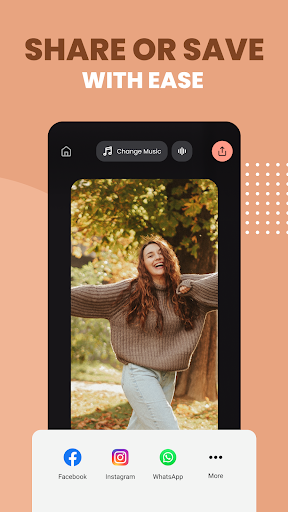
OnBeat: Video & Reels Maker screenshot
Permissions Explained 8 permissions requested View details

This app requests 8 permissions. The table below explains what each permission may allow and what users should review before installing.

Status Permission What it means Why it may be used User safety note
ℹ️ Review Read The Contents Of Your Usb Storage read the contents of your USB storage This is an Android permission or app-specific permission requested by the app. The app may use this permission for features related to its category, device support, background behavior, storage, connectivity, or system integration. Review this permission before installing, especially if it does not match the app’s expected purpose.
ℹ️ Review Modify Or Delete The Contents Of Your Usb Storage modify or delete the contents of your USB storage This is an Android permission or app-specific permission requested by the app. The app may use this permission for features related to its category, device support, background behavior, storage, connectivity, or system integration. Review this permission before installing, especially if it does not match the app’s expected purpose.
ℹ️ Review Record Audio record audio This is an Android permission or app-specific permission requested by the app. The app may use this permission for features related to its category, device support, background behavior, storage, connectivity, or system integration. Review this permission before installing, especially if it does not match the app’s expected purpose.
ℹ️ Review View Network Connections view network connections This is an Android permission or app-specific permission requested by the app. The app may use this permission for features related to its category, device support, background behavior, storage, connectivity, or system integration. Review this permission before installing, especially if it does not match the app’s expected purpose.
ℹ️ Review Full Network Access full network access This is an Android permission or app-specific permission requested by the app. The app may use this permission for features related to its category, device support, background behavior, storage, connectivity, or system integration. Review this permission before installing, especially if it does not match the app’s expected purpose.
ℹ️ Review Prevent Device From Sleeping prevent device from sleeping This is an Android permission or app-specific permission requested by the app. The app may use this permission for features related to its category, device support, background behavior, storage, connectivity, or system integration. Review this permission before installing, especially if it does not match the app’s expected purpose.
ℹ️ Review Google Play License Check Google Play license check This is an Android permission or app-specific permission requested by the app. The app may use this permission for features related to its category, device support, background behavior, storage, connectivity, or system integration. Review this permission before installing, especially if it does not match the app’s expected purpose.
ℹ️ Review Receive Data From Internet receive data from Internet This is an Android permission or app-specific permission requested by the app. The app may use this permission for features related to its category, device support, background behavior, storage, connectivity, or system integration. Review this permission before installing, especially if it does not match the app’s expected purpose.

About OnBeat: Video & Reels Maker

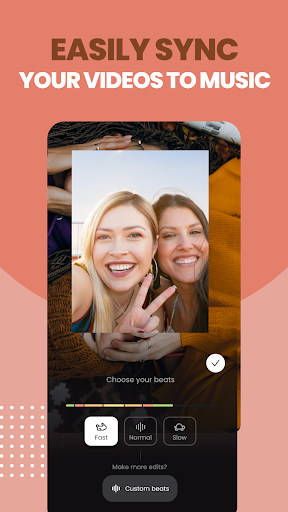
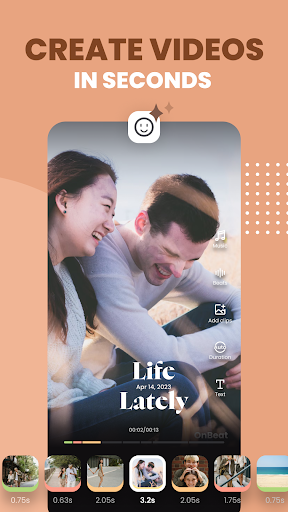
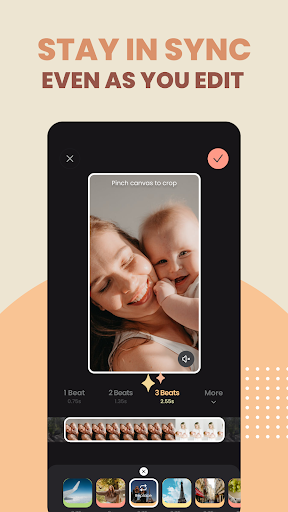
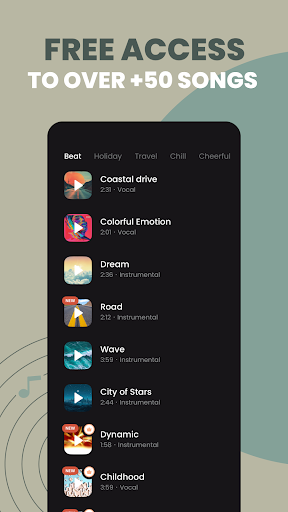
Skip hours of painful editing… and say hi to OnBeat, the easiest way to create beat-synced videos for social media. Take advantage of our auto-sync tech and turn your clips into rhythm-perfect content in seconds. Whether you’re crafting an epic ‘end of year’ recap or creating daily vlogs – OnBeat has you covered. Start creating videos you’ll love today - and entirely for free! 🎵 KEY FEATURES🎵 - Automatic Beat Sync: Watch your videos instantly align with the rhythm of the music (no matter how much you edit!) - Rich Music Library: Bring your videos to life with free access to over 50 carefully curated, copyright-free tracks, perfect for social media posting. - Smart Beat Control: Customize your video's pace with multiple beat speed options (Choose from fast/slow/normal!) - Flexible Clip Timing: Easily adjust each clip's length, for when you need that ✨ extra✨ level of editing control. Start creating amazing beat-synced videos for your Instagram Reels, TikTok videos, or YouTube Shorts - today! Our intuitive interface makes it beyond easy to turn your everyday moments into captivating musical stories. ⭐ COMING SOON ⭐ We're constantly working to bring you new features! Stay tuned for upcoming updates including: - Viral template layouts - Fonts & filters - Enhanced video editing tools - Direct social media sharing - Advanced beat customization - And much much more! Any feature requests or feedback? We’d love them. Tell us at [email protected] or connect with us on Instagram @onbeat.app Terms of Service: http://cardinalblue.com/tos Privacy Policy: https://cardinalblue.com/privacy

What OnBeat: Video & Reels Maker Is Used For

OnBeat: Video & Reels Maker appears to be a phone app for making short, music-driven videos with a focus on social media formats. Based on the metadata, it is commonly used to combine clips with music and align the edits to a beat, which may be helpful for reels, short highlight videos, recaps, and similar personal content.

The app’s description suggests it is aimed at users who want a quicker editing workflow rather than a full manual editor. Features like automatic beat sync, clip timing control, and a built-in music library point to common use cases such as creating synchronized montage videos, vlog-style edits, or event summaries. Since it requests storage access, it may need permission to read and modify video files on the device, and the audio recording permission suggests it can also capture sound for certain projects. Network access likely supports music, updates, or online-related functions. It appears best suited for Android phones used for short-form video creation and sharing.

Common uses

  • Create short videos timed to music beats
  • Edit clips for social media formats like reels or shorts
  • Make recap videos, highlight montages, or daily vlog edits
  • Adjust clip length and playback pace for rhythm matching
  • Use the included music library for background tracks
  • Work with media stored on the device
  • Record audio when needed for a video project
Best for:
short-form video editing social media creators music-synced edits phone app content recap videos

App Details

Package:
com.cardinalblue.onbeat
Developer:
Cardinal Blue Software, Inc.
Version:
1.171
Updated:
Mar 5, 2026
Min Android:
11
Age Rating:
Everyone
Contains Ads:
No
In-App Purchases:
Yes

Official Listing

  • Official listing available on Google Play
  • Package name: com.cardinalblue.onbeat
  • Age rating: Everyone

Explore More

Browse more apps in Video Players & Editors or explore the Phone hub .

Related Video Players & Editors Apps

Reels & Story Maker Storybeat icon

Reels & Story Maker Storybeat

Photography Storybeat

AI Photo & Video Editor. Music, Templates, Filters, Effects, Captions & Avatars

Version 4.40.3.0 19.9 MB ⭐ 4.40 10,000,000+ installs
Unfold: Story & Reels Maker icon

Unfold: Story & Reels Maker

Photography Squarespace Inc

IG Templates, AI Editor, Collages & Fonts

Version 8.156.0 80.8 MB ⭐ 3.80 10,000,000+ installs
BeatSync icon

BeatSync

Video Players & Editors KineMaster, Video Editor Experts Group

A must-have for Reels, Shorts, and TikTok! Easy & free to make great videos now!

Version 4.0.174 139.9 MB ⭐ 4.33 5,000,000+ installs

How to Download OnBeat: Video & Reels Maker

If this app is not hosted directly on APKApps official link, then for the safest and most up-to-date version, install it from its official Google Play listing.