About CL Theme C1
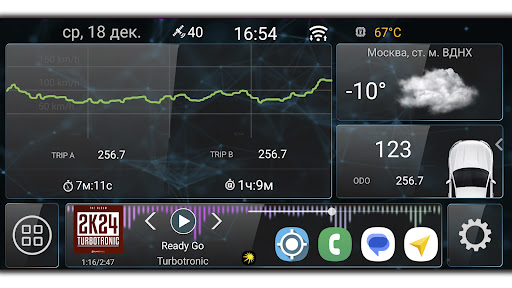
Warning. This is not an application, but a theme for Car Launcher. Introducing a new theme for Car Launcher v 4.5+. How to install the theme: 1. Open Car Launcher. 2. Open the settings and click "Select Theme". 3. Click on the desired theme.
What CL Theme C1 Is Used For
Based on the metadata, CL Theme C1 appears to be a visual theme add-on for Car Launcher, rather than a standalone app. It is meant to change the look of the Car Launcher interface, likely by applying a different layout or style inside the launcher’s theme settings. Because it is listed in the Auto & Vehicles category, it is most relevant for drivers who use their Android phone as an in-car display or dashboard interface.
This kind of theme may be used to customize the appearance of Car Launcher v4.5+ without changing the core functions of the launcher itself. The included instructions suggest that users install the theme first, then open Car Launcher, go to settings, and choose the theme from the theme selector. No permissions are listed, so the available metadata mainly points to visual customization rather than device access or background features.
Common uses
- Used to change the appearance of Car Launcher
- Appears to work as a theme pack, not a full standalone app
- May help personalize an in-car Android launcher layout
- Relevant for users running Car Launcher v4.5+
- Installed through Car Launcher’s theme selection menu
- Best suited for phone-based car dashboard setups
How to Download CL Theme C1
If this app is not hosted directly on APKApps official link,
then for the safest and most up-to-date version, install it from its official Google Play listing.