Meteogram Weather Widget
com.cloud3squared.meteogram
by Meteograms Ltd
Screenshots
Ad slot: Top Leaderboard
About this app
Summary
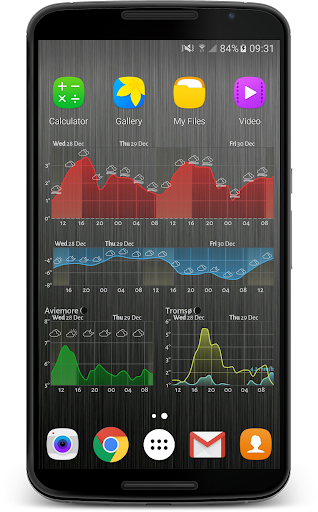
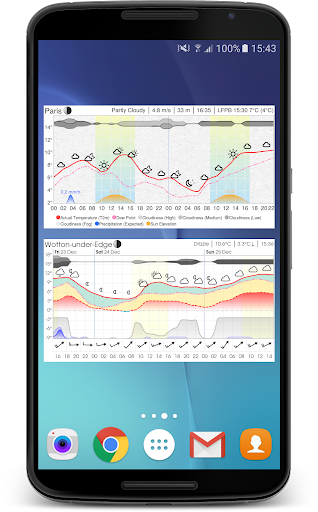
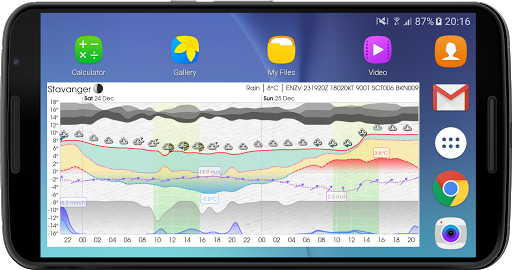
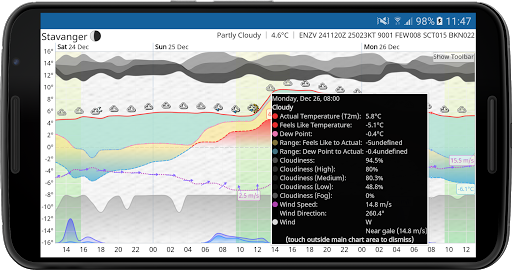
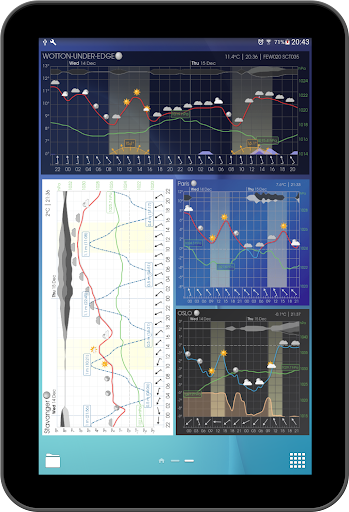
This resizable weather widget (and interactive app) provides a detailed and visually appealing weather forecast, allowing you very quickly to understand what to expect when you venture outdoors. The graphical format is commonly referred to as a 'meteogram'.
You can choose to display as little or as much information as you like, or you can set up multiple widgets showing different information (optionally for different places) in different widgets.
You can plot common weather parameters like temperature, wind speed and pressure, as well as tide charts, UV Index, wave height, moon phase, sunrise and sunset times, and much much more!
You can even display government-issued weather alerts chart, with coverage for at least 63 different countries.
The content and style of the meteogram is extremely configurable... with over 4000 options to set, your imagination is the limit!
The widget is also fully resizable, so make it however small or large you like on your home screen! And the interactive app is just a click away, direct from the widget.
Furthermore, you can choose where your weather data comes from, with over 30 different models or sources including:
★ The Weather Company
★ Apple Weather (WeatherKit)
★ Foreca
★ AccuWeather
★ MeteoGroup
★ Norwegian Met Office (Meteorologisk Institutt)
★ MOSMIX, ICON-EU and COSMO-D2 models from German Met Office (Deutscher Wetterdienst or DWD
★ AROME and ARPEGE models from Météo-France
★ Swedish Met Office (SMHI)
★ UK Met Office
★ National Oceanic and Atmospheric Administration (NOAA)
★ GFS & HRRR models from NOAA
★ GEM model from the Canadian Meteorological Centre (CMC)
★ Global GSM and local MSM models from the Japan Meteorological Agency (JMA)
★ IFS model from the European Centre for Medium-Range Weather Forecasts (ECMWF)
★ HARMONIE model from Finnish Meteorological Institute (FMI)
★ and more!
Note that this app has no affiliation with any of the data sources used in the app.
Upgrade to Platinum
In addition to the great features available in the free version, an in-app platinum upgrade is available which will give you the following extra benefits:
★ use of all available weather data providers
★ use of tide data
★ higher spatial resolution used (e.g. nearest km vs nearest 10 km)
★ no adverts
★ no watermark on chart
★ favourite locations list
★ choice of weather icon set
★ change location (e.g. from favourites) direct from widget button
★ change data provider direct from widget button
★ link to windy.com direct from widget button
★ save/load settings to/from a local file
★ save/load settings to/from a remote server
★ show historical (cached forecast) data
★ show full days (midnight to midnight)
★ show twilight periods (civil, nautical, astronomical)
★ time machine (show weather or tides for any date, past or future)
★ greater choice of fonts
★ custom webfont (choose any from Google Fonts)
★ notifications (including temperature in status bar)
Support and Feedback
We always welcome feedback or suggestions. Join one of our online communities:
★ Reddit: bit.ly/meteograms-reddit
★ Slack: bit.ly/slack-meteograms
★ Discord: bit.ly/meteograms-discord
You can also email us using the handy link in the settings page in the app. Also check out the help pages at https://trello.com/b/ST1CuBEm, and the website (https://meteograms.com) for further information and an interactive meteogram map.
This resizable weather widget (and interactive app) provides a detailed and visually appealing weather forecast, allowing you very quickly to understand what to expect when you venture outdoors. The graphical format is commonly referred to as a 'meteogram'.
You can choose to display as little or as much information as you like, or you can set up multiple widgets showing different information (optionally for different places) in different widgets.
You can plot common weather parameters like temperature, wind speed and pressure, as well as tide charts, UV Index, wave height, moon phase, sunrise and sunset times, and much much more!
You can even display government-issued weather alerts chart, with coverage for at least 63 different countries.
The content and style of the meteogram is extremely configurable... with over 4000 options to set, your imagination is the limit!
The widget is also fully resizable, so make it however small or large you like on your home screen! And the interactive app is just a click away, direct from the widget.
Furthermore, you can choose where your weather data comes from, with over 30 different models or sources including:
★ The Weather Company
★ Apple Weather (WeatherKit)
★ Foreca
★ AccuWeather
★ MeteoGroup
★ Norwegian Met Office (Meteorologisk Institutt)
★ MOSMIX, ICON-EU and COSMO-D2 models from German Met Office (Deutscher Wetterdienst or DWD
★ AROME and ARPEGE models from Météo-France
★ Swedish Met Office (SMHI)
★ UK Met Office
★ National Oceanic and Atmospheric Administration (NOAA)
★ GFS & HRRR models from NOAA
★ GEM model from the Canadian Meteorological Centre (CMC)
★ Global GSM and local MSM models from the Japan Meteorological Agency (JMA)
★ IFS model from the European Centre for Medium-Range Weather Forecasts (ECMWF)
★ HARMONIE model from Finnish Meteorological Institute (FMI)
★ and more!
Note that this app has no affiliation with any of the data sources used in the app.
Upgrade to Platinum
In addition to the great features available in the free version, an in-app platinum upgrade is available which will give you the following extra benefits:
★ use of all available weather data providers
★ use of tide data
★ higher spatial resolution used (e.g. nearest km vs nearest 10 km)
★ no adverts
★ no watermark on chart
★ favourite locations list
★ choice of weather icon set
★ change location (e.g. from favourites) direct from widget button
★ change data provider direct from widget button
★ link to windy.com direct from widget button
★ save/load settings to/from a local file
★ save/load settings to/from a remote server
★ show historical (cached forecast) data
★ show full days (midnight to midnight)
★ show twilight periods (civil, nautical, astronomical)
★ time machine (show weather or tides for any date, past or future)
★ greater choice of fonts
★ custom webfont (choose any from Google Fonts)
★ notifications (including temperature in status bar)
Support and Feedback
We always welcome feedback or suggestions. Join one of our online communities:
★ Reddit: bit.ly/meteograms-reddit
★ Slack: bit.ly/slack-meteograms
★ Discord: bit.ly/meteograms-discord
You can also email us using the handy link in the settings page in the app. Also check out the help pages at https://trello.com/b/ST1CuBEm, and the website (https://meteograms.com) for further information and an interactive meteogram map.
What's New
5.5.2
• updated translations
• fix Windy window going under button bar
5.5.1
• target Android 16
5.4.4
• option to start the chart on a particular day of the week
• e.g. for the weekend, select Saturday and a time range of 48 hours
• pollen data for "Air and Pollen Bar" is now available outside the US (data from Google)
• NOTE: if your widget does not completely fill the space in Android 15... see https://trello.com/c/NMhU9kU4
• updated translations
• fix Windy window going under button bar
5.5.1
• target Android 16
5.4.4
• option to start the chart on a particular day of the week
• e.g. for the weekend, select Saturday and a time range of 48 hours
• pollen data for "Air and Pollen Bar" is now available outside the US (data from Google)
• NOTE: if your widget does not completely fill the space in Android 15... see https://trello.com/c/NMhU9kU4
App Information
Version Name
1.9.7
Version Code
271
File Size
2.9 MB
Minimum OS
Android 7.0+
Target SDK
Android 23
Developer
Meteograms Ltd
Contact
Website
Content Rating
Everyone
Package Name
com.cloud3squared.meteogramPermissions Required
This app may request the following permissions:
Recent Reviews
A Google user
5.0★
I wanted something super simple: a three-day forecast on a widget which showed a line graph of temperature and precipitation. Weather Underground used to have this. I went searching for another app that did after WU deprecated their widget, and this is the only one I've found that gives me exactly what I want. Unfortunately it took a while to customize, but once I got it customized, it's exactly what I want.
Chris Rigol
5.0★
This is the widget I've been looking for! Ever since W.Underground broke their app, I've been looking for a widget that provides useful and detailed forcast at a glance. This app is amazing. It is very customizable to display the information you want and remove what you don't. There are so many more variables to choose from as well as how they are displayed! This isnt a trendy artsy looking widget. It is for those who want data and don't want to have to open the app and scroll around to get it.
A Google user
5.0★
Absolutely amazing. I went through a whole bunch of apps trying to find one that could fit my needs (hourly temp and weather over the span of a few days). This app could do that and so much more! And has customizable themes to boot! Definitely worth sitting down for an hour or so to learn all the features and tweak it to perfection, but the default settings are already great if you don't have time for that.
A Google user
5.0★
Very versatile widget. Hard to get a handle on all the settings. I spent about an hour trying to reconfigure it after I changed phones, you should register to unlock saved settings for sure. [Misguided criticisms deleted.] [Edit] D'oh! Forgot about the center press to edit. And I'm going to register for platinum to get the saved settings. I plan on using this for a while.
A Google user
5.0★
The best weather widget ever. I was looking for something that'll show a week's temperature as a plot (not as list of numbers, and not just two days worth of a plot). Weather underground became useless after an update, which I'm glad of because I found this. It's more of an environment (you want irradiance? wind? just the temperature? what's the font size and text format for days of week?) rather than an app with three buttons. It has pic presets to choose from too, if that's your thing.
A Google user
5.0★
I have been using Weather Underground as my go to weather app. for years, and they had a pretty good graph style widget. That company was bought and the widget went away. I have been looking for something as good or better for months with no luck. Then I found Meteogram Weather Widget. This widget takes some time to get tweaked just the way you want, but it is worth the effort. The most configurable widget i have ever used. I have done some light app development, but this is super impressive. Kudos to the developers of this! If you want simple just go into settings and use one of the "Predefined Options Sets" and you are good to go. Even if you are going to customize. Choose one of the predefined layouts and then customize from there. I used if for a couple of days and then paid for the platinum version. I have never paid anywhere near that much for an app but this is worth it as it is on my home screen and I look at it every time I unlock my phone. I work outside and need to make decisions based on the weather every day. I just want a simple widget that shows on the information I need at a glance. If I need more I can open the full app. Put the free version on your phone select a predefined option set and see how nice this is. Then when you want to make it a little better take a plunge into the setting, but make sure you have some time on your hands. There are lots of settings. The paid version lets you save and restore the settings once you finally get it tweaked the way you want it.
Ad slot: In-Content