Light Show Creator for Tesla icon

Phone

Light Show Creator for Tesla

Auto & Vehicles Bamboo Game ⭐ 3.30 10,000+
Version 3.6.09 Everyone

Screenshots

Light Show Creator for Tesla screenshot
Permissions Explained 7 permissions requested View details

This app requests 7 permissions. The table below explains what each permission may allow and what users should review before installing.

Status Permission What it means Why it may be used User safety note
ℹ️ Review Access Usb Storage Filesystem access USB storage filesystem This is an Android permission or app-specific permission requested by the app. The app may use this permission for features related to its category, device support, background behavior, storage, connectivity, or system integration. Review this permission before installing, especially if it does not match the app’s expected purpose.
ℹ️ Review Read The Contents Of Your Usb Storage read the contents of your USB storage This is an Android permission or app-specific permission requested by the app. The app may use this permission for features related to its category, device support, background behavior, storage, connectivity, or system integration. Review this permission before installing, especially if it does not match the app’s expected purpose.
ℹ️ Review Modify Or Delete The Contents Of Your Usb Storage modify or delete the contents of your USB storage This is an Android permission or app-specific permission requested by the app. The app may use this permission for features related to its category, device support, background behavior, storage, connectivity, or system integration. Review this permission before installing, especially if it does not match the app’s expected purpose.
ℹ️ Review View Network Connections view network connections This is an Android permission or app-specific permission requested by the app. The app may use this permission for features related to its category, device support, background behavior, storage, connectivity, or system integration. Review this permission before installing, especially if it does not match the app’s expected purpose.
ℹ️ Review Full Network Access full network access This is an Android permission or app-specific permission requested by the app. The app may use this permission for features related to its category, device support, background behavior, storage, connectivity, or system integration. Review this permission before installing, especially if it does not match the app’s expected purpose.
ℹ️ Review Control Vibration control vibration This is an Android permission or app-specific permission requested by the app. The app may use this permission for features related to its category, device support, background behavior, storage, connectivity, or system integration. Review this permission before installing, especially if it does not match the app’s expected purpose.
ℹ️ Review Prevent Device From Sleeping prevent device from sleeping This is an Android permission or app-specific permission requested by the app. The app may use this permission for features related to its category, device support, background behavior, storage, connectivity, or system integration. Review this permission before installing, especially if it does not match the app’s expected purpose.

About Light Show Creator for Tesla

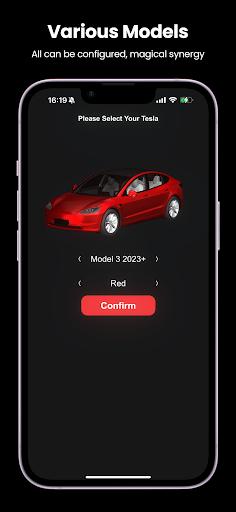
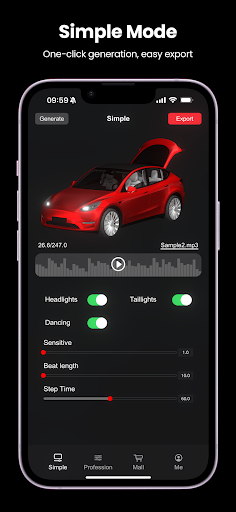
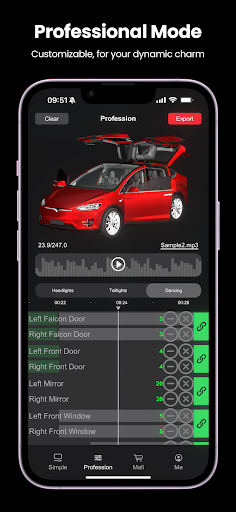
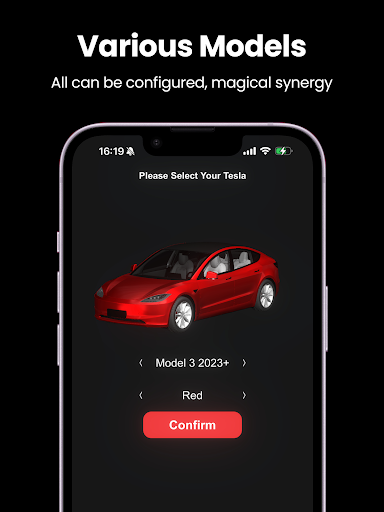
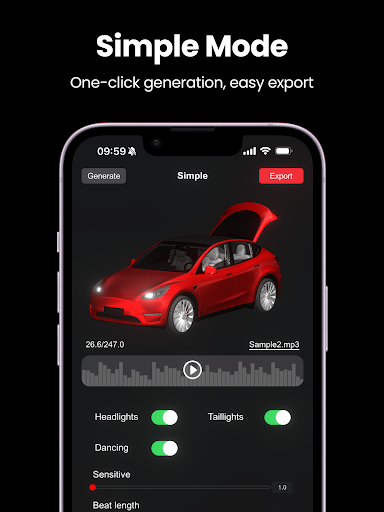
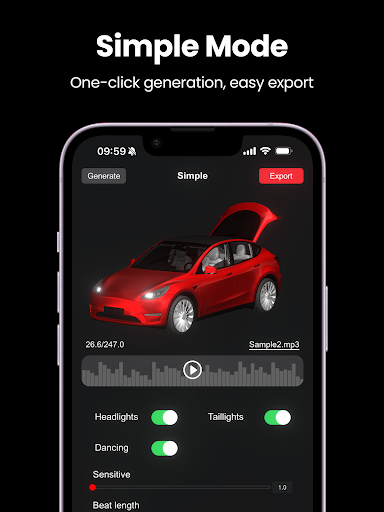
Light Show Creator for Tesla Unleash the ultimate light show experience for your Tesla! With our app, you can effortlessly create custom light shows synced to your favorite tunes, turning heads wherever you go. No technical skills needed—just select your music and watch the magic happen. Features: Auto-sync lights to music beats Adjustable flashing frequency and duration Easy manual frame editing Preview and export for xLights Special Offer: Free Tesla accessory trials included! How to Use: Share an mp3 or wav music file. Tap auto to see your light show in action. Export and check file size limits. Share files and copy to a USB drive's "LightShow" folder. Insert USB into your Tesla and dazzle the crowd! USB Requirements: "LightShow" folder with "lightshow.fseq" and "lightshow.mp3/wav" Format: exFAT, FAT 32, MS-DOS (Mac), ext3/ext4. NTFS not supported. No TeslaCam or firmware update files. Supported Models: Model Y Model 3 Model 3 Highland Model S (2021+) Model X (2021+) Disclaimer: Absolutely protect your privacy, no personal info collected. Creates light show files only; does not control your vehicle. Test on select Tesla models; caution with other brands. Tesla® is a registered trademark of Tesla, Inc. Sponsored by REEVAA: Redefining EV accessories to enhance the EV driving experience. Committed to accelerating the world's transition to sustainable energy.

What Light Show Creator for Tesla Is Used For

Light Show Creator for Tesla appears to be an app for making custom Tesla light show files from music. Based on the metadata, it is used to turn an MP3 or WAV track into a synced sequence that can be previewed, adjusted, and exported for use with compatible Tesla light show setups. The app seems aimed at users who want to create a personalized show rather than manually building every frame from scratch.

In practical use, the app may be most helpful for Tesla owners who want to prepare a USB-based light show file for supported models such as Model 3, Model Y, and newer Model S/X variants listed in the description. The permission set suggests it works with USB storage, which fits the workflow of reading music files, exporting generated show data, and copying the results to a drive. Since it mentions previewing, manual frame editing, and xLights export, it may also appeal to users who want more control over timing and flashing behavior before loading the files into a vehicle.

Common uses

  • Create custom light show files from MP3 or WAV music
  • Auto-sync flashing patterns to song beats
  • Adjust timing, flash frequency, and duration
  • Edit frames manually for finer control
  • Preview and export files for xLights workflows
  • Copy generated files to a USB drive for Tesla use
  • Work with supported Tesla models listed in the metadata
Best for:
Tesla owners Custom light shows USB export workflow Music-based editing Phone app use

App Details

Package:
com.coding1024.tslshow
Developer:
Bamboo Game
Version:
3.6.09
Updated:
Nov 24, 2025
Min Android:
6.0
Age Rating:
Everyone
Contains Ads:
Yes
In-App Purchases:
Yes

Official Listing

  • Official listing available on Google Play
  • Package name: com.coding1024.tslshow
  • Age rating: Everyone

Explore More

Browse more apps in Auto & Vehicles or explore the Phone hub .

Related Auto & Vehicles Apps

BimmerCode for BMW and MINI icon

BimmerCode for BMW and MINI

Auto & Vehicles SG Software GmbH & Co. KG

Coding your BMW, MINI or Toyota Supra made simple.

Version 5.0.0-13390 6.0 MB ⭐ 4.30 1,000,000+ installs
TopScan icon

TopScan

Tools TopDon HK
Version 6.20.004 ⭐ 3.10 100,000+ installs
FordPass icon

FordPass

Lifestyle Ford Motor Co.

The app that puts your ownership experience right in the palm of your hand

Version 4.37.0 201.2 MB ⭐ 4.73 10,000,000+ installs

How to Download Light Show Creator for Tesla

If this app is not hosted directly on APKApps official link, then for the safest and most up-to-date version, install it from its official Google Play listing.