Covve : Business Card Scanner icon

Phone

Covve : Business Card Scanner

Productivity Covve Visual Network Limited ⭐ 4.60 1,000,000+
Version 14.0.3 Everyone

Screenshots

Covve : Business Card Scanner screenshot
Permissions Explained 12 permissions requested View details

This app requests 12 permissions. The table below explains what each permission may allow and what users should review before installing.

Status Permission What it means Why it may be used User safety note
ℹ️ Review Read The Contents Of Your Usb Storage read the contents of your USB storage This is an Android permission or app-specific permission requested by the app. The app may use this permission for features related to its category, device support, background behavior, storage, connectivity, or system integration. Review this permission before installing, especially if it does not match the app’s expected purpose.
ℹ️ Review Modify Or Delete The Contents Of Your Usb Storage modify or delete the contents of your USB storage This is an Android permission or app-specific permission requested by the app. The app may use this permission for features related to its category, device support, background behavior, storage, connectivity, or system integration. Review this permission before installing, especially if it does not match the app’s expected purpose.
ℹ️ Review Take Pictures And Videos take pictures and videos This is an Android permission or app-specific permission requested by the app. The app may use this permission for features related to its category, device support, background behavior, storage, connectivity, or system integration. Review this permission before installing, especially if it does not match the app’s expected purpose.
ℹ️ Review Record Audio record audio This is an Android permission or app-specific permission requested by the app. The app may use this permission for features related to its category, device support, background behavior, storage, connectivity, or system integration. Review this permission before installing, especially if it does not match the app’s expected purpose.
ℹ️ Review View Network Connections view network connections This is an Android permission or app-specific permission requested by the app. The app may use this permission for features related to its category, device support, background behavior, storage, connectivity, or system integration. Review this permission before installing, especially if it does not match the app’s expected purpose.
ℹ️ Review Full Network Access full network access This is an Android permission or app-specific permission requested by the app. The app may use this permission for features related to its category, device support, background behavior, storage, connectivity, or system integration. Review this permission before installing, especially if it does not match the app’s expected purpose.
ℹ️ Review Control Near Field Communication control Near Field Communication This is an Android permission or app-specific permission requested by the app. The app may use this permission for features related to its category, device support, background behavior, storage, connectivity, or system integration. Review this permission before installing, especially if it does not match the app’s expected purpose.
ℹ️ Review Run At Startup run at startup This is an Android permission or app-specific permission requested by the app. The app may use this permission for features related to its category, device support, background behavior, storage, connectivity, or system integration. Review this permission before installing, especially if it does not match the app’s expected purpose.
ℹ️ Review Control Vibration control vibration This is an Android permission or app-specific permission requested by the app. The app may use this permission for features related to its category, device support, background behavior, storage, connectivity, or system integration. Review this permission before installing, especially if it does not match the app’s expected purpose.
ℹ️ Review Prevent Device From Sleeping prevent device from sleeping This is an Android permission or app-specific permission requested by the app. The app may use this permission for features related to its category, device support, background behavior, storage, connectivity, or system integration. Review this permission before installing, especially if it does not match the app’s expected purpose.
ℹ️ Review Read Google Service Configuration read Google service configuration This is an Android permission or app-specific permission requested by the app. The app may use this permission for features related to its category, device support, background behavior, storage, connectivity, or system integration. Review this permission before installing, especially if it does not match the app’s expected purpose.
ℹ️ Review Receive Data From Internet receive data from Internet This is an Android permission or app-specific permission requested by the app. The app may use this permission for features related to its category, device support, background behavior, storage, connectivity, or system integration. Review this permission before installing, especially if it does not match the app’s expected purpose.

About Covve : Business Card Scanner

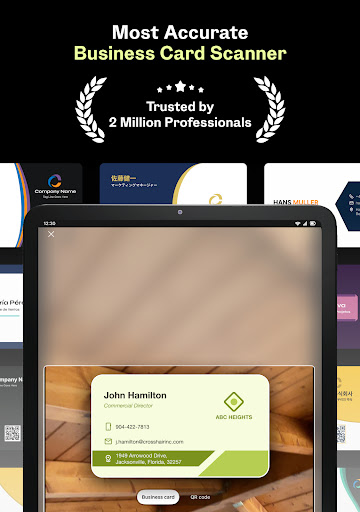
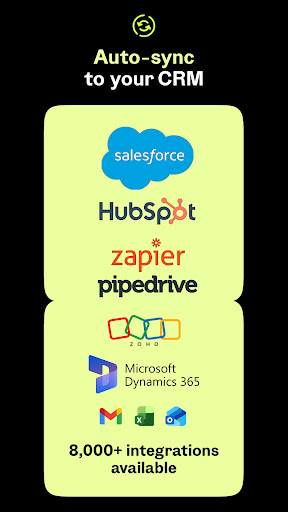
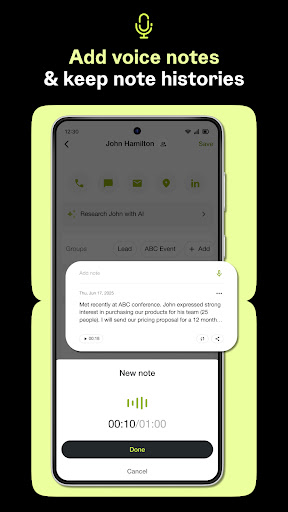
Over 2 million professionals have upgraded their business card scanning and lead capture with Covve Scan - join them today and experience unparalleled lead capture accuracy! Enjoy a free trial for 14 days, then continue with a subscription for unlimited scans. ⚡ Unrivaled business card scanning accuracy and speed - Achieve market-leading business card scanning accuracy in over 60 languages and experience the fastest scan times, outperforming competitors like CamCard, ABBYY, and BizConnect. - Scan QR codes to create leads from online profiles, digital business cards, LinkedIn and more. 📝 Organize and manage your business cards - Add notes, groups, and locations to your scanned business cards for easy organization. - Distil all your notes into a concise actionable summary. - Keep your business card organizer up to date with grouping, tagging and search. - Use AI-powered research and qualify your leads on the go, directly from their cards. 🚀 Export and share your business cards - Save scanned business cards and leads directly to your phone contacts with one tap. - Export your cards to Excel, Outlook, or Google Contacts. - Share scanned business cards and leads with your team or assistant - Integrate with all leading CRMs; Salesforce, HubSpot, Zoho and more. - Integrate with any other platform using Zapier, ensuring every business card scan fits into your workflow. 🔒 Private and Secure - Your scanned business cards are kept private, with terms and technology that safeguard your data. - Covve Scan is developed in Europe, ensuring top-tier privacy protection. 📈 Why choose Covve Scan Covve Scan is more than just a fast business card scanner – it’s a complete business card organizer and digital contact manager. From capturing every detail of your business cards and QRs with unrivaled accuracy to helping you manage, organize, and share, Covve Scan simplifies business card scanning like no other app. "Just exceptional, a photo and everything fills in automatically. I bought the full version and it’s really great. In addition, you can export in CSV format – what a time saver! We tag keywords, and we easily find the contact. Thank you!" (Store review, "Ben Linus," 05 April 2025) Covve Scan is brought to you by the award-winning team behind Covve: Personal CRM. Contact us anytime at [email protected]. Privacy policy and terms of use can be found at https://covve.com/scanner/privacy

What Covve : Business Card Scanner Is Used For

Covve : Business Card Scanner appears to be a productivity app for turning physical business cards and related contact details into digital records. Based on the metadata, it may be used by people who collect leads at meetings, events, or sales visits and want a quicker way to save contact information without typing everything manually. It also appears to support scanning QR codes, which suggests it can handle some digital business card or online profile workflows as well.

The app may also be useful for organizing and working with those contacts after capture. The metadata mentions notes, tags, groups, search, and location details, so it seems geared toward users who need to keep business contacts organized and easy to retrieve later. Export and sharing options, along with CRM and contact-app integrations, suggest it may fit into sales, networking, or administrative workflows where scanned contacts need to move into other tools.

Relevant permissions such as camera access, network access, storage access, and NFC control align with its scanning and data-management role. Since it is a phone app, it appears intended for on-the-go use at conferences, client meetings, and other networking situations where quick capture matters.

Common uses

  • Scan business cards into digital contact records
  • Capture QR codes linked to profiles or digital business cards
  • Add notes, groups, tags, and locations to contacts
  • Search and organize scanned leads for later follow-up
  • Export contacts to tools like Excel, Outlook, or Google Contacts
  • Share scanned contacts with teammates or an assistant
  • Connect scanned data to CRM or workflow tools
Best for:
sales teams networking lead capture contact management phone app

App Details

Package:
com.covve.businesscardscanner
Category:
Productivity
Developer:
Covve Visual Network Limited
Version:
14.0.3
Updated:
Mar 18, 2026
Min Android:
8.0
Age Rating:
Everyone
Contains Ads:
No
In-App Purchases:
Yes

Official Listing

  • Official listing available on Google Play
  • Package name: com.covve.businesscardscanner
  • Age rating: Everyone

Explore More

Browse more apps in Productivity or explore the Phone hub .

Related Productivity Apps

Tiny Scanner - PDF Scanner App icon

Tiny Scanner - PDF Scanner App

Business TinyWork Apps

All-in-one powerful app, digitize your paperwork with ease.

Version 8.15.0 40.8 MB ⭐ 4.60 10,000,000+ installs
CamCard AI Scanner, Transcribe icon

CamCard AI Scanner, Transcribe

Productivity INTSIG

Business card scanner, Digital Card, OCR, Recordor, AI Note taker

Version 7.88.7.20260327 88.6 MB ⭐ 4.10 10,000,000+ installs

How to Download Covve : Business Card Scanner

If this app is not hosted directly on APKApps official link, then for the safest and most up-to-date version, install it from its official Google Play listing.