About Silent Toggle Widget
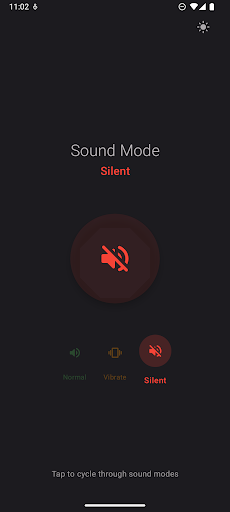
🔇 Silent Toggle Widget - The Simplest Way to Control Your Phone's Sound Tired of digging through settings to change your phone's sound mode? Silent Toggle Widget makes it effortless with a beautiful, one-tap solution to cycle between Normal, Vibrate, and Silent modes. ✨ KEY FEATURES 🎯 One-Tap Toggle - Instantly cycle through all sound modes with a single tap 📱 Home Screen Widget - Quick access right from your home screen ⚡ Lightning Fast - No delays, instant mode switching 🔔 Smart Permissions - Clear guidance for setting up Do Not Disturb access 🚀 HOW IT WORKS Simply tap the beautiful circular button to cycle through: • 🔊 Normal - All sounds and notifications • 📳 Vibrate - Vibration only, no sounds • 🔇 Silent - Complete silence 📲 WIDGET CONVENIENCE Add the elegant widget to your home screen for instant access without opening the app. The widget shows your current mode with clear visual indicators and works seamlessly with the main app. 🛡️ PRIVACY FOCUSED • No ads, no tracking, no unnecessary permissions • Only requires Do Not Disturb access to control Silent mode • Completely offline - no internet connection needed • Lightweight and battery efficient 🎨 BEAUTIFUL INTERFACE Experience a thoughtfully designed app with: • Smooth animations and transitions • Color-coded mode indicators • Intuitive visual feedback • Consistent Material Design throughout 💡 PERFECT FOR • Meetings and conferences • Study sessions and libraries • Theaters and quiet spaces • Sleep and focus time • Quick mode switching throughout the day 🔧 TECHNICAL DETAILS • Works on Android 6.0+ (API 23+) • Supports both portrait and landscape orientations • Optimized for all screen sizes • Minimal storage footprint • No background services or battery drain ⚙️ EASY SETUP 1. Install the app 2. Grant Do Not Disturb access when prompted 3. Start toggling your sound modes instantly! 4. Optional: Add the widget to your home screen Transform the way you manage your phone's sound with SilenceToggle - where simplicity meets functionality. Download now and experience the most elegant sound mode toggle available!
What Silent Toggle Widget Is Used For
Silent Toggle Widget appears to be a simple phone utility for quickly changing your device’s sound mode. Based on the metadata, it is commonly used to cycle between Normal, Vibrate, and Silent with a single tap, which can save time when you need to adjust audio settings during meetings, classes, travel, or other quiet settings.
The app also includes a home screen widget, so it may be especially useful when you want fast access without opening the full app. The listed permission to change audio settings suggests it is meant to control sound modes directly, and the Do Not Disturb access mentioned in the description may be needed for silent-mode behavior on newer Android versions. Since it is described as lightweight and offline, it seems aimed at users who want a focused sound toggle rather than a broader settings app. It may fit well on phones where quick, repeatable sound changes are part of daily use.
Common uses
- Quickly switch between normal, vibrate, and silent modes
- Use the home screen widget for one-tap sound changes
- Manage sound mode during meetings, classes, or quiet spaces
- Avoid opening deeper Android settings for routine volume changes
- Set the phone to silent or vibrate before sleep or focus time
- Useful on Android phones for frequent audio mode adjustments
App Details
Package:
com.davidschindler.silencetoggle
Developer:
Silent Toggle
Version:
1.1
Updated:
Jul 21, 2025
Min Android:
7.0
Age Rating:
Everyone
Contains Ads:
No
In-App Purchases:
No
Official Listing
-
Official listing available on
Google Play
-
Package name:
com.davidschindler.silencetoggle
-
Age rating:
Everyone
Related Tools Apps
Business
•
Shenzhen Junan Technology Co., Ltd
Version 6.0.1
⭐ 4.60
100,000+ installs
How to Download Silent Toggle Widget
If this app is not hosted directly on APKApps official link,
then for the safest and most up-to-date version, install it from its official Google Play listing.