Ortho-Photo Dental Brace Photo icon

Phone

Ortho-Photo Dental Brace Photo

Medical INFINI Marketing 1,000+
Version Varies with device Everyone

Screenshots

Ortho-Photo Dental Brace Photo screenshot
Permissions Explained 9 permissions requested View details

This app requests 9 permissions. The table below explains what each permission may allow and what users should review before installing.

Status Permission What it means Why it may be used User safety note
ℹ️ Review Read The Contents Of Your Usb Storage read the contents of your USB storage This is an Android permission or app-specific permission requested by the app. The app may use this permission for features related to its category, device support, background behavior, storage, connectivity, or system integration. Review this permission before installing, especially if it does not match the app’s expected purpose.
ℹ️ Review Modify Or Delete The Contents Of Your Usb Storage modify or delete the contents of your USB storage This is an Android permission or app-specific permission requested by the app. The app may use this permission for features related to its category, device support, background behavior, storage, connectivity, or system integration. Review this permission before installing, especially if it does not match the app’s expected purpose.
ℹ️ Review Take Pictures And Videos take pictures and videos This is an Android permission or app-specific permission requested by the app. The app may use this permission for features related to its category, device support, background behavior, storage, connectivity, or system integration. Review this permission before installing, especially if it does not match the app’s expected purpose.
ℹ️ Review Record Audio record audio This is an Android permission or app-specific permission requested by the app. The app may use this permission for features related to its category, device support, background behavior, storage, connectivity, or system integration. Review this permission before installing, especially if it does not match the app’s expected purpose.
ℹ️ Review View Network Connections view network connections This is an Android permission or app-specific permission requested by the app. The app may use this permission for features related to its category, device support, background behavior, storage, connectivity, or system integration. Review this permission before installing, especially if it does not match the app’s expected purpose.
ℹ️ Review Full Network Access full network access This is an Android permission or app-specific permission requested by the app. The app may use this permission for features related to its category, device support, background behavior, storage, connectivity, or system integration. Review this permission before installing, especially if it does not match the app’s expected purpose.
ℹ️ Review Prevent Device From Sleeping prevent device from sleeping This is an Android permission or app-specific permission requested by the app. The app may use this permission for features related to its category, device support, background behavior, storage, connectivity, or system integration. Review this permission before installing, especially if it does not match the app’s expected purpose.
ℹ️ Review Read Google Service Configuration read Google service configuration This is an Android permission or app-specific permission requested by the app. The app may use this permission for features related to its category, device support, background behavior, storage, connectivity, or system integration. Review this permission before installing, especially if it does not match the app’s expected purpose.
ℹ️ Review Receive Data From Internet receive data from Internet This is an Android permission or app-specific permission requested by the app. The app may use this permission for features related to its category, device support, background behavior, storage, connectivity, or system integration. Review this permission before installing, especially if it does not match the app’s expected purpose.

About Ortho-Photo Dental Brace Photo

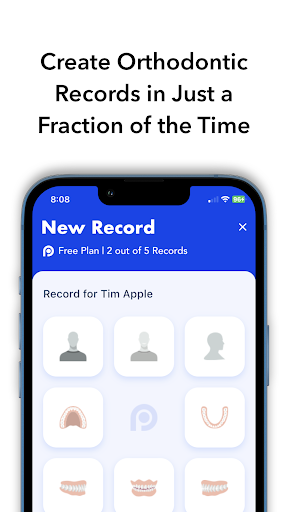
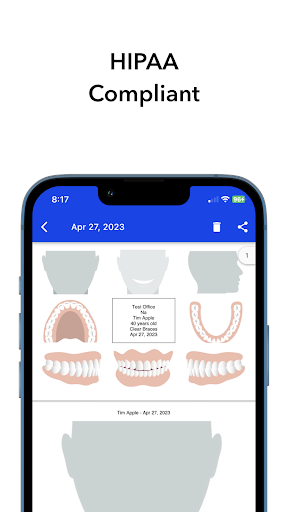
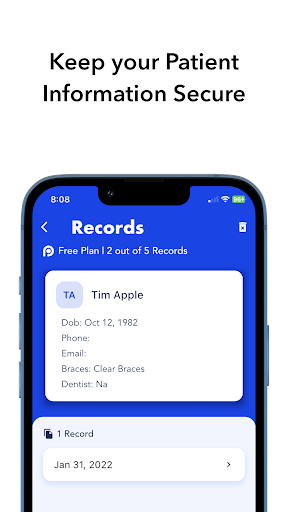
Ortho-Photo is the very first time-saving mobile Orthodontic braces photo app, which gives dentists and orthodontists a valuable dental recording tool to enhance their office workflow by facilitating the tedious process of capturing photos that track their patients’ progress with braces. The Ortho-Photo orthodontic patient management app utilizes the mobile device’s camera to capture high definition images, which can then be easily formatted and exported to current or new patient files. This allows dental clinics and office administrators the ability to assign or update a patient’s record, and email them. Simply open the Ortho-Photo braces app, create a patient profile, capture a clinical photo, and save the image to the corresponding patient file. It’s as easy as posting a photo to your social media feed. Features: - Create dental record files for each unique patient - Capture and save orthodontic progress along with dates - Automatically format images into a template for consistency - Export files with ease for medical and dental record-keeping - HIPAA compliant and connects to existing patient management software **For a limited time, the Ortho-Photo App is FREE to download.** Subscriptions will automatically renew unless canceled within 24-hours before the end of the current period. You can cancel anytime with your iTunes account settings. Any unused portion of a free trial will be forfeited if you purchase a subscription.

What Ortho-Photo Dental Brace Photo Is Used For

Based on the metadata, Ortho-Photo Dental Brace Photo appears to be a mobile tool for orthodontic and dental clinics to capture, organize, and export patient progress photos. It is designed around braces and orthodontic records, so it may be used during routine checkups to document how a patient’s treatment is changing over time. The app also appears to support creating patient profiles and matching photos to the correct record, which can help with office documentation.

The camera permission and storage permissions suggest the app is meant to take clinical photos on the device and save or move them into patient files. The description also mentions image formatting, date tracking, exporting, and connection to patient management software, so it may fit into a dental workflow where staff need consistent records for review, sharing, or chart updates. Because it is a phone app in the Medical category, it seems aimed at chairside use by dentists, orthodontists, or office administrators rather than general consumers.

Common uses

  • Capture orthodontic progress photos during patient visits
  • Create profile-based photo records for individual patients
  • Save images with dates for treatment tracking
  • Format photos into a consistent template for records
  • Export images for dental documentation or office files
  • Use in clinic workflows on a phone camera
  • Support record updates and patient file management
Best for:
Dentists Orthodontists Dental staff Clinic recordkeeping Phone-based capture

App Details

Package:
com.dentist.orthophoto
Category:
Medical
Developer:
INFINI Marketing
Version:
Varies with device
Min Android:
Varies with device
Age Rating:
Everyone
Contains Ads:
No
In-App Purchases:
Yes

Official Listing

  • Official listing available on Google Play
  • Package name: com.dentist.orthophoto
  • Age rating: Everyone

Explore More

Browse more apps in Medical or explore the Phone hub .

Related Medical Apps

My Heart: Blood Pressure Log icon

My Heart: Blood Pressure Log

Medical Klimaszewski Szymon

Your portable blood pressure tracker. Record, monitor, and analyze BP anytime.

Version Google-7.4.0 11.8 MB ⭐ 4.20 10,000,000+ installs
Meds & Pill Reminder MyTherapy icon

Meds & Pill Reminder MyTherapy

Medical MyTherapy

Our health app helps with a medication reminder, pill counter & mood tracker

Version 3.259.3 85.7 MB ⭐ 4.60 5,000,000+ installs
Anatomy 3D Atlas icon

Anatomy 3D Atlas

Medical Catfish Animation Studio

Learn human anatomy interactively

Version 7.0.6 10.7 MB ⭐ 4.20 5,000,000+ installs

How to Download Ortho-Photo Dental Brace Photo

If this app is not hosted directly on APKApps official link, then for the safest and most up-to-date version, install it from its official Google Play listing.