Audyssey MultEQ Editor app icon

Phone

Audyssey MultEQ Editor app

Music & Audio D+M Group ⭐ 2.70 50,000+
Version 1.13.6 Everyone

Screenshots

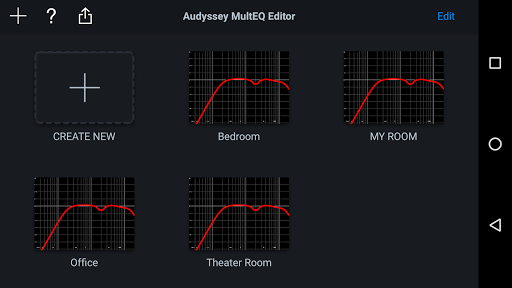
Audyssey MultEQ Editor app screenshot
Permissions Explained 9 permissions requested View details

This app requests 9 permissions. The table below explains what each permission may allow and what users should review before installing.

Status Permission What it means Why it may be used User safety note
ℹ️ Review Find Accounts On The Device find accounts on the device This is an Android permission or app-specific permission requested by the app. The app may use this permission for features related to its category, device support, background behavior, storage, connectivity, or system integration. Review this permission before installing, especially if it does not match the app’s expected purpose.
ℹ️ Review Read The Contents Of Your Usb Storage read the contents of your USB storage This is an Android permission or app-specific permission requested by the app. The app may use this permission for features related to its category, device support, background behavior, storage, connectivity, or system integration. Review this permission before installing, especially if it does not match the app’s expected purpose.
ℹ️ Review Modify Or Delete The Contents Of Your Usb Storage modify or delete the contents of your USB storage This is an Android permission or app-specific permission requested by the app. The app may use this permission for features related to its category, device support, background behavior, storage, connectivity, or system integration. Review this permission before installing, especially if it does not match the app’s expected purpose.
ℹ️ Review View Wi Fi Connections view Wi-Fi connections This is an Android permission or app-specific permission requested by the app. The app may use this permission for features related to its category, device support, background behavior, storage, connectivity, or system integration. Review this permission before installing, especially if it does not match the app’s expected purpose.
ℹ️ Review View Network Connections view network connections This is an Android permission or app-specific permission requested by the app. The app may use this permission for features related to its category, device support, background behavior, storage, connectivity, or system integration. Review this permission before installing, especially if it does not match the app’s expected purpose.
ℹ️ Review Allow Wi Fi Multicast Reception allow Wi-Fi Multicast reception This is an Android permission or app-specific permission requested by the app. The app may use this permission for features related to its category, device support, background behavior, storage, connectivity, or system integration. Review this permission before installing, especially if it does not match the app’s expected purpose.
ℹ️ Review Connect And Disconnect From Wi Fi connect and disconnect from Wi-Fi This is an Android permission or app-specific permission requested by the app. The app may use this permission for features related to its category, device support, background behavior, storage, connectivity, or system integration. Review this permission before installing, especially if it does not match the app’s expected purpose.
ℹ️ Review Full Network Access full network access This is an Android permission or app-specific permission requested by the app. The app may use this permission for features related to its category, device support, background behavior, storage, connectivity, or system integration. Review this permission before installing, especially if it does not match the app’s expected purpose.
ℹ️ Review Prevent Device From Sleeping prevent device from sleeping This is an Android permission or app-specific permission requested by the app. The app may use this permission for features related to its category, device support, background behavior, storage, connectivity, or system integration. Review this permission before installing, especially if it does not match the app’s expected purpose.

About Audyssey MultEQ Editor app

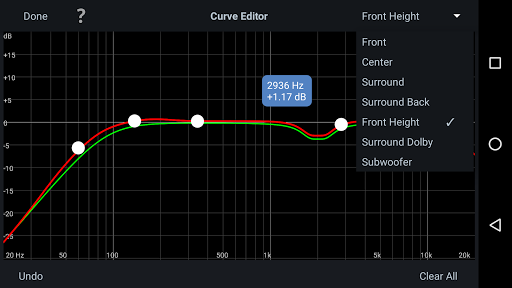
The latest Denon Marantz audio video products use Audyssey MultEQ for simple, accurate set-up calibration of your system to the room in which it’s used. But, now you can go further with the Audyssey MultEQ Editor app, going ‘under the hood’ to view and adjust settings for detailed tuning – allowing you to customize the sound more precisely to the specific problems in your room, and tailor the sound to your personal preferences. With this comprehensive app, you can harness the power of Audyssey MultEQ to take total control of the way your home cinema sounds. This app will allow you to: •View the speaker detection results, to check correct installation •View before and after results of the Audyssey calibration, making it easy to identify room problems. •Edit the Audyssey target curve for each channel pair to suit your tastes •Adjust the overall EQ frequency rolloff for each channel pair •Switch between 2 high frequency rolloff target curves •Enable/Disable midrange compensation to make the sound brighter or smoother •Save and load calibration results This app requires specific hardware in your product to function: please double-check that your Denon or Marantz model is supported - see list below - before purchasing. •Multi-Language Support (English, French, German, Spanish, Italian, Dutch, Swedish, Polish, Russian, Japanese and Simplified Chinese. The OS language setting is automatically detected; when not available, English is selected.) Compatible models: (Product availability varies depending on regions.) Denon AV Receiver: AVR-X6300H, AVR-X4300H, AVR-X3300W, AVR-X2300W, AVR-X1300W, AVR-S920W, AVR-S720W, AVR-S930H, AVR-S730H, AVR-X1400H, AVR-X2400H, AVR-X3400H, AVR-X4400H, AVR-X6400H, AVR-X8500H, AVR-S740H, AVR-S940H, AVR-X1500H, AVR-X2500H, AVR-X3500H, AVR-X4500H, AVR-X6500H, AVR-X1600H, AVR-X2600H, AVR-X3600H, AVR-S750H, AVR-S950H, AVR-A110, AVR-X6700H, AVR-X4700H, AVR-X3700H, AVR-X2700H, AVR-S960H, AVR-X8500HA, AVR-X1700H, AVR-S760H, AVR-A1H, AVR-X4800H, AVR-X3800H, AVR-X2800H, AVR-S970H, AVR-X1800H, AVR-S770H, AVR-X6800H, AVR-A10H Marantz AV Receiver: AV7703, SR7011, SR6011, SR5011, NR1607, NR1608, SR5012, SR6012, SR7012, SR8012, AV7704, AV8805, NR1609, SR5013, SR6013, SR7013, AV7705, NR1710, SR5014, S6014, SR8015, SR7015, SR6015, SR5015, NR1711, AV7706, AV8805A, AV 10, CINEMA 30, CINEMA 40, CINEMA 50, CINEMA 60, CINEMA 70s, AV 20, AV 30 Not compatible with Denon and Marantz models other than those listed above. Compatible Android devices: •Android Smartphones with Android OS ver.5.0 (or higher) •Screen resolution: 800x480, 854x480, 960x540, 1280x720, 1280x800, 1920x1080, 1920x1200, 2048x1536 * This application does not support smartphones in QVGA (320x240) and HVGA (480x320) resolution. * This application does not support smartphones of less than 2GB RAM capacity. Confirmed Android devices: Samsung Galaxy S10 (OS 12), Google (ASUS) Nexus 7 (2013) (OS 6.0.1), Google (LG) Nexus 5X (OS 8.1.0), Google Pixel 2 (OS 9), Google Pixel 3 (OS 12)…

What Audyssey MultEQ Editor app Is Used For

Based on the metadata, Audyssey MultEQ Editor app is a companion tool for supported Denon and Marantz AV receivers that use Audyssey MultEQ room calibration. It appears to be used after or alongside the receiver’s automatic setup so you can inspect calibration results, check speaker detection, and make further adjustments to the sound profile for a home theater system.

Common uses seem to include reviewing how the room correction was applied, comparing before-and-after calibration data, and editing the target curve for different channel pairs. The listed permissions and Wi‑Fi access indicate the app is designed to communicate with compatible audio equipment over a local network, while USB storage access may relate to saving or loading calibration files. It is a phone app rather than a TV app, so it’s likely meant for hands-on setup and tuning from a mobile device while you are near the receiver. The app also appears focused on supported hardware only, so usefulness depends on having a compatible Denon or Marantz model.

Common uses

  • Check speaker detection results during receiver setup
  • Review Audyssey calibration before and after tuning
  • Adjust target curves for channel pairs
  • Change high-frequency rolloff settings
  • Enable or disable midrange compensation
  • Save and load calibration results
  • Control setup from a phone on the same network

Best for:
Home theater tuning Denon receiver owners Marantz receiver owners Phone-based setup Audio calibration

App Details

Package:
com.dmholdings.AudysseyMultEq
Category:
Music & Audio
Developer:
D+M Group
Version:
1.13.6
Updated:
Jan 14, 2026
Min Android:
5.0
Age Rating:
Everyone
Contains Ads:
No
In-App Purchases:
No

Official Listing

  • Official listing available on Google Play
  • Package name: com.dmholdings.AudysseyMultEq
  • Age rating: Everyone

Explore More

Browse more apps in Music & Audio or explore the Phone hub .

Related Music & Audio Apps

Poweramp Equalizer icon

Poweramp Equalizer

Music & Audio Poweramp Software Design (Max MP)
Version build-1020-bundle-play ⭐ 4.30 1,000,000+ installs
Sonos S1 icon

Sonos S1

Music & Audio Sonos, Inc

This first generation of the Sonos app supports the earliest Sonos products.

Version 11.14 62.4 MB ⭐ 2.87 10,000,000+ installs

How to Download Audyssey MultEQ Editor app

If this app is not hosted directly on APKApps official link, then for the safest and most up-to-date version, install it from its official Google Play listing.