Avare
com.ds.avare
by Apps For Aviators
Screenshots
Ad slot: Top Leaderboard
About this app
** Not a Map app - Aviation Only. **
** Aviation U.S. FAA materials and more. **
** No support in Reviews. **
** Please use our Friendly, helpful Support Forum. **
24/7 at: https://groups.google.com/forum/#!forum/apps4av-forum
**NOTE: Avare can't function fully until you turn on BOTH
of Avare's requested Permissions (Location & Storage).
Avare (pronounced "ah vAir" - like "aware" with a "v") is a free moving-map Aviation GPS & EFB app.
*Note: Internet access is required only for installing the free app, aviation Database, and at least 1 of the free charts; and for any updates. We recommend that you TURN OFF Play Store AUTOMATIC UPDATE for Avare, manually update it and all Downloads, then fly in Airplane Mode to save battery.
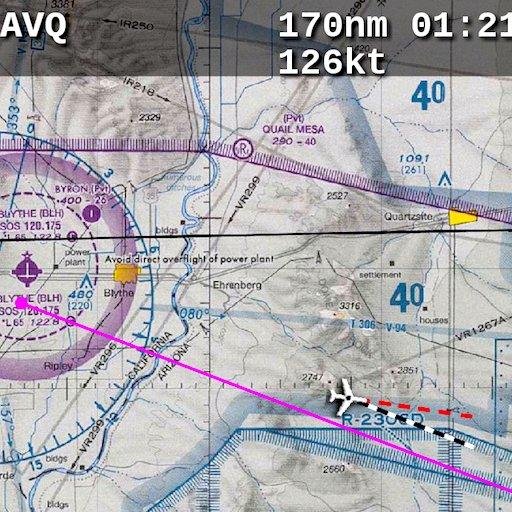
Avare offers offline moving map on all FAA charts (VFR Sectional, IFR lo/hi enroute, Approach Plate, WAC & TAC); plus A/FD info, Airport Diagrams w/GPS Taxi, and Terminal Procedures. Also: GPS status, Terrain/Elevation Maps, 50 Nearest airports, Obstacles, and more. Some FAA Charts cover Puerto Rico, plus parts of Canada, Mexico and the Caribbean. All of this is Completely Free with no ads.
*Note: Like all apps for portable devices, Avare is not FAA certified for primary navigation but may be used as outlined in FAA documents. See our NOTICE below, and the FAQ on our website for links to FAA documents.
Avare Advantages:
•Made by & for pilots
•Easy to learn & use
•Quick & responsive
•All free FAA materials & more
•Runs on most Android devices
•No ads or invasive permissions
More Features:
•Type in any address or coordinates.
•NOTAMS, METAR, TAF and Winds (Internet fetch or ADSB).
•ADSB TIS-B Traffic (UAT/1090), PIREP (free AddOn apps).
•Graphic & text TFRs (Internet fetch or ADSB).
•Canada topo, plus terrain maps for most of the world.
•External GPS, autopilot and flite sim options.
•Obstacles: Any over 500' AGL within 200' of GPS altitude.
•Frequencies, runways, fuel availability, & all A/FD info.
•13000+ GeoReferenced approach plates and taxi diagrams.
•Landscape/Portrait, North Up/Track Up (NU/TU) display.
•Draw notes on-screen, or Pan freely on charts (Draw/Pan).
•Long-Press any two points for approximate distance.
•Location icon Center, or track from your own placement.
•GPS compass direction, Bearing, and Distance to and FROM any point on the map by long-pressing one finger on that point. Great for your ATC and CTAF radio calls.
Avare installation begins with the small app, and then fetching an aviation Database and at least one chart. You can of course choose additional charts and materials for Avare to Download free at any time.
Note: The FAA occasionally changes their charts such that outdated charts may incorrectly display your location in Avare, so be sure to Update any charts you may use in flight! ANY time you plan to Update a chart, first ensure that you have the latest version of Avare and its Database.
After installing Avare, please use the Help feature to begin. New features are being added very quickly in response to user feedback, and may not be reflected in this Description page. You are invited to Contact us directly via our apps4av google group Forum to share your questions, feedback, and feature requests.
Launch Note: To access Help in the Avare app, on the Map screen tap the round Menu button, then the rectangular Help button at lower-left.
NOTICE: This software is provided "as is" and any express or implied warranties, including, but not limited to, implied warranties of merchantability and fitness for a particular purpose are disclaimed. In no event shall the copyright holder or contributors be liable for any direct, indirect, incidental, special, exemplary, or consequential damages (including, but not limited to loss of use or data) however caused and on any theory of liability, whether in contract, strict liability, or tort (including negligence or otherwise) arising in any way out of the use of this software, even if advised of the possibility of such damage.
** Aviation U.S. FAA materials and more. **
** No support in Reviews. **
** Please use our Friendly, helpful Support Forum. **
24/7 at: https://groups.google.com/forum/#!forum/apps4av-forum
**NOTE: Avare can't function fully until you turn on BOTH
of Avare's requested Permissions (Location & Storage).
Avare (pronounced "ah vAir" - like "aware" with a "v") is a free moving-map Aviation GPS & EFB app.
*Note: Internet access is required only for installing the free app, aviation Database, and at least 1 of the free charts; and for any updates. We recommend that you TURN OFF Play Store AUTOMATIC UPDATE for Avare, manually update it and all Downloads, then fly in Airplane Mode to save battery.
Avare offers offline moving map on all FAA charts (VFR Sectional, IFR lo/hi enroute, Approach Plate, WAC & TAC); plus A/FD info, Airport Diagrams w/GPS Taxi, and Terminal Procedures. Also: GPS status, Terrain/Elevation Maps, 50 Nearest airports, Obstacles, and more. Some FAA Charts cover Puerto Rico, plus parts of Canada, Mexico and the Caribbean. All of this is Completely Free with no ads.
*Note: Like all apps for portable devices, Avare is not FAA certified for primary navigation but may be used as outlined in FAA documents. See our NOTICE below, and the FAQ on our website for links to FAA documents.
Avare Advantages:
•Made by & for pilots
•Easy to learn & use
•Quick & responsive
•All free FAA materials & more
•Runs on most Android devices
•No ads or invasive permissions
More Features:
•Type in any address or coordinates.
•NOTAMS, METAR, TAF and Winds (Internet fetch or ADSB).
•ADSB TIS-B Traffic (UAT/1090), PIREP (free AddOn apps).
•Graphic & text TFRs (Internet fetch or ADSB).
•Canada topo, plus terrain maps for most of the world.
•External GPS, autopilot and flite sim options.
•Obstacles: Any over 500' AGL within 200' of GPS altitude.
•Frequencies, runways, fuel availability, & all A/FD info.
•13000+ GeoReferenced approach plates and taxi diagrams.
•Landscape/Portrait, North Up/Track Up (NU/TU) display.
•Draw notes on-screen, or Pan freely on charts (Draw/Pan).
•Long-Press any two points for approximate distance.
•Location icon Center, or track from your own placement.
•GPS compass direction, Bearing, and Distance to and FROM any point on the map by long-pressing one finger on that point. Great for your ATC and CTAF radio calls.
Avare installation begins with the small app, and then fetching an aviation Database and at least one chart. You can of course choose additional charts and materials for Avare to Download free at any time.
Note: The FAA occasionally changes their charts such that outdated charts may incorrectly display your location in Avare, so be sure to Update any charts you may use in flight! ANY time you plan to Update a chart, first ensure that you have the latest version of Avare and its Database.
After installing Avare, please use the Help feature to begin. New features are being added very quickly in response to user feedback, and may not be reflected in this Description page. You are invited to Contact us directly via our apps4av google group Forum to share your questions, feedback, and feature requests.
Launch Note: To access Help in the Avare app, on the Map screen tap the round Menu button, then the rectangular Help button at lower-left.
NOTICE: This software is provided "as is" and any express or implied warranties, including, but not limited to, implied warranties of merchantability and fitness for a particular purpose are disclaimed. In no event shall the copyright holder or contributors be liable for any direct, indirect, incidental, special, exemplary, or consequential damages (including, but not limited to loss of use or data) however caused and on any theory of liability, whether in contract, strict liability, or tort (including negligence or otherwise) arising in any way out of the use of this software, even if advised of the possibility of such damage.
What's New
Fix stop bug in Plates.
App Information
Version Name
7.1.7
Version Code
247
File Size
2.2 MB
Minimum OS
Android 4.4W+
Target SDK
Android 23
Developer
Apps For Aviators
Contact
Website
Content Rating
Everyone
Package Name
com.ds.avarePermissions Required
This app may request the following permissions:
Recent Reviews
Randy Seiler
5.0★
PILOTS - Don't pass this one up!! Put this app on your android tablet or phone, down load the maps, and you'll always have a FREE backup to Fore Flight or Garmin Pilot. Where else can you get a backup nav app for FREE? I've used this app for VFR flying many years and never had a problem with it. It's easy to get chart downloads and updates. it's intuitive and takes absolutely no time to learn. Give it a try and if you don't like it just uninstall it and you've lost nothing.
Wayne Foster
5.0★
Avare is a great free product/app for pilots looking for a navigation app with all the features found in other products that you would otherwise have to pay for. Traffic alert, weather info, maps for vfr and ifr, plates, supplemental info, and many many other features exist within the Avare app. I am able to plan a flight, and it also has filing capability although I have not tried filing a plan there yet. To appreciate what the Avare app has to offer each pillot needs to try it for themselves.
A Google user
5.0★
This is a great go to when I don't have my iPad with my Garmin GPS. For a free app., it does all my basic needs. Once I configured to my screen with the options I like, it gives me most of the info. I need. I used this the other day in the back of my friends RV8. There are no instruments back there, and I was able to navigate with approximate airspeed, altitude and stay clear of airspaces with Avare. Since he did not have any ADSB equipment, my iPad was worthless, so this worked like a charm.
Sam W (sjweikart)
5.0★
A very powerful and free navigation / flight planning software. Only complaint is that it has an "open source feel" meaning that there is a lot of stuff to use but it can be slightly confusing. I used this on a 600nm trip and it worked great. Just make sure to keep the app up to date and download whatever sectionals you need before your trip. The last big selling point is that you can use it out of cell range. You won't get real-time data other than location, but nav and saved data works great.
A Google user
5.0★
I have an Android tablet that is so lame that is can not be used for internet however it works great for the Avare map app. I practiced using the app on my living room couch until I learned how to use well. Then today I used it in flight. It is awesome to use. I had low clouds so I had to fly low so finding all tall structures and antenna towers was necessary for safety. The map can be made larger easily so you don't miss the details bouncing around in the rough air. There is a dashed line that shows your future track and I turned on the distance circles which stay around the aircraft while you travel so you can see how far you are away from that tall radio tower. If you forget what runways are at your destination airport just look at your map and you will see the red arrows that not only show the direction of the runway but the number of each.. I am still learning to use it but so far this program is the best. I do have paper charts for a back up but this beats paper hands down. Try opening and refolding a map in a 24 inch wide cockpit is no fun. Thank you for making this product. It has for sure improved the safety of my flying.
Chris Rudisill
5.0★
I really like the app. I've been using it for 2 years now. Today I added a Stratux receiver to give me traffic on it. Only problem is that as of the last update, any time I open a different window on my device it loses all of the data and have to reenter the flight plan. Hope they fix it quickly. Edit: Thanks for the update! Solved the restart problem!
Ad slot: In-Content