Tracker Detect: AirTag Scanner icon

Phone

Tracker Detect: AirTag Scanner

Tools Tag Tracker LLC ⭐ 4.80 100,000+
Version 9.1.7 Everyone

Screenshots

Tracker Detect: AirTag Scanner screenshot
Permissions Explained 14 permissions requested View details

This app requests 14 permissions. The table below explains what each permission may allow and what users should review before installing.

Status Permission What it means Why it may be used User safety note
ℹ️ Review Approximate Location (network Based) approximate location (network-based) This is an Android permission or app-specific permission requested by the app. The app may use this permission for features related to its category, device support, background behavior, storage, connectivity, or system integration. Review this permission before installing, especially if it does not match the app’s expected purpose.
ℹ️ Review Precise Location (gps And Network Based) precise location (GPS and network-based) This is an Android permission or app-specific permission requested by the app. The app may use this permission for features related to its category, device support, background behavior, storage, connectivity, or system integration. Review this permission before installing, especially if it does not match the app’s expected purpose.
ℹ️ Review View Wi Fi Connections view Wi-Fi connections This is an Android permission or app-specific permission requested by the app. The app may use this permission for features related to its category, device support, background behavior, storage, connectivity, or system integration. Review this permission before installing, especially if it does not match the app’s expected purpose.
ℹ️ Review View Network Connections view network connections This is an Android permission or app-specific permission requested by the app. The app may use this permission for features related to its category, device support, background behavior, storage, connectivity, or system integration. Review this permission before installing, especially if it does not match the app’s expected purpose.
ℹ️ Review Pair With Bluetooth Devices pair with Bluetooth devices This is an Android permission or app-specific permission requested by the app. The app may use this permission for features related to its category, device support, background behavior, storage, connectivity, or system integration. Review this permission before installing, especially if it does not match the app’s expected purpose.
ℹ️ Review Access Bluetooth Settings access Bluetooth settings This is an Android permission or app-specific permission requested by the app. The app may use this permission for features related to its category, device support, background behavior, storage, connectivity, or system integration. Review this permission before installing, especially if it does not match the app’s expected purpose.
ℹ️ Review Connect And Disconnect From Wi Fi connect and disconnect from Wi-Fi This is an Android permission or app-specific permission requested by the app. The app may use this permission for features related to its category, device support, background behavior, storage, connectivity, or system integration. Review this permission before installing, especially if it does not match the app’s expected purpose.
ℹ️ Review Full Network Access full network access This is an Android permission or app-specific permission requested by the app. The app may use this permission for features related to its category, device support, background behavior, storage, connectivity, or system integration. Review this permission before installing, especially if it does not match the app’s expected purpose.
ℹ️ Review Run At Startup run at startup This is an Android permission or app-specific permission requested by the app. The app may use this permission for features related to its category, device support, background behavior, storage, connectivity, or system integration. Review this permission before installing, especially if it does not match the app’s expected purpose.
ℹ️ Review Control Vibration control vibration This is an Android permission or app-specific permission requested by the app. The app may use this permission for features related to its category, device support, background behavior, storage, connectivity, or system integration. Review this permission before installing, especially if it does not match the app’s expected purpose.
ℹ️ Review Prevent Device From Sleeping prevent device from sleeping This is an Android permission or app-specific permission requested by the app. The app may use this permission for features related to its category, device support, background behavior, storage, connectivity, or system integration. Review this permission before installing, especially if it does not match the app’s expected purpose.
ℹ️ Review Google Play License Check Google Play license check This is an Android permission or app-specific permission requested by the app. The app may use this permission for features related to its category, device support, background behavior, storage, connectivity, or system integration. Review this permission before installing, especially if it does not match the app’s expected purpose.
ℹ️ Review Bind To A Vpn Service bind to a VPN service This is an Android permission or app-specific permission requested by the app. The app may use this permission for features related to its category, device support, background behavior, storage, connectivity, or system integration. Review this permission before installing, especially if it does not match the app’s expected purpose.
ℹ️ Review Receive Data From Internet receive data from Internet This is an Android permission or app-specific permission requested by the app. The app may use this permission for features related to its category, device support, background behavior, storage, connectivity, or system integration. Review this permission before installing, especially if it does not match the app’s expected purpose.

About Tracker Detect: AirTag Scanner

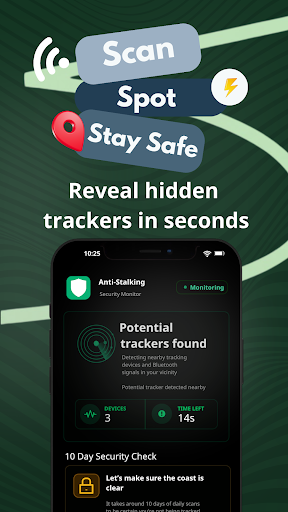
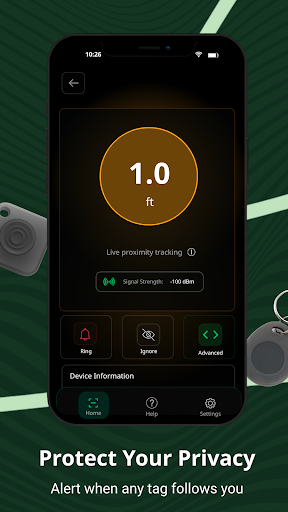
Tracker Detect Pro is your complete privacy protection suite for Android. Detect hidden cameras, block online trackers, and find unknown AirTags—all in one app. 🔒 Three layers of protection Hidden camera detection Scan for spy cameras in hotel rooms, Airbnbs, rentals, and changing rooms. Get clear alerts when a potential camera is found. Online tracker blocking Block ad trackers, fingerprinting scripts, and data collectors across all your apps—24/7, even when the app is closed. AirTag & Bluetooth tracker detection Find unknown Apple AirTags and Bluetooth trackers near you with real-time alerts and a proximity meter to locate them fast. Why 500K+ users trust Tracker Detect Pro ✓ All-in-one privacy tool for travel, rideshares, rentals, and daily life ✓ Everything stays on your device—no data sold or shared ✓ Background protection that works even when the app is closed ✓ Clear alerts and easy steps to neutralize threats Real-world uses • Sweep a hotel room or Airbnb for hidden cameras before you unpack • Block ad trackers while browsing or using apps • Find an unknown AirTag hidden in your bag or car • Check a rideshare or rental vehicle for trackers • Keep a private log if you need to report stalking to authorities How it works Hidden cameras Scan your surroundings for infrared signals and lens reflections using the guided sweep mode. Online trackers Enable background blocking and we handle the rest—tracker domains are blocked in real time across all apps. AirTags & Bluetooth trackers 1. Run a scan to list nearby trackers 2. Get a clear alert if an unknown device is following you 3. Use the proximity meter to locate it 4. Play a sound on supported devices to pinpoint the tag 5. Follow in-app steps to disable it Tracking Protection VPN When you enable background blocking, Tracker Detect Pro creates an Android VpnService tunnel entirely on your device. We inspect DNS lookups locally, block known tracker domains in real time, and forward allowed requests over TLS. No browsing data is sold or rerouted through third-party VPN servers—this tunnel exists solely to keep 24/7 tracker protection and per-app stats active even when the app is closed. Full feature list • Hidden camera scanner with infrared and lens detection • On-device VPN for 24/7 online tracker blocking • AirTag detector and AirTag finder for Android • Bluetooth tracker detector for Find My accessories • Background scanning with instant notifications • Live signal strength (RSSI) proximity meter • Detection history with date, time, and map location • Per-app tracker stats • Play Sound on supported Apple devices • Rename known devices to ignore your own gear • Dark mode • In-app guidance to disable unwanted tags Privacy and permissions • Uses Bluetooth, Location, Camera, and Notifications to scan and alert • VPN permission is used only for local DNS filtering—no traffic goes through third-party servers • Detection history stays on your device unless you share it • No account required Tips…

What Tracker Detect: AirTag Scanner Is Used For

Tracker Detect: AirTag Scanner is a tools app for Android phones that appears focused on privacy monitoring and nearby device detection. Based on the metadata, people may use it to look for hidden cameras in places like hotel rooms, rentals, or changing areas, and to scan for unknown AirTags or other Bluetooth trackers that might be nearby. The app title and description suggest it is meant for situations where someone wants to check for unwanted tracking or suspicious devices.

It also appears to include tracker-blocking functions for online activity. The listed VPN service permission, network access, and startup/background behavior suggest the app may run protection features continuously, even when not open, to block tracker domains and track app-level activity. Because it requests Bluetooth, Wi‑Fi, and location-related permissions, it likely uses those system features to detect nearby devices and estimate proximity when scanning.

Common use cases may include checking a room or vehicle before staying in it, scanning a bag or car for an unknown tracker, and monitoring apps for tracker-related network requests. Since it is a phone app, it seems intended for on-the-go checks and everyday privacy use rather than a large-screen workflow.

Common uses

  • Scan for nearby AirTags or Bluetooth trackers
  • Check rooms, rentals, or vehicles for hidden cameras
  • Use proximity-style detection to help locate a nearby tracker
  • Run background tracker blocking across apps
  • Review privacy-related alerts and scan results on a phone
  • Use Bluetooth, Wi‑Fi, and location features during detection
  • Keep it active for ongoing protection and monitoring
Best for:
privacy checks tracker detection phone users travel use everyday monitoring

App Details

Package:
com.dylan.airtag.detector.pro
Category:
Tools
Developer:
Tag Tracker LLC
Version:
9.1.7
Updated:
Mar 30, 2026
Min Android:
6.0
Age Rating:
Everyone
Contains Ads:
No
In-App Purchases:
Yes

Official Listing

  • Official listing available on Google Play
  • Package name: com.dylan.airtag.detector.pro
  • Age rating: Everyone

Explore More

Browse more apps in Tools or explore the Phone hub .

Related Tools Apps

ieGeek Cam icon

ieGeek Cam

Tools SHENZHEN GLOBALEBUY CO., LTD.
Version 6.0.0 ⭐ 4.50 1,000,000+ installs

How to Download Tracker Detect: AirTag Scanner

If this app is not hosted directly on APKApps official link, then for the safest and most up-to-date version, install it from its official Google Play listing.