MySunset icon

Phone

MySunset

Weather Emily Sallstrom ⭐ 3.50 10,000+
Version Varies with device Everyone

Screenshots

MySunset screenshot
MySunset screenshot
MySunset screenshot
MySunset screenshot
MySunset screenshot
MySunset screenshot
MySunset screenshot
MySunset screenshot
MySunset screenshot
MySunset screenshot
Permissions Explained 10 permissions requested View details

This app requests 10 permissions. The table below explains what each permission may allow and what users should review before installing.

Status Permission What it means Why it may be used User safety note
ℹ️ Review Approximate Location (network Based) approximate location (network-based) This is an Android permission or app-specific permission requested by the app. The app may use this permission for features related to its category, device support, background behavior, storage, connectivity, or system integration. Review this permission before installing, especially if it does not match the app’s expected purpose.
ℹ️ Review Precise Location (gps And Network Based) precise location (GPS and network-based) This is an Android permission or app-specific permission requested by the app. The app may use this permission for features related to its category, device support, background behavior, storage, connectivity, or system integration. Review this permission before installing, especially if it does not match the app’s expected purpose.
ℹ️ Review Read The Contents Of Your Usb Storage read the contents of your USB storage This is an Android permission or app-specific permission requested by the app. The app may use this permission for features related to its category, device support, background behavior, storage, connectivity, or system integration. Review this permission before installing, especially if it does not match the app’s expected purpose.
ℹ️ Review Modify Or Delete The Contents Of Your Usb Storage modify or delete the contents of your USB storage This is an Android permission or app-specific permission requested by the app. The app may use this permission for features related to its category, device support, background behavior, storage, connectivity, or system integration. Review this permission before installing, especially if it does not match the app’s expected purpose.
ℹ️ Review View Network Connections view network connections This is an Android permission or app-specific permission requested by the app. The app may use this permission for features related to its category, device support, background behavior, storage, connectivity, or system integration. Review this permission before installing, especially if it does not match the app’s expected purpose.
ℹ️ Review Full Network Access full network access This is an Android permission or app-specific permission requested by the app. The app may use this permission for features related to its category, device support, background behavior, storage, connectivity, or system integration. Review this permission before installing, especially if it does not match the app’s expected purpose.
ℹ️ Review Run At Startup run at startup This is an Android permission or app-specific permission requested by the app. The app may use this permission for features related to its category, device support, background behavior, storage, connectivity, or system integration. Review this permission before installing, especially if it does not match the app’s expected purpose.
ℹ️ Review Control Vibration control vibration This is an Android permission or app-specific permission requested by the app. The app may use this permission for features related to its category, device support, background behavior, storage, connectivity, or system integration. Review this permission before installing, especially if it does not match the app’s expected purpose.
ℹ️ Review Prevent Device From Sleeping prevent device from sleeping This is an Android permission or app-specific permission requested by the app. The app may use this permission for features related to its category, device support, background behavior, storage, connectivity, or system integration. Review this permission before installing, especially if it does not match the app’s expected purpose.
ℹ️ Review Receive Data From Internet receive data from Internet This is an Android permission or app-specific permission requested by the app. The app may use this permission for features related to its category, device support, background behavior, storage, connectivity, or system integration. Review this permission before installing, especially if it does not match the app’s expected purpose.

About MySunset

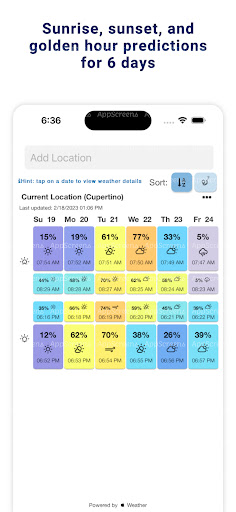
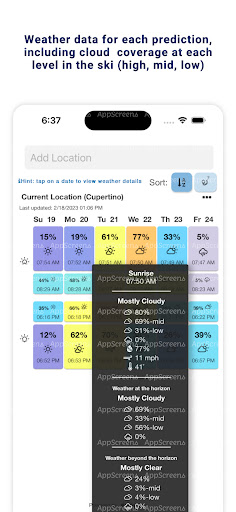
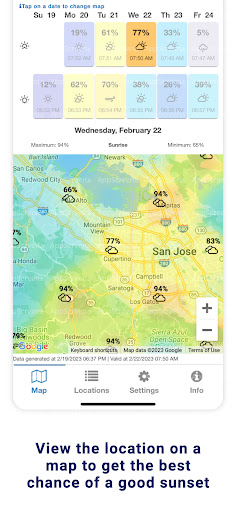
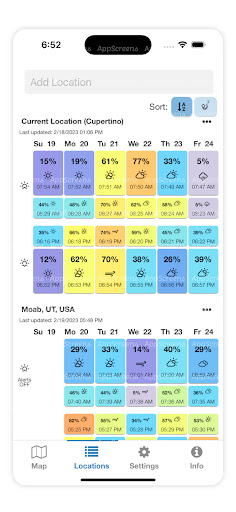
MySunset gives you the ability to view sunrise, sunset, and golden hour predictions for the next 6 days. There are two methods to view sunrise/sunset data: 1 - An interactive map with an overlay showing the forecasted quality of upcoming sunrises and sunsets. By default, your current location is shown on the map. On this screen, you can toggle between sunrise and sunset, change the date, move the map around, and zoom in and out of the map. 2 - The second screen is a table showing a list of custom locations. Each location displays a forecast percentage, a corresponding color representing the quality of the sunrise/sunset, and the time of the sunrise/sunset. Add as many custom locations as desired. Tap on a day to view weather data for that sunrise/sunset. Even if the sunrise/sunset isn't great, this data is meant to assist in accomplishing your unique artistic goals. Current location: - % cloud cover - % chance of precipitation - Humidity - Wind speed - Temperature 50 km (30 miles) East/West: - % cloud cover - % chance of precipitation 150 km (90 miles) East/West: - % cloud cover - % chance of precipitation Tap the three dots to open more options: - "View on Map" will open the location on the Map screen - "Configure Alerts" allows you to receive push notifications when an upcoming sunrise or sunset is predicted to be colorful. In-app purchase required.

What MySunset Is Used For

MySunset appears to be a weather-focused app for checking sunrise, sunset, and golden hour predictions over the next several days. Based on the metadata, it is meant for people who want to plan around light conditions, especially when timing matters for photography, outdoor scenes, or other creative projects. The app also shows forecast details such as cloud cover, precipitation chance, humidity, wind, and temperature, which may help users judge whether a sunrise or sunset is likely to be visually useful.

The app is built around two main ways to view this information: an interactive map and a custom location list. The map screen uses your current location by default and lets you switch between sunrise and sunset, change dates, and zoom or move around the map. The location list lets you save multiple places and compare their forecast quality, color rating, and event times. Location permissions suggest the app uses nearby position data to show local forecasts and map-based results, while network access supports fetching weather data and alerts.

Common uses

  • Check sunrise and sunset predictions for the next 6 days
  • Compare golden hour conditions for different locations
  • Use the map view to inspect forecasted sunrise/sunset quality
  • Save custom locations and review their forecast percentages
  • View weather details like cloud cover, precipitation, humidity, wind, and temperature
  • Set alerts for colorful sunrise or sunset forecasts
  • Use current location data to see local results on the map
Best for:
photography planning sunrise tracking sunset tracking weather checking phone app

App Details

Package:
com.emilyjeppson.mysunset
Category:
Weather
Developer:
Emily Sallstrom
Version:
Varies with device
Min Android:
Varies with device
Age Rating:
Everyone
Contains Ads:
Yes
In-App Purchases:
Yes

Official Listing

  • Official listing available on Google Play
  • Package name: com.emilyjeppson.mysunset
  • Age rating: Everyone

Explore More

Browse more apps in Weather or explore the Phone hub .

Related Weather Apps

1Weather Forecasts & Radar icon

1Weather Forecasts & Radar

Weather OneLouder Apps

Hyperlocal Forecasts, Live Radar, Severe Weather alerts & Homescreen Widgets

Version 12.4.1 81.5 MB ⭐ 4.30 100,000,000+ installs
The Weather Channel - Radar icon

The Weather Channel - Radar

Weather The Weather Channel

Prepare for severe weather with notifications, future radar, and live alerts.

Version 15.18.0 85.2 MB ⭐ 4.70 100,000,000+ installs
Weather & Radar Forecast icon

Weather & Radar Forecast

Weather WetterOnline

Local forecast, alerts, rain, snow and wind radar, air quality & weather widget

Version Varies with device 67.7 MB ⭐ 4.70 100,000,000+ installs
AccuWeather: Weather Radar icon

AccuWeather: Weather Radar

Weather AccuWeather

Your local weather forecast, storm tracker, radar maps & live weather news

Version Varies with device 46.1 MB ⭐ 3.50 100,000,000+ installs
Weather icon

Weather

Weather OneLouder Apps
Version 0.7.5.0 ⭐ 4.70 50,000,000+ installs

How to Download MySunset

If this app is not hosted directly on APKApps official link, then for the safest and most up-to-date version, install it from its official Google Play listing.