About scan my tesla
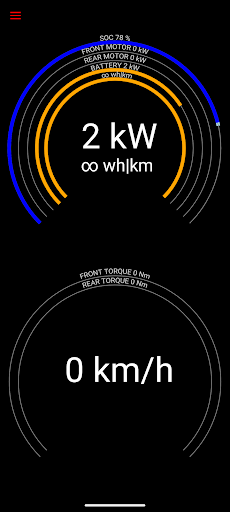
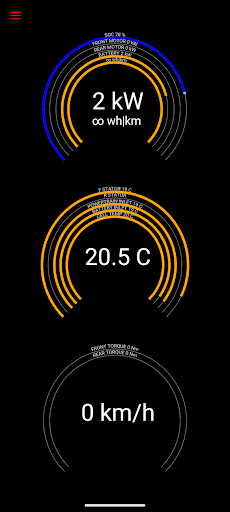
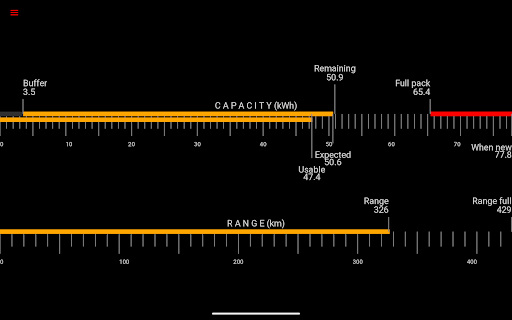
Gives you real-time readings from Tesla Model S, 3, X, Y diagnostics port * This app needs an adapter cable and a certain type of OBD2 adapter to work * - please check our info pages at https://www.scanmytesla.com/adapters Scan My Tesla reads information from the diagnostics port of your Tesla Model S, 3, or X, to present visually, or log for later analysis. This app gives you numerous live statistics such as: - Battery power / voltage / current / temperatures - Drive Unit electric power / torque / horsepower* / RPM / temperatures - Battery lifetime stats, capacity estimates and mileage - 12V system current, voltage, temperature - Trip recording and statistics, including regenerated and charged energy (* currently not available on Model 3) Most CANBUS packets decoded by Jason Hughes (skie.net) Battery cell info decoded by Jack Rickard (evtv.me) DC/AC Charge counters publicized by "DB 2" HVAC controls by Marc Olivier Chouinard (teslalog.com) Trip recording system idea by Marc Olivier Chouinard (teslalog.com) Model 3 decoding community led by JWardell on https://teslaownersonline.com/threads/diagnostic-port-and-data-access.7502/ Contains elements of Android OS example code adhering to Apache 2.0 license Go here for more information: https://sites.google.com/view/scanmytesla/ Facebook page: https://www.facebook.com/scanmytesla/ Model 3 specific information https://teslaownersonline.com/threads/diagnostic-port-and-data-access.7502/ Disclaimer This software is not affiliated with Tesla Motors Information shown in this app was not meant for the public and may be inaccurate, subject to change or disappear as the car gets software updates. This information is presented for entertainment purposes, and for learning more about how your car works. The information contained on Scan My Tesla mobile app (the "Service") is for general information purposes only. Børsand Engineering assumes no responsibility for errors or omissions in the contents on the Service. In no event shall be liable for any special, direct, indirect, consequential, or incidental damages or any damages whatsoever, whether in an action of contract, negligence or other tort, arising out of or in connection with the use of the Service or the contents of the Service. reserves the right to make additions, deletions, or modification to the contents on the Service at any time without prior notice. This Disclaimer is licensed by TermsFeed Generator.
What Scan My Tesla Is Used For
Scan My Tesla appears to be a vehicle diagnostics app for Tesla Model S, Model 3, and Model X owners who want to read live data from the car’s diagnostics port. Based on the metadata, it is used with an external adapter cable and a compatible OBD2 adapter, so it is more of a monitoring tool than a general driving app. It may appeal to users who want to see detailed vehicle stats that are not usually shown on the standard dashboard.
Common uses include checking battery power, voltage, current, temperatures, and other drive-unit readings, as well as viewing battery lifetime estimates and 12V system information. The app also supports trip recording and later analysis, which suggests it can be helpful for drivers who want to review energy use, charging, and regeneration over time. Because it can read and log data, it may be useful for enthusiasts, owners troubleshooting unusual behavior, or anyone learning more about how the vehicle reports internal status.
The listed network, Bluetooth, and USB/storage permissions fit an app that communicates with an external adapter and may store or transfer log data. Since the app works through the car’s diagnostics interface, it is best understood as a specialized phone app for Tesla data monitoring rather than a general Auto & Vehicles app for everyday navigation or media.
Common uses
- Read live Tesla diagnostic and sensor data
- Monitor battery and drive-unit statistics
- Track trip energy use and regeneration
- Log vehicle data for later review
- View 12V system readings
- Work with a supported OBD2 adapter and cable
- Useful for Tesla owners and technical enthusiasts
App Details
Package:
com.emon.canbus.tesla
Developer:
Børsand Engineering
Version:
3.1.4
Updated:
Nov 26, 2025
Min Android:
5.0
Age Rating:
Everyone
Contains Ads:
No
In-App Purchases:
No
Official Listing
-
Official listing available on
Google Play
-
Package name:
com.emon.canbus.tesla
-
Age rating:
Everyone
Related Auto & Vehicles Apps
Auto & Vehicles
•
CAR SCANNER LLC
Trip computer+car diagnostic tool with widest variety of features and dashboard!
Version 2.1.3
77.2 MB
⭐ 4.70
10,000,000+ installs
Auto & Vehicles
•
Appwest Limited
Find radar, speed camera, flight tracker. Use hud, location tracker, speedometer
Version 5.37.2
55.7 MB
⭐ 4.10
10,000,000+ installs
Auto & Vehicles
•
Infocar Co., Ltd.
Infocar is a smart vehicle management app
Version 2.29.1
49.3 MB
⭐ 3.90
10,000,000+ installs
Auto & Vehicles
•
Outils OBD Facile
Measure Torque and be your own mechanic with an ELM 327 OBD2 car code reader.
Version 3.84.1158
45.5 MB
⭐ 4.30
5,000,000+ installs
Auto & Vehicles
•
Naz Digital
Version 1.7.3
⭐ 4.00
5,000,000+ installs
Auto & Vehicles
•
Sygic.
Car management, gas prices, consumption, expenses, mileage log, GPS tracker
Version 9.20.1
21.0 MB
⭐ 4.30
5,000,000+ installs
How to Download scan my tesla
If this app is not hosted directly on APKApps official link,
then for the safest and most up-to-date version, install it from its official Google Play listing.