MangaPin - Web Browser icon

Phone

MangaPin - Web Browser

Comics Endyq Studio ⭐ 4.80 100,000+
Version 6.0.3 Adults only 18+

Screenshots

MangaPin - Web Browser screenshot
Permissions Explained 6 permissions requested View details

This app requests 6 permissions. The table below explains what each permission may allow and what users should review before installing.

Status Permission What it means Why it may be used User safety note
ℹ️ Review View Network Connections view network connections This is an Android permission or app-specific permission requested by the app. The app may use this permission for features related to its category, device support, background behavior, storage, connectivity, or system integration. Review this permission before installing, especially if it does not match the app’s expected purpose.
ℹ️ Review Full Network Access full network access This is an Android permission or app-specific permission requested by the app. The app may use this permission for features related to its category, device support, background behavior, storage, connectivity, or system integration. Review this permission before installing, especially if it does not match the app’s expected purpose.
ℹ️ Review Control Vibration control vibration This is an Android permission or app-specific permission requested by the app. The app may use this permission for features related to its category, device support, background behavior, storage, connectivity, or system integration. Review this permission before installing, especially if it does not match the app’s expected purpose.
ℹ️ Review Prevent Device From Sleeping prevent device from sleeping This is an Android permission or app-specific permission requested by the app. The app may use this permission for features related to its category, device support, background behavior, storage, connectivity, or system integration. Review this permission before installing, especially if it does not match the app’s expected purpose.
ℹ️ Review Read Google Service Configuration read Google service configuration This is an Android permission or app-specific permission requested by the app. The app may use this permission for features related to its category, device support, background behavior, storage, connectivity, or system integration. Review this permission before installing, especially if it does not match the app’s expected purpose.
ℹ️ Review Receive Data From Internet receive data from Internet This is an Android permission or app-specific permission requested by the app. The app may use this permission for features related to its category, device support, background behavior, storage, connectivity, or system integration. Review this permission before installing, especially if it does not match the app’s expected purpose.

About MangaPin - Web Browser

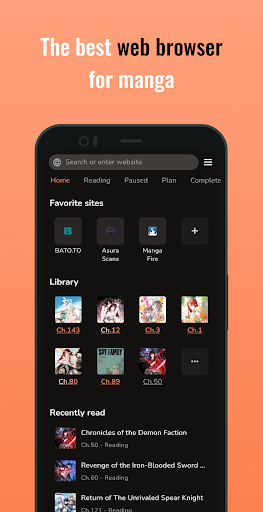
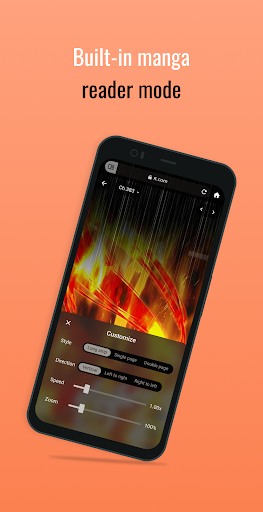
MangaPin is the all-in-one web browser for manga lovers. Read without distractions with manga reader mode and built-in adblock. - Effortless Reading: Browse & read seamlessly. - Powerful Tracking: Track progress & get new releases. - Organize Your Collection: Manage your library with ease. - Offline Access: Download and read without an internet connection. - External Trackers: Sync with other manga tracker services. Download MangaPin and start your next manga adventure today!

What MangaPin - Web Browser Is Used For

MangaPin appears to be a manga-focused browser app for reading and organizing manga content on Android phones. Based on the metadata, it is designed for people who want to browse manga in a more reader-friendly way, rather than using a general-purpose web browser. The app’s manga reader mode and built-in ad blocking suggest it may be used to reduce on-page clutter while reading chapters in a web-based format.

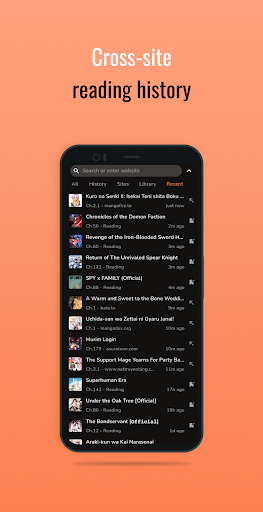
The app also seems intended for tracking and library management. Its tracking features may help users monitor reading progress and notice new releases, while the collection tools appear suited for keeping manga organized in one place. Offline downloading is another notable use case, which may be helpful when reading without an internet connection. The network permissions listed indicate the app needs internet access for browsing, syncing, and receiving data, while the sleep-related permission may support longer reading or download sessions.

Common uses

  • Read manga in a browser-style layout with fewer distractions
  • Use reader mode for a cleaner chapter viewing experience
  • Track reading progress and check for new releases
  • Organize a personal manga library or collection
  • Download chapters for offline reading
  • Sync with external manga tracker services
  • Suitable for phone-based manga reading and collection management
Best for:
manga readers tracking chapters offline reading phone app collection management

App Details

Package:
com.endyq.trackkun
Category:
Comics
Developer:
Endyq Studio
Version:
6.0.3
Updated:
Feb 22, 2026
Min Android:
7.0
Age Rating:
Adults only 18+
Contains Ads:
No
In-App Purchases:
Yes

Official Listing

  • Official listing available on Google Play
  • Package name: com.endyq.trackkun
  • Age rating: Adults only 18+

Explore More

Browse more apps in Comics or explore the Phone hub .

Related Comics Apps

WEBTOON: Manga, Comics, Manhwa icon

WEBTOON: Manga, Comics, Manhwa

Comics NAVER WEBTOON

The largest manga, comics, and manhwa community with millions of fans!

Version 3.8.11 54.5 MB ⭐ 4.60 100,000,000+ installs
MangaToon: Comic & Manga icon

MangaToon: Comic & Manga

Comics MangaToon

A universal application for reading comics

Version 3.33.00 40.3 MB ⭐ 4.30 10,000,000+ installs
MANGA Plus by SHUEISHA icon

MANGA Plus by SHUEISHA

Comics 株式会社 集英社

Get the latest manga chapters daily, released simultaneously with Japan.

Version 2.2.2 56.3 MB ⭐ 3.20 10,000,000+ installs
WebComics - Webtoon & Manga icon

WebComics - Webtoon & Manga

Comics WEBCOMICS HOLDINGS HK LIMITED

Read Manga, Comics & Manhwa of Romance, Action, Fantasy, Drama, BL and more!

Version 3.8.10 36.0 MB ⭐ 4.40 10,000,000+ installs

How to Download MangaPin - Web Browser

If this app is not hosted directly on APKApps official link, then for the safest and most up-to-date version, install it from its official Google Play listing.