Metar-Taf - Visual decoder icon

Phone

Metar-Taf - Visual decoder

Weather Studio Eveline ⭐ 4.90 10,000+
Version 2.8.0 Everyone

Screenshots

Metar-Taf - Visual decoder screenshot
Permissions Explained 12 permissions requested View details

This app requests 12 permissions. The table below explains what each permission may allow and what users should review before installing.

Status Permission What it means Why it may be used User safety note
ℹ️ Review Approximate Location (network Based) approximate location (network-based) This is an Android permission or app-specific permission requested by the app. The app may use this permission for features related to its category, device support, background behavior, storage, connectivity, or system integration. Review this permission before installing, especially if it does not match the app’s expected purpose.
ℹ️ Review Precise Location (gps And Network Based) precise location (GPS and network-based) This is an Android permission or app-specific permission requested by the app. The app may use this permission for features related to its category, device support, background behavior, storage, connectivity, or system integration. Review this permission before installing, especially if it does not match the app’s expected purpose.
ℹ️ Review Read The Contents Of Your Usb Storage read the contents of your USB storage This is an Android permission or app-specific permission requested by the app. The app may use this permission for features related to its category, device support, background behavior, storage, connectivity, or system integration. Review this permission before installing, especially if it does not match the app’s expected purpose.
ℹ️ Review Modify Or Delete The Contents Of Your Usb Storage modify or delete the contents of your USB storage This is an Android permission or app-specific permission requested by the app. The app may use this permission for features related to its category, device support, background behavior, storage, connectivity, or system integration. Review this permission before installing, especially if it does not match the app’s expected purpose.
ℹ️ Review View Network Connections view network connections This is an Android permission or app-specific permission requested by the app. The app may use this permission for features related to its category, device support, background behavior, storage, connectivity, or system integration. Review this permission before installing, especially if it does not match the app’s expected purpose.
ℹ️ Review Full Network Access full network access This is an Android permission or app-specific permission requested by the app. The app may use this permission for features related to its category, device support, background behavior, storage, connectivity, or system integration. Review this permission before installing, especially if it does not match the app’s expected purpose.
ℹ️ Review Run At Startup run at startup This is an Android permission or app-specific permission requested by the app. The app may use this permission for features related to its category, device support, background behavior, storage, connectivity, or system integration. Review this permission before installing, especially if it does not match the app’s expected purpose.
ℹ️ Review Draw Over Other Apps draw over other apps This is an Android permission or app-specific permission requested by the app. The app may use this permission for features related to its category, device support, background behavior, storage, connectivity, or system integration. Review this permission before installing, especially if it does not match the app’s expected purpose.
ℹ️ Review Control Vibration control vibration This is an Android permission or app-specific permission requested by the app. The app may use this permission for features related to its category, device support, background behavior, storage, connectivity, or system integration. Review this permission before installing, especially if it does not match the app’s expected purpose.
ℹ️ Review Prevent Device From Sleeping prevent device from sleeping This is an Android permission or app-specific permission requested by the app. The app may use this permission for features related to its category, device support, background behavior, storage, connectivity, or system integration. Review this permission before installing, especially if it does not match the app’s expected purpose.
ℹ️ Review Google Play License Check Google Play license check This is an Android permission or app-specific permission requested by the app. The app may use this permission for features related to its category, device support, background behavior, storage, connectivity, or system integration. Review this permission before installing, especially if it does not match the app’s expected purpose.
ℹ️ Review Receive Data From Internet receive data from Internet This is an Android permission or app-specific permission requested by the app. The app may use this permission for features related to its category, device support, background behavior, storage, connectivity, or system integration. Review this permission before installing, especially if it does not match the app’s expected purpose.

About Metar-Taf - Visual decoder

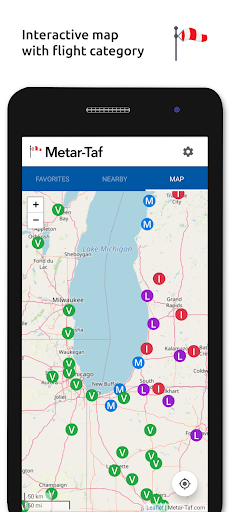
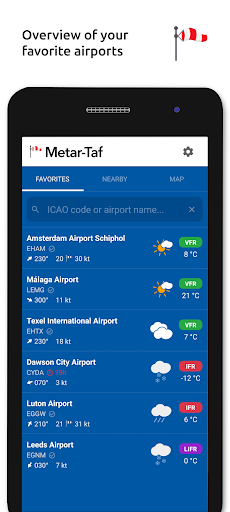
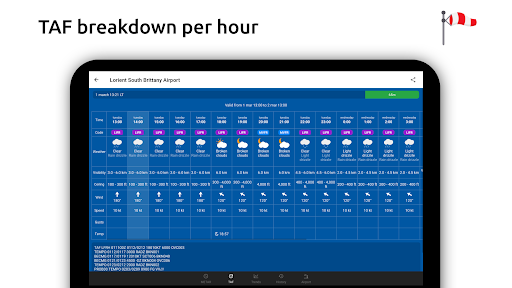
Visualized METAR and TAF weather information for all airports in the world. Concise summary of everything you need to know about today's aviation weather. METAR features: - Visualized in easy to understand and colourful metrics - Weather symbols for significant weather and clouds, like in a non-aviation weather report - Crosswind calculations, by combining METAR and runway information - Flight rules category: VFR, MVFR, IFR, LIFR - Read out by text-to-speech available, listen to a decoded METAR while doing other things TAF features: - TAF broken down and displayed per hour in a table - Show sunrise/sunset, minimum and maximum temperature Keeping track: - Add your favorite stations to the list, see their weather at a glance - Get observations near your location - Find stations in the interactive map with weather codes - Search airports by ICAO code or name History: - Graphs with weather trends today and yesterday: temperature, visibility, wind speed, QNH - METAR history for the last hours and link to more on the website Airport information: - See information about the airports, like runway directions, elevation, location - If the airport doesn't report a METAR, the nearest station used for calculations Calculations: - All units are customizable units: speed (knots, km/h, m/s, mph), altitude (meters/feet), visibility (kilometers/miles), temperature (Celcius/Fahrenheit) and air pressure (Hectopascal, Inch Hg) - Times are converted to the local time for each airport - Sunrise and sunset are calculated based on the airports latitude/longitude General: - METAR, TAF and airport data are automatically saved for offline use - Available in 6 languages: English, Dutch, Spanish, Portuguese, German and French

What Metar-Taf - Visual decoder Is Used For

Metar-Taf - Visual decoder appears to be a weather app focused on aviation weather reports. Based on the metadata, it is commonly used to read METAR and TAF data for airports, which can help pilots, aviation students, dispatchers, and weather-interested users quickly interpret current conditions and short-term forecasts. The visual format may make the coded aviation reports easier to understand than raw text alone.

The app seems designed for phone use while checking airport weather on the go. It includes features such as airport search by ICAO code or name, favorite stations, nearby observations, an interactive map, and weather history charts. The location permissions suggest it may show stations near your current location, while network access is needed to retrieve and sync weather data. It also stores METAR, TAF, and airport information for offline use, which may be helpful when you need to review recent data without a connection.

Other practical uses include checking runway directions, elevation, crosswind calculations, flight rules categories, sunrise and sunset times, and temperature ranges. It also supports text-to-speech for reading decoded METARs aloud, which could be useful when multitasking.

Common uses

  • Decode METAR and TAF aviation weather reports
  • Check airport conditions and short-term forecasts
  • Search airports by ICAO code or name
  • Track favorite stations and nearby observations
  • Review weather trends with history graphs
  • Use crosswind and flight rules information
  • Store weather data for offline viewing
Best for:
Pilots Aviation students Airport weather checks Phone app users Offline reference

App Details

Package:
com.eveline.metar_taf
Category:
Weather
Developer:
Studio Eveline
Version:
2.8.0
Updated:
Oct 27, 2025
Min Android:
7.0
Age Rating:
Everyone
Contains Ads:
No
In-App Purchases:
No

Official Listing

  • Official listing available on Google Play
  • Package name: com.eveline.metar_taf
  • Age rating: Everyone

Explore More

Browse more apps in Weather or explore the Phone hub .

Related Weather Apps

Foreca Weather & Radar icon

Foreca Weather & Radar

Weather Foreca

Very accurate, clean and convenient weather app which is widely customizable.

Version 4.80.1 154.7 MB ⭐ 4.70 1,000,000+ installs
Weather Live icon

Weather Live

Weather Nuts Mobile Inc.
Version 1.4.0 ⭐ 4.60 1,000+ installs

How to Download Metar-Taf - Visual decoder

If this app is not hosted directly on APKApps official link, then for the safest and most up-to-date version, install it from its official Google Play listing.