GBC.emu (Gameboy Emulator) icon

Phone

GBC.emu (Gameboy Emulator)

Arcade Robert Broglia ⭐ 4.60 50,000+
Version Varies with device Everyone

Screenshots

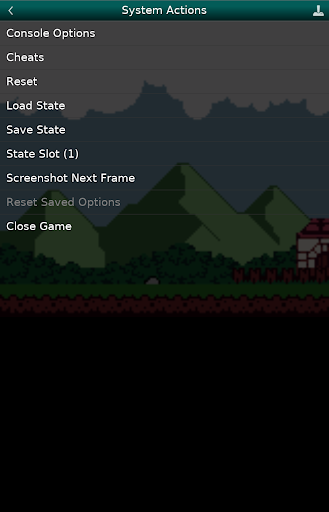
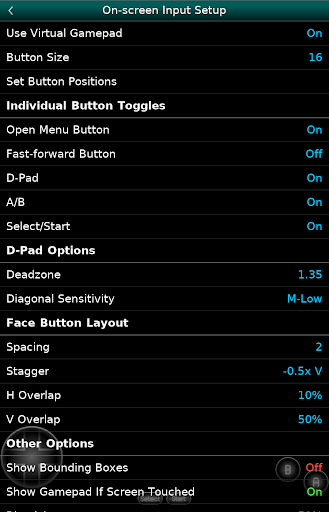
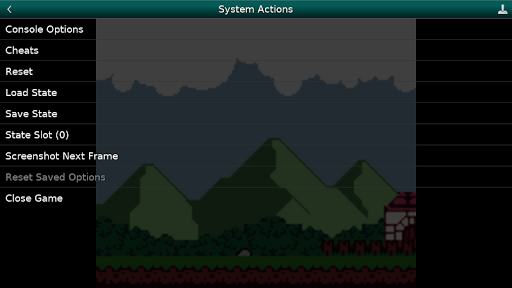
GBC.emu (Gameboy Emulator) screenshot
Permissions Explained 6 permissions requested View details

This app requests 6 permissions. The table below explains what each permission may allow and what users should review before installing.

Status Permission What it means Why it may be used User safety note
ℹ️ Review Read The Contents Of Your Usb Storage read the contents of your USB storage This is an Android permission or app-specific permission requested by the app. The app may use this permission for features related to its category, device support, background behavior, storage, connectivity, or system integration. Review this permission before installing, especially if it does not match the app’s expected purpose.
ℹ️ Review Modify Or Delete The Contents Of Your Usb Storage modify or delete the contents of your USB storage This is an Android permission or app-specific permission requested by the app. The app may use this permission for features related to its category, device support, background behavior, storage, connectivity, or system integration. Review this permission before installing, especially if it does not match the app’s expected purpose.
ℹ️ Review Pair With Bluetooth Devices pair with Bluetooth devices This is an Android permission or app-specific permission requested by the app. The app may use this permission for features related to its category, device support, background behavior, storage, connectivity, or system integration. Review this permission before installing, especially if it does not match the app’s expected purpose.
ℹ️ Review Access Bluetooth Settings access Bluetooth settings This is an Android permission or app-specific permission requested by the app. The app may use this permission for features related to its category, device support, background behavior, storage, connectivity, or system integration. Review this permission before installing, especially if it does not match the app’s expected purpose.
ℹ️ Review Control Vibration control vibration This is an Android permission or app-specific permission requested by the app. The app may use this permission for features related to its category, device support, background behavior, storage, connectivity, or system integration. Review this permission before installing, especially if it does not match the app’s expected purpose.
ℹ️ Review Install Shortcuts install shortcuts This is an Android permission or app-specific permission requested by the app. The app may use this permission for features related to its category, device support, background behavior, storage, connectivity, or system integration. Review this permission before installing, especially if it does not match the app’s expected purpose.

About GBC.emu (Gameboy Emulator)

Advanced open-source GB & GBC emulator based on Gambatte with a minimalist UI and a focus on low audio/video latency, supporting a wide variety of devices from the original Xperia Play to modern devices like the Nvidia Shield and Pixel phones. Features include: * Multiple color palettes for original GB games * Cheats codes in Game Genie & Gameshark (01xxxxxx type) formats * Supports .gb and .gbc file formats, optionally compressed with ZIP, RAR, or 7Z * Configurable on-screen controls * Bluetooth/USB gamepad & keyboard support compatible with any HID device recognized by the OS like Xbox and PS controllers No ROMs are included with this app and must be supplied by the user. It supports Android's storage access framework for opening files on both internal and external storage (SD cards, USB drives, etc.). View the full update changelog: https://www.explusalpha.com/contents/emuex/updates Follow development of my apps on GitHub and report issues: https://github.com/Rakashazi/emu-ex-plus-alpha Please report any crashes or device-specific problems via email (include your device name and OS version) or GitHub so future updates continue to run on as many devices as possible.

What GBC.emu (Gameboy Emulator) Is Used For

GBC.emu appears to be a phone app for playing original Game Boy and Game Boy Color games on Android. Based on the metadata, it is an emulator focused on low audio and video latency, which may make it suitable for users who want responsive gameplay on mobile devices. The app supports .gb and .gbc files, and it can also open compressed game files in formats like ZIP, RAR, and 7Z.

Common use cases include loading legally obtained game files from internal storage, SD cards, or USB drives through Android’s storage access framework. The app also appears to support configurable on-screen controls, plus Bluetooth or USB gamepads and keyboards, so it may work well with handheld controllers or other HID devices. Permissions such as USB storage access, Bluetooth pairing, vibration, and shortcut installation fit with file access, controller support, and emulator-style input features.

Common uses

  • Play Game Boy and Game Boy Color games on an Android phone
  • Open .gb and .gbc files from local or external storage
  • Use compressed game archives such as ZIP, RAR, or 7Z
  • Map or adjust on-screen touch controls for mobile play
  • Connect Bluetooth or USB controllers and keyboards
  • Use cheat code formats like Game Genie and GameShark
  • Access files through Android storage access framework
Best for:
retro gaming phone app controller support portable play emulator users

App Details

Package:
com.explusalpha.GbcEmu
Category:
Arcade
Developer:
Robert Broglia
Version:
Varies with device
Updated:
Mar 17, 2026
Min Android:
Varies with device
Age Rating:
Everyone
Contains Ads:
No
In-App Purchases:
No

Official Listing

  • Official listing available on Google Play
  • Package name: com.explusalpha.GbcEmu
  • Age rating: Everyone

Explore More

Browse more apps in Arcade or explore the Phone hub .

Related Arcade Apps

How to Download GBC.emu (Gameboy Emulator)

If this app is not hosted directly on APKApps official link, then for the safest and most up-to-date version, install it from its official Google Play listing.