ezClocker: Employee Time Track icon

Phone

ezClocker: Employee Time Track

Business ezNova Technologies DBA ezClocker ⭐ 4.60 100,000+
Version 3.23 Everyone

Screenshots

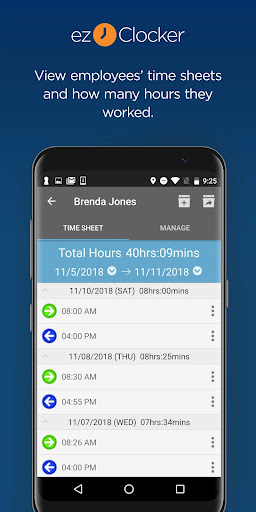
ezClocker: Employee Time Track screenshot
Permissions Explained 13 permissions requested View details

This app requests 13 permissions. The table below explains what each permission may allow and what users should review before installing.

Status Permission What it means Why it may be used User safety note
ℹ️ Review Approximate Location (network Based) approximate location (network-based) This is an Android permission or app-specific permission requested by the app. The app may use this permission for features related to its category, device support, background behavior, storage, connectivity, or system integration. Review this permission before installing, especially if it does not match the app’s expected purpose.
ℹ️ Review Precise Location (gps And Network Based) precise location (GPS and network-based) This is an Android permission or app-specific permission requested by the app. The app may use this permission for features related to its category, device support, background behavior, storage, connectivity, or system integration. Review this permission before installing, especially if it does not match the app’s expected purpose.
ℹ️ Review Read Phone Status And Identity read phone status and identity This is an Android permission or app-specific permission requested by the app. The app may use this permission for features related to its category, device support, background behavior, storage, connectivity, or system integration. Review this permission before installing, especially if it does not match the app’s expected purpose.
ℹ️ Review Read The Contents Of Your Usb Storage read the contents of your USB storage This is an Android permission or app-specific permission requested by the app. The app may use this permission for features related to its category, device support, background behavior, storage, connectivity, or system integration. Review this permission before installing, especially if it does not match the app’s expected purpose.
ℹ️ Review Modify Or Delete The Contents Of Your Usb Storage modify or delete the contents of your USB storage This is an Android permission or app-specific permission requested by the app. The app may use this permission for features related to its category, device support, background behavior, storage, connectivity, or system integration. Review this permission before installing, especially if it does not match the app’s expected purpose.
ℹ️ Review View Wi Fi Connections view Wi-Fi connections This is an Android permission or app-specific permission requested by the app. The app may use this permission for features related to its category, device support, background behavior, storage, connectivity, or system integration. Review this permission before installing, especially if it does not match the app’s expected purpose.
ℹ️ Review View Network Connections view network connections This is an Android permission or app-specific permission requested by the app. The app may use this permission for features related to its category, device support, background behavior, storage, connectivity, or system integration. Review this permission before installing, especially if it does not match the app’s expected purpose.
ℹ️ Review Full Network Access full network access This is an Android permission or app-specific permission requested by the app. The app may use this permission for features related to its category, device support, background behavior, storage, connectivity, or system integration. Review this permission before installing, especially if it does not match the app’s expected purpose.
ℹ️ Review Run At Startup run at startup This is an Android permission or app-specific permission requested by the app. The app may use this permission for features related to its category, device support, background behavior, storage, connectivity, or system integration. Review this permission before installing, especially if it does not match the app’s expected purpose.
ℹ️ Review Control Vibration control vibration This is an Android permission or app-specific permission requested by the app. The app may use this permission for features related to its category, device support, background behavior, storage, connectivity, or system integration. Review this permission before installing, especially if it does not match the app’s expected purpose.
ℹ️ Review Prevent Device From Sleeping prevent device from sleeping This is an Android permission or app-specific permission requested by the app. The app may use this permission for features related to its category, device support, background behavior, storage, connectivity, or system integration. Review this permission before installing, especially if it does not match the app’s expected purpose.
ℹ️ Review Read Google Service Configuration read Google service configuration This is an Android permission or app-specific permission requested by the app. The app may use this permission for features related to its category, device support, background behavior, storage, connectivity, or system integration. Review this permission before installing, especially if it does not match the app’s expected purpose.
ℹ️ Review Receive Data From Internet receive data from Internet This is an Android permission or app-specific permission requested by the app. The app may use this permission for features related to its category, device support, background behavior, storage, connectivity, or system integration. Review this permission before installing, especially if it does not match the app’s expected purpose.

About ezClocker: Employee Time Track

ezClocker is a simple to use employee time tracking and shift scheduling tool with GPS map to verify clock in and out locations. Ideal for any business with remote employees or those looking to replace the traditional time card system with something more modern and streamlined, ezClocker lets you provide your employees with a time clock on their mobile device! ezClocker makes your life easier by allowing you to modify and review timesheets, export data for payroll, create shift schedules for employees and much more! Simple and convenient to use, now you can focus more of your time on your business and customers, and less time managing your employees! ------------------------------------------------ Why businesses LOVE ezClocker! ------------------------------------------------ • Easy to use, employees clock in with a tap of a button using their mobile phone. • Built-in GPS map shows where employees clock in and out (does not track their movements) • Affordable! monthly subscription plans start at $15/month covering up to 15 employees with no hidden fees. • Create shift schedules using the app or website in real-time • All data is stored in the secure ezClocker Cloud – 24/7 access via the website or app • Review & modify employee time sheets • Export data to a .csv / Excel file and email it to yourself or your accountant in seconds • Streamline and modernize the traditional time card system ------------------------------------------------ ezClocker Business is perfect for… ------------------------------------------------ • Construction companies • Janitorial businesses • Contractors • Landscape businesses • Home Healthcare • Sales departments • Physician offices … and so much more! In-App Purchases: After your 30 days free trial, if you have more than 1 employee you will need to purchase a monthly subscription that will get automatically renewed every month. Monthly subscriptions start at $15 based on the number of employees you have: -Up to 15 Employees for $15 -Up to 30 Employees for $30 -Up to 100 Employees for $60 Automatic Renewal Feature: Your subscription will be charged to your Google Play Account at confirmation of purchase and will automatically renew unless auto-renew is turned off Subscribers can manage their subscription including turning off auto-renewal by visiting their Google Play Account and select the manage subscriptions option. Please visit https://ezclocker.com/public/privacy.html to learn more about how we protect your privacy and https://ezclocker.com/public/ezclocker_terms_of_service.html for our terms of service. DOWNLOAD EZCLOCKER TODAY – THE SIMPLE, STREAMLINED TIME MANAGEMENT TOOL!

What ezClocker: Employee Time Track Is Used For

ezClocker: Employee Time Track appears to be a business app for logging employee hours and organizing work schedules from a phone. Based on the metadata, it is commonly used by businesses that need a mobile time clock for staff who work away from a central office, such as field teams, contractors, or rotating crews. Employees may tap in and out from their device, while managers review the resulting time records in one place.

The app also appears to support shift scheduling, timesheet review, and exporting time data for payroll or accounting workflows. Its location permissions suggest it can use GPS or network-based location to show where clock-ins and clock-outs happen, which may help with attendance confirmation. Because it includes cloud access and network permissions, it seems designed for ongoing business use rather than one-time time entry. The phone-focused app type makes it most relevant for day-to-day employee use, supervisor review, and small to mid-sized teams that want a digital replacement for paper time cards.

Common uses

  • Clock in and out from a mobile device
  • Track work hours for hourly employees
  • Review and adjust timesheets
  • Create and manage shift schedules
  • Export time data for payroll or spreadsheets
  • Check clock-in and clock-out locations using GPS-based features
  • Support field teams and remote workers
Best for:
small businesses shift scheduling employee time tracking field teams phone app

App Details

Package:
com.ezclocker
Category:
Business
Developer:
ezNova Technologies DBA ezClocker
Version:
3.23
Updated:
Mar 26, 2026
Min Android:
7.0
Age Rating:
Everyone
Contains Ads:
No
In-App Purchases:
Yes

Official Listing

  • Official listing available on Google Play
  • Package name: com.ezclocker
  • Age rating: Everyone

Explore More

Browse more apps in Business or explore the Phone hub .

Related Business Apps

LinkedIn: Community & Network icon

LinkedIn: Community & Network

Business LinkedIn

Smarter career moves start here. AI job alerts, insights & the right tools.

Version 4.1.1185.1 90.3 MB ⭐ 4.10 1,000,000,000+ installs
Zoom Workplace icon

Zoom Workplace

Business zoom.com
Version Varies with device 181.9 MB ⭐ 4.10 1,000,000,000+ installs
Microsoft Teams icon

Microsoft Teams

Business Microsoft Corporation

Chat, meet, and collaborate to achieve more together, all in one place on Teams

Version 1416/1.0.0.2026044202 346.8 MB ⭐ 4.70 500,000,000+ installs
Adobe Scan AI PDF Scanner, OCR icon

Adobe Scan AI PDF Scanner, OCR

Business Adobe

Scan and save to multiple files types like PDF, Microsoft Word, JPEG and more.

Version Varies with device 79.3 MB ⭐ 4.70 100,000,000+ installs
File Commander Manager & Vault icon

File Commander Manager & Vault

Business MobiSystems

File manager | Explorer for cloud storage files & folders | Hide private photos.

Version Varies with device 23.1 MB ⭐ 4.20 100,000,000+ installs

How to Download ezClocker: Employee Time Track

If this app is not hosted directly on APKApps official link, then for the safest and most up-to-date version, install it from its official Google Play listing.