About Lithium Pro
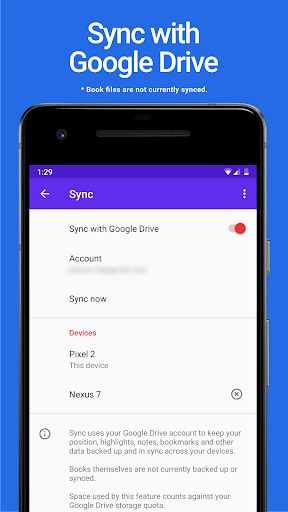
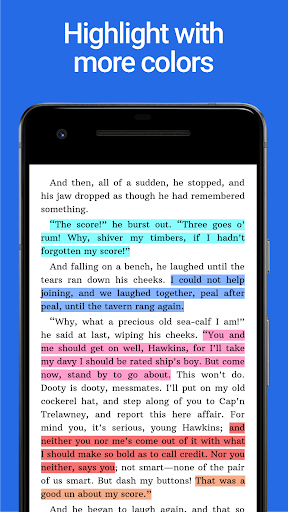
NOTE: This app acts as a Pro license to the free app. You must have Lithium installed in addition to this app and then the Pro features will activate in the free app. • Sync: Keep your data backed up and in sync across your devices using your Google Drive account. (Books themselves are not currently backed up or synced.) • Custom themes: Customize your page background color, text color and link colors. Create, delete and edit themes. You can access the custom themes feature by tapping the three-dots under Theme in display settings after upgrading. • More hightlight colors (see screenshots) • More features later.
What Lithium Pro Is Used For
Lithium Pro appears to be a license app for the free Lithium reading app, rather than a standalone books app. Based on the metadata, its main purpose is to unlock Pro features inside Lithium after both apps are installed on the same Android phone. That means people would typically use it when they want extra customization or account-based syncing in the reading app they already use.
The listed Pro features suggest it is commonly used for reading-app personalization and data continuity. It may let users back up and sync app data across devices with a Google Drive account, while noting that the books themselves are not backed up or synced. It also appears to add theme controls such as page background, text, and link colors, plus additional highlight colors. Since there are no permissions listed, the app metadata does not indicate any special device access requirements beyond normal app use.
Common uses
- Unlocks Pro features in the free Lithium app
- May sync reading app data across devices through Google Drive
- Provides custom theme controls for reading appearance
- Adds more highlight color options
- Useful for users who want to personalize text and background colors
- Best suited for people already using Lithium on Android phones
App Details
Package:
com.faultexception.reader.pro
Developer:
FaultException
Version:
Varies with device
Min Android:
Varies with device
Age Rating:
Everyone
Contains Ads:
No
In-App Purchases:
No
Official Listing
-
Official listing available on
Google Play
-
Package name:
com.faultexception.reader.pro
-
Age rating:
Everyone
Related Books & Reference Apps
Books & Reference
•
Amazon Mobile LLC
Your library in your pocket. Anytime, anywhere.
Version Varies with device
139.7 MB
⭐ 4.80
100,000,000+ installs
Books & Reference
•
Wattpad.com
A story reading app: Read stories, novels and books, or write your own.
Version 11.27.0
44.1 MB
⭐ 3.80
100,000,000+ installs
Books & Reference
•
Audible, Inc.
Build a playlist of books & podcasts. Listen to true crime, news, fiction & more
Version Varies with device
57.1 MB
⭐ 4.60
100,000,000+ installs
Books & Reference
•
Ozion
An easy-to-use offline Bible reader with the KJV, daily verses, and study tools.
Version 3.64.0
68.0 MB
⭐ 4.80
100,000,000+ installs
Books & Reference
•
Bíblia Offline
Version 6.3.8
36.3 MB
⭐ 4.80
100,000,000+ installs
Books & Reference
•
MobiSystems
Version 15.9.1144
92.3 MB
⭐ 4.30
50,000,000+ installs
How to Download Lithium Pro
If this app is not hosted directly on APKApps official link,
then for the safest and most up-to-date version, install it from its official Google Play listing.