Uconnect Radio Code Instant icon

Phone

Uconnect Radio Code Instant

Auto & Vehicles findradiocode ⭐ 0.00 1,000+
Version Varies with device Everyone

Screenshots

Uconnect Radio Code Instant screenshot
Permissions Explained 6 permissions requested View details

This app requests 6 permissions. The table below explains what each permission may allow and what users should review before installing.

Status Permission What it means Why it may be used User safety note
ℹ️ Review View Wi Fi Connections view Wi-Fi connections This is an Android permission or app-specific permission requested by the app. The app may use this permission for features related to its category, device support, background behavior, storage, connectivity, or system integration. Review this permission before installing, especially if it does not match the app’s expected purpose.
ℹ️ Review View Network Connections view network connections This is an Android permission or app-specific permission requested by the app. The app may use this permission for features related to its category, device support, background behavior, storage, connectivity, or system integration. Review this permission before installing, especially if it does not match the app’s expected purpose.
ℹ️ Review Change Network Connectivity change network connectivity This is an Android permission or app-specific permission requested by the app. The app may use this permission for features related to its category, device support, background behavior, storage, connectivity, or system integration. Review this permission before installing, especially if it does not match the app’s expected purpose.
ℹ️ Review Full Network Access full network access This is an Android permission or app-specific permission requested by the app. The app may use this permission for features related to its category, device support, background behavior, storage, connectivity, or system integration. Review this permission before installing, especially if it does not match the app’s expected purpose.
ℹ️ Review Prevent Device From Sleeping prevent device from sleeping This is an Android permission or app-specific permission requested by the app. The app may use this permission for features related to its category, device support, background behavior, storage, connectivity, or system integration. Review this permission before installing, especially if it does not match the app’s expected purpose.
ℹ️ Review Google Play License Check Google Play license check This is an Android permission or app-specific permission requested by the app. The app may use this permission for features related to its category, device support, background behavior, storage, connectivity, or system integration. Review this permission before installing, especially if it does not match the app’s expected purpose.

About Uconnect Radio Code Instant

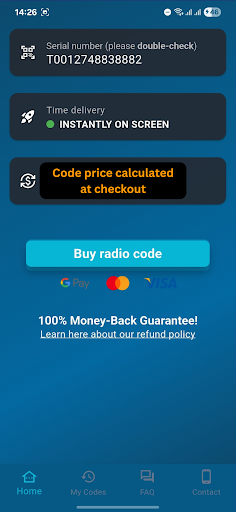
❓ How to Use This App for Uconnect Radios? Simply enter your radio’s serial number (S/N) into our app to check if your code is instantly available ⚡ on-screen after payment. 📲💸 🔍 Finding Your Serial Number: Your serial number is printed on a label or sticker inside the radio unit. To locate it: 1️⃣ Remove the radio from the console. 2️⃣ Find the label—usually above or below the barcode. 📹 Need help? Search YouTube for tutorials on how to remove your Uconnect radio. 💡 Tip: Serial numbers typically start with T or A2C, e.g., TM9325854121. ❌ No VIN required! Each unlock code is unique to the radio’s serial number and cannot be retrieved using the VIN. 💬 24/7 Support – Quick & Reliable! 📩 Contact us anytime via WhatsApp or Email – we respond within 24 hours. 😊 💯 100% Money-Back Guarantee! If your Uconnect radio code doesn’t work, we’ll refund your payment in full. 💰✅ 📹 Just provide a video proof showing: ✔️ The serial number on the label. ✔️ The code entry process on your Uconnect radio screen. 🚀 100% Working Code or Your Money Back! ⏳💰 Save Time & Money! Skip the dealership, avoid long wait times, and stop overpaying! 🚗💸 ✔️ Instant delivery – Your radio code appears on-screen after payment! ✔️ Simple & hassle-free – No special tools or VIN required! ✔️ Available 24/7 – Unlock your radio anytime, anywhere! 🌍✨ ⚡ Uconnect Radio Anti-Theft Unlock Code – Instant Retrieval ⚡ ✔️ Get your unlock code instantly on-screen after payment! ✔️ Supports a wide range of Uconnect radios, including: 🔑 Supported Serial Numbers & Radio Types: ✔️ T00BE (T00BE351823197) – Becker radio code ✔️ TM9 (TM9341100221) – Panasonic radio code ✔️ T0MYD (T0MYD164822563) – Aptiv, Delphi radio unlock code ✔️ TVPQN TQN (TVPQN32427GRQA) – Continental (Made in Mexico) radio code ✔️ T0012 (T0012566327123) – Harman radio code ✔️ A2C (A2C1231231231231231) – Continental (Made in Czech Republic & Hungary) ✔️ A3C (A3C03487600H0581) – Fiat Continental (Made in Mexico) ✔️ A2C-A3C Small Label – Requires QR-code scan from the motherboard ✔️ TAA (TT1AA3192E2346, TQ1AA, TQAAA, TH1AA) – Any character between T and AA ⚠️ Serial numbers starting with T**QN (T82QN623104232) and T00AM (T00AM6732T1436) are NOT instant and require manual processing. 🚘 Compatible Uconnect Radio Models: Uconnect 3: 5" or 7" – Lower trims in Chrysler, Dodge, Jeep, and Ram. Uconnect 4: 7" or 8.4" – Mid trims in Chrysler, Dodge, Jeep, and Ram. Uconnect 4C: 8.4" – Higher trims in Chrysler, Dodge, Jeep, and Ram. Uconnect 5: 8.4" or 10.1" – Newer models (2020+) with improved features. Uconnect 5C: 10.1" – High-end models like Jeep Grand Cherokee and Ram 1500. Chrysler: Pacifica (8.4" or 10.1"), Voyager (5" or 8.4") Dodge: Charger (7" or 8.4"), Durango (7" or 8.4"), Ram 1500 (8.4" or 12") Jeep: Grand Cherokee (8.4" or 10.1"), Wrangler (7" or 8.4"), Gladiator (7" or 8.4") Ram: 1500 (8.4" or 12"), 2500/3500 (8.4" or 12") Fiat: 500X (7" or 8.4")

What Uconnect Radio Code Instant Is Used For

Uconnect Radio Code Instant appears to be a phone app for helping users look up an unlock code for certain Uconnect radios. Based on the metadata, it is used when a car stereo or radio is asking for a code and the user has the radio’s serial number available. The app’s description suggests the process centers on entering the serial number and checking whether a code can be retrieved through the app.

Because it is in the Auto & Vehicles category, this app seems intended for drivers, vehicle owners, or repair situations where a factory radio needs code entry after being disconnected or reset. The network permissions and license-check permission suggest the app may need internet access to process requests and confirm purchases or access. The “prevent device from sleeping” permission may be used to keep the lookup process running while the code is being retrieved.

Common use cases may include checking a radio serial number, requesting an unlock code for supported Uconnect radio types, and handling the code-entry step on the radio itself. It may be most relevant for people working on their own vehicle audio system or trying to restore radio functionality after battery or unit changes.

Common uses

  • Enter a Uconnect radio serial number to look up a code request
  • Use it when a car radio is prompting for an unlock code
  • Helpful for vehicle owners dealing with a reset or replacement radio
  • Appears to rely on internet access to process the lookup
  • May be used with radios whose serial number is printed on the unit label
  • Relevant when you need to enter the code directly on the radio screen
  • Can fit phone-based use while working near the vehicle
Best for:
vehicle owners radio code lookup car stereo setup phone app auto repair

App Details

Package:
com.findradiocode.uconnectradiocode
Developer:
findradiocode
Version:
Varies with device
Min Android:
Varies with device
Age Rating:
Everyone
Contains Ads:
No
In-App Purchases:
Yes

Official Listing

  • Official listing available on Google Play
  • Package name: com.findradiocode.uconnectradiocode
  • Age rating: Everyone

Explore More

Browse more apps in Auto & Vehicles or explore the Phone hub .

Related Auto & Vehicles Apps

TopScan icon

TopScan

Tools TopDon HK
Version 6.20.004 ⭐ 3.10 100,000+ installs
ParkWhiz icon

ParkWhiz

Maps & Navigation ParkWhiz Inc

ParkWhiz, an Arrive Mobility brand, part of the Arrive Network

Version 15.11.1 16.4 MB ⭐ 4.36 1,000,000+ installs

How to Download Uconnect Radio Code Instant

If this app is not hosted directly on APKApps official link, then for the safest and most up-to-date version, install it from its official Google Play listing.