Flip Sampler icon

Phone

Flip Sampler

Music & Audio Suture Sound Inc. ⭐ 4.00 10,000+
Version 1.5.1 Everyone

Screenshots

Flip Sampler screenshot
Permissions Explained 8 permissions requested View details

This app requests 8 permissions. The table below explains what each permission may allow and what users should review before installing.

Status Permission What it means Why it may be used User safety note
ℹ️ Review Read The Contents Of Your Usb Storage read the contents of your USB storage This is an Android permission or app-specific permission requested by the app. The app may use this permission for features related to its category, device support, background behavior, storage, connectivity, or system integration. Review this permission before installing, especially if it does not match the app’s expected purpose.
ℹ️ Review Modify Or Delete The Contents Of Your Usb Storage modify or delete the contents of your USB storage This is an Android permission or app-specific permission requested by the app. The app may use this permission for features related to its category, device support, background behavior, storage, connectivity, or system integration. Review this permission before installing, especially if it does not match the app’s expected purpose.
ℹ️ Review Record Audio record audio This is an Android permission or app-specific permission requested by the app. The app may use this permission for features related to its category, device support, background behavior, storage, connectivity, or system integration. Review this permission before installing, especially if it does not match the app’s expected purpose.
ℹ️ Review Pair With Bluetooth Devices pair with Bluetooth devices This is an Android permission or app-specific permission requested by the app. The app may use this permission for features related to its category, device support, background behavior, storage, connectivity, or system integration. Review this permission before installing, especially if it does not match the app’s expected purpose.
ℹ️ Review Access Bluetooth Settings access Bluetooth settings This is an Android permission or app-specific permission requested by the app. The app may use this permission for features related to its category, device support, background behavior, storage, connectivity, or system integration. Review this permission before installing, especially if it does not match the app’s expected purpose.
ℹ️ Review Full Network Access full network access This is an Android permission or app-specific permission requested by the app. The app may use this permission for features related to its category, device support, background behavior, storage, connectivity, or system integration. Review this permission before installing, especially if it does not match the app’s expected purpose.
ℹ️ Review Reorder Running Apps reorder running apps This is an Android permission or app-specific permission requested by the app. The app may use this permission for features related to its category, device support, background behavior, storage, connectivity, or system integration. Review this permission before installing, especially if it does not match the app’s expected purpose.
ℹ️ Review Prevent Device From Sleeping prevent device from sleeping This is an Android permission or app-specific permission requested by the app. The app may use this permission for features related to its category, device support, background behavior, storage, connectivity, or system integration. Review this permission before installing, especially if it does not match the app’s expected purpose.

About Flip Sampler

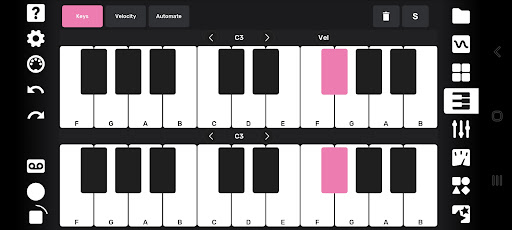
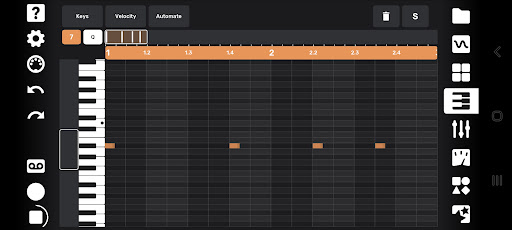
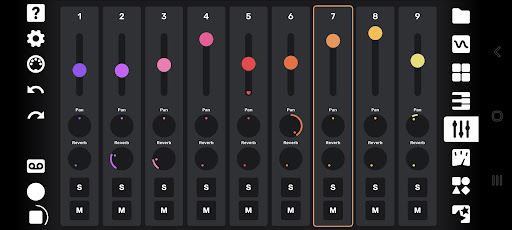
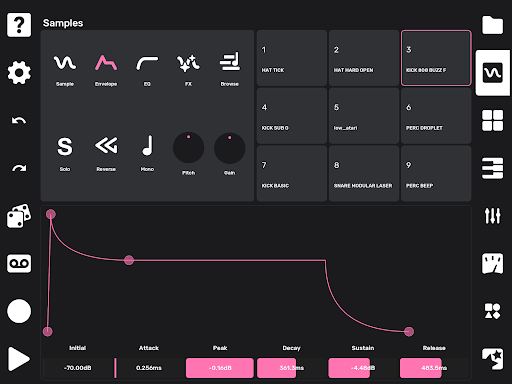
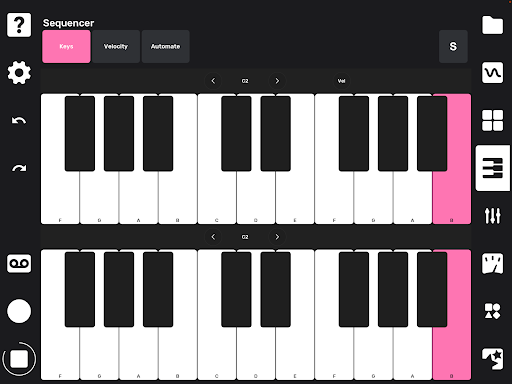
Flip is a sample-based mobile music studio that was designed for a fast and intuitive work flow. Import your own sounds, or record sounds directly with your device's microphone. As soon as you record a sound it’s available to be played on drum pads as well as being mapped across a keyboard. Sounds can be subtly shaped or entirely transformed using the built-in effects and easy-to-use editing tools. You can record a quantized or unquantized performance on the pads or keyboard. There is also a full piano roll where you can enter and edit notes and velocities. Record knob movements or draw automation by hand to bring even more life to your sounds. Every automation lane can also have its own independent length, for polymetric and generative music possibilities. Create up to 16 different sections for your song and drag and drop them into any order to create your arrangement. Mixing and mastering tools allow you to finish a full track without ever leaving your phone. You can export your full track, or hit the tape icon and record the live output of the app while you tweak anything on the fly. Both options allow you to capture individual track stems as well! A performance page lets you trigger your patterns live while controlling a global filter, assignable pitch bends and reverb sends, and a random fill generator. ********************************** Flip can play up to 144 samples at a time, so it's a very CPU-intensive app. We recommend new devices and Android 10 or higher to really have fun with the app. ********************************** Features: - 9 track sampler - 4 effects per track: Delay, Filter, Chorus, Bitcrush - Graphic EQ per track - Monophonic or up to 16-note polyphonic playback per sample - Adjustable pitch, volume, playback direction, sample start and stop points - 19 automatable parameters per track - Independent lengths for each automation lane - Automation can be recorded via knob movements or drawn by hand - Drum pad and keyboard input - Full piano roll with 10 octaves, note velocity, editing tools - Randomization over sample selection for quick inspiration - Randomization over note position to create surprising variations - Drag-and-drop song arrangement page - Global reverb with individual track sends - Mixing and mastering tools - Powerful performance features for creating instant fills, pitch shifts, reverb sends, and global low or high pass filtering - Export full track and stems - Live recording of performances - Metronome with tap tempo and swing/shuffle - Undo and redo UPDATE 1.4.0 - New Sample Looper with forward & both (ping pong) direction - Ableton Link sync support

What Flip Sampler Is Used For

Flip Sampler appears to be a mobile music-making app focused on sample-based production on Android phones. Based on the metadata, it is commonly used to import or record sounds, then play them on drum pads or a keyboard for beat making, melodic writing, and quick idea building. Its category and feature list suggest it fits users who want a compact studio for composing directly on a phone rather than a full desktop workflow.

The app also seems built for hands-on editing and arranging. Users may use the piano roll, note velocity tools, and automation controls to shape performances, create sections, and organize them into a song structure. The presence of audio recording, USB storage access, Bluetooth permissions, and network access may indicate support for importing/exporting sounds, recording from the microphone, and working with external audio-related devices or files. Based on the metadata, it is especially relevant for people who want to record, sample, sequence, mix, and export tracks from a single phone app.

Common uses

  • Import or record sounds for sampling on your phone
  • Trigger samples with drum pads or a keyboard layout
  • Edit notes, velocity, and automation in the piano roll
  • Build song sections and arrange them in different orders
  • Apply effects and basic mixing tools while shaping a track
  • Record live performances or export stems and full mixes
  • Use performance controls for live pattern triggering and fills
Best for:
phone music production sample-based beat making mobile songwriting live performance control audio experimentation

App Details

Package:
com.flipsampler.flip
Category:
Music & Audio
Developer:
Suture Sound Inc.
Version:
1.5.1
Updated:
Jan 28, 2026
Min Android:
9
Age Rating:
Everyone
Contains Ads:
No
In-App Purchases:
No

Official Listing

  • Official listing available on Google Play
  • Package name: com.flipsampler.flip
  • Age rating: Everyone

Explore More

Browse more apps in Music & Audio or explore the Phone hub .

Related Music & Audio Apps

Spotify: Music and Podcasts icon

Spotify: Music and Podcasts

Music & Audio Spotify AB

Listen to music and podcasts. Discover playlists and lyrics.

Version Varies with device 89.6 MB ⭐ 4.30 1,000,000,000+ installs
StarMaker: Sing Karaoke Songs icon

StarMaker: Sing Karaoke Songs

Music & Audio SKYWORK AI PTE. LTD.

Record karaoke songs with pro audio editors, learn to sing, duet and share music

Version 9.7.7 239.5 MB ⭐ 4.40 500,000,000+ installs
JioSaavn - Music & Podcasts icon

JioSaavn - Music & Podcasts

Music & Audio Saavn Media Limited

Play music in 16 languages, download the latest hits, and set trending JioTunes.

Version Varies with device 48.5 MB ⭐ 4.30 500,000,000+ installs
Gaana: Music App, MP3 Songs icon

Gaana: Music App, MP3 Songs

Music & Audio Entertainment Network (India) Ltd.

India's Largest Hindi, English, Panjabi Music Streaming & Radio & Podcast App

Version 8.56.5 5.6 MB ⭐ 4.20 100,000,000+ installs
Smule: Sing, Duet & Karaoke icon

Smule: Sing, Duet & Karaoke

Music & Audio Smule

Create music together! Sing, record & share your voice with a worldwide audience

Version 12.8.5 124.5 MB ⭐ 4.10 100,000,000+ installs

How to Download Flip Sampler

If this app is not hosted directly on APKApps official link, then for the safest and most up-to-date version, install it from its official Google Play listing.