Calendar Widget Agenda Planner icon

Phone

Calendar Widget Agenda Planner

Productivity Francisco Franco ⭐ 3.90 50,000+
Version 3.8.5 Everyone

Screenshots

Calendar Widget Agenda Planner screenshot
Permissions Explained 7 permissions requested View details

This app requests 7 permissions. The table below explains what each permission may allow and what users should review before installing.

Status Permission What it means Why it may be used User safety note
ℹ️ Review Read Calendar Events Plus Confidential Information read calendar events plus confidential information This is an Android permission or app-specific permission requested by the app. The app may use this permission for features related to its category, device support, background behavior, storage, connectivity, or system integration. Review this permission before installing, especially if it does not match the app’s expected purpose.
ℹ️ Review Add Or Modify Calendar Events And Send Email To Guests Without Owners' Knowledge add or modify calendar events and send email to guests without owners' knowledge This is an Android permission or app-specific permission requested by the app. The app may use this permission for features related to its category, device support, background behavior, storage, connectivity, or system integration. Review this permission before installing, especially if it does not match the app’s expected purpose.
ℹ️ Review View Network Connections view network connections This is an Android permission or app-specific permission requested by the app. The app may use this permission for features related to its category, device support, background behavior, storage, connectivity, or system integration. Review this permission before installing, especially if it does not match the app’s expected purpose.
ℹ️ Review Full Network Access full network access This is an Android permission or app-specific permission requested by the app. The app may use this permission for features related to its category, device support, background behavior, storage, connectivity, or system integration. Review this permission before installing, especially if it does not match the app’s expected purpose.
ℹ️ Review Run At Startup run at startup This is an Android permission or app-specific permission requested by the app. The app may use this permission for features related to its category, device support, background behavior, storage, connectivity, or system integration. Review this permission before installing, especially if it does not match the app’s expected purpose.
ℹ️ Review Prevent Device From Sleeping prevent device from sleeping This is an Android permission or app-specific permission requested by the app. The app may use this permission for features related to its category, device support, background behavior, storage, connectivity, or system integration. Review this permission before installing, especially if it does not match the app’s expected purpose.
ℹ️ Review Google Play License Check Google Play license check This is an Android permission or app-specific permission requested by the app. The app may use this permission for features related to its category, device support, background behavior, storage, connectivity, or system integration. Review this permission before installing, especially if it does not match the app’s expected purpose.

About Calendar Widget Agenda Planner

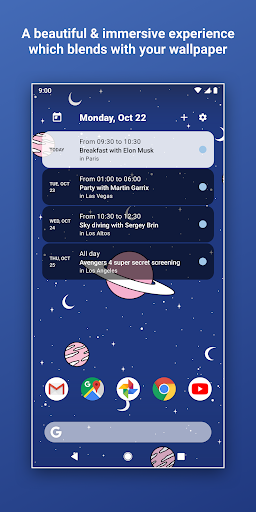
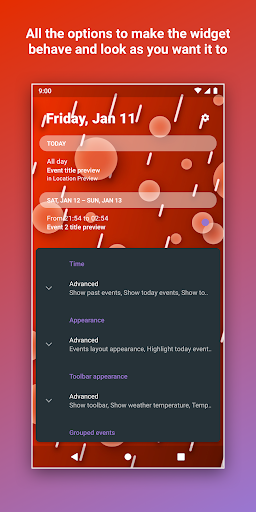
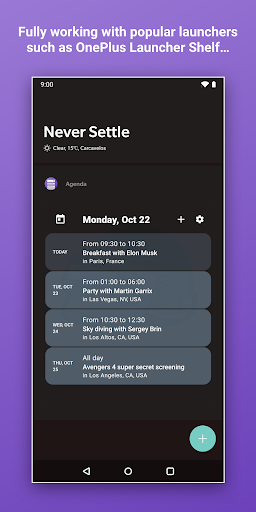
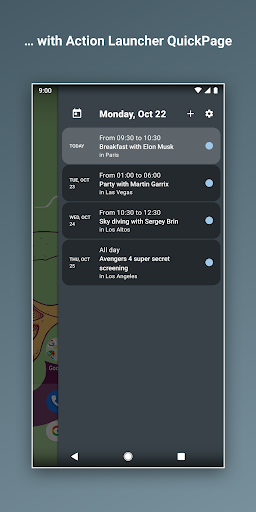
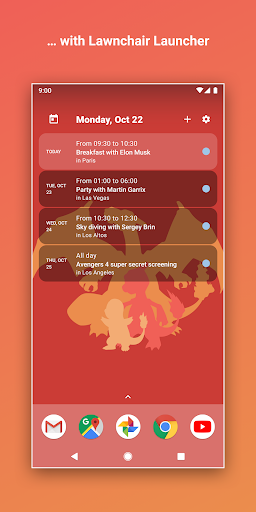
Home Agenda is a customizable calendar widget, agenda, and planner for Android—sync your events, plan your day, and personalize your home screen effortlessly. • Custom Design: Build your own theme and widget sizes. • Instant Sync: Connects with Google Calendar, Outlook, and more. • Easy Planning: Quickly view, add, and edit events. • Productivity Boost: Stay organized and on schedule. • Low Battery Impact: Optimized performance for daily use. With Home Agenda, you get a clean, modern interface that transforms your home screen into a dynamic planning hub. Whether you need to sync your events automatically or customize the look and feel to match your style, our widget adapts to your needs. Enjoy hassle-free integration with your favorite calendars and stay updated with real-time notifications. Unlike many other calendar apps, our tool is 100% local. We never track your data or show ads. Your information remains private, giving you full control over your schedule without compromising your personal data. The icon is masterfully crafted by Tom Wellington @wellingtonicons All the wallpapers shown in the screenshots are downloaded from Walli app. Disclaimer Unfortunately due to lack of a public API from Google there isn't a known way to fetch Reminders from Google Calendar. As much as I would love to do so (because I use Reminders myself all the time) at present time that is, unfortunately, impossible. Have a question? Feel free to reach out! Unlike most developers you will find, I'm more than happy to respond. If you have a problem, before putting in that one star review, please reach out to @franciscof_1990 on Twitter, or send me an e-mail to [email protected]. I'm always happy to get back to you. Enjoy the app! Privacy policy: https://shorturl.at/abfoI

What Calendar Widget Agenda Planner Is Used For

Calendar Widget Agenda Planner, based on the metadata, appears to be a productivity app for people who want a calendar and agenda view directly on their Android home screen. It is commonly used to sync events from calendars such as Google Calendar and Outlook, then show upcoming appointments, tasks, and daily plans in a widget format that is easy to check at a glance.

The app also seems geared toward users who want to customize how their schedule looks on the phone. The description mentions theme and widget size options, quick event viewing and editing, and support for notifications. Because the permissions include reading calendar events, adding or modifying events, network access, startup behavior, and preventing sleep, it may be used as a constantly available planning tool that stays updated in the background while keeping the device ready for scheduled reminders and routine check-ins.

Common uses

  • Check upcoming meetings and events from the home screen
  • Sync calendars like Google Calendar or Outlook
  • Add or edit events without opening a separate calendar app
  • Customize widget size, layout, and theme to match the home screen
  • Use as a daily agenda view for planning schedules
  • Keep calendar information updating in the background
  • Stay on top of notifications and appointment timing
Best for:
home screen planning calendar widget users daily schedule tracking phone productivity customizable agenda view

App Details

Package:
com.franco.agenda
Category:
Productivity
Developer:
Francisco Franco
Version:
3.8.5
Updated:
Jul 8, 2025
Min Android:
6.0
Age Rating:
Everyone
Contains Ads:
No
In-App Purchases:
No

Official Listing

  • Official listing available on Google Play
  • Package name: com.franco.agenda
  • Age rating: Everyone

Explore More

Browse more apps in Productivity or explore the Phone hub .

Related Productivity Apps

DigiCal icon

DigiCal

Productivity Digibites

Schedule your agenda with the #1 calendar app & month widget for Google Calendar

Version 2.3.0 17.4 MB ⭐ 4.49 10,000,000+ installs

How to Download Calendar Widget Agenda Planner

If this app is not hosted directly on APKApps official link, then for the safest and most up-to-date version, install it from its official Google Play listing.