Bluetooth Radar - Find Devices icon

Phone

Bluetooth Radar - Find Devices

Tools FruitMobile LLC ⭐ 4.10 1,000+
Version 1.4.0 Everyone

Screenshots

Bluetooth Radar - Find Devices screenshot
Permissions Explained 8 permissions requested View details

This app requests 8 permissions. The table below explains what each permission may allow and what users should review before installing.

Status Permission What it means Why it may be used User safety note
ℹ️ Review Approximate Location (network Based) approximate location (network-based) This is an Android permission or app-specific permission requested by the app. The app may use this permission for features related to its category, device support, background behavior, storage, connectivity, or system integration. Review this permission before installing, especially if it does not match the app’s expected purpose.
ℹ️ Review Precise Location (gps And Network Based) precise location (GPS and network-based) This is an Android permission or app-specific permission requested by the app. The app may use this permission for features related to its category, device support, background behavior, storage, connectivity, or system integration. Review this permission before installing, especially if it does not match the app’s expected purpose.
ℹ️ Review View Network Connections view network connections This is an Android permission or app-specific permission requested by the app. The app may use this permission for features related to its category, device support, background behavior, storage, connectivity, or system integration. Review this permission before installing, especially if it does not match the app’s expected purpose.
ℹ️ Review Pair With Bluetooth Devices pair with Bluetooth devices This is an Android permission or app-specific permission requested by the app. The app may use this permission for features related to its category, device support, background behavior, storage, connectivity, or system integration. Review this permission before installing, especially if it does not match the app’s expected purpose.
ℹ️ Review Access Bluetooth Settings access Bluetooth settings This is an Android permission or app-specific permission requested by the app. The app may use this permission for features related to its category, device support, background behavior, storage, connectivity, or system integration. Review this permission before installing, especially if it does not match the app’s expected purpose.
ℹ️ Review Full Network Access full network access This is an Android permission or app-specific permission requested by the app. The app may use this permission for features related to its category, device support, background behavior, storage, connectivity, or system integration. Review this permission before installing, especially if it does not match the app’s expected purpose.
ℹ️ Review Run At Startup run at startup This is an Android permission or app-specific permission requested by the app. The app may use this permission for features related to its category, device support, background behavior, storage, connectivity, or system integration. Review this permission before installing, especially if it does not match the app’s expected purpose.
ℹ️ Review Prevent Device From Sleeping prevent device from sleeping This is an Android permission or app-specific permission requested by the app. The app may use this permission for features related to its category, device support, background behavior, storage, connectivity, or system integration. Review this permission before installing, especially if it does not match the app’s expected purpose.

About Bluetooth Radar - Find Devices

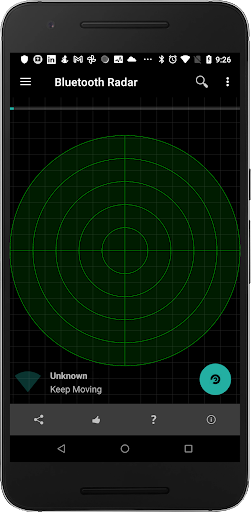
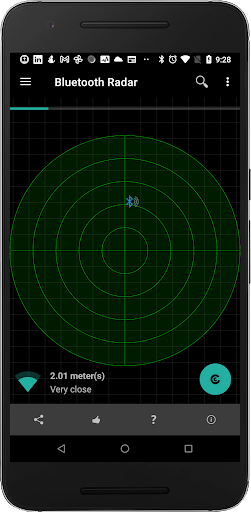
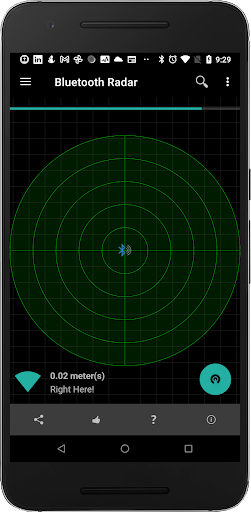
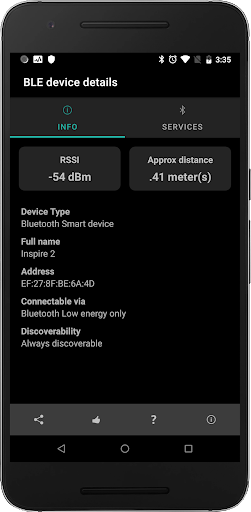
Why pick Bluetooth radar to track your lost bluetooth accessory? ------------------------------------------------------------------------------------------ It's easy to use and it updates the position of the device on the radar every second so that you can see whether you're moving away or towards it. Fruitmobile 'Bluetooth Radar' is the perfect app to find a lost fitness accessory or simply to find all beacons and bluetooth accessories around you. No Root , No Ads, No internet permission. Location permission is for finding devices on Android Marshmallow. Features: 1. Shows bluetooth smart devices and updates their position on the radar every second. 2. Find a lost bluetooth accessory or any other saved device. 3. Find all beacons around you like EddyStone , iBeacon, or alt beacon. 4. See the URLs advertised by EddyStone beacons. 5. See full details of other types of EddyStone beacons (TLMor Uid). 6. Tap on each device on the radar and get all details about it. 7. Connect to a device and find the services running on it. 8. Save favorite devices so that they can be found later if lost. ==================================== For more details on this app with screenshots go to: Discover How to Use Bluetooth Radar to Find Lost devices =========================================== Questions, Suggestions, Feature requests? mail us at [email protected] FAQ ------- 1. Should I save all my devices ? Ans: Definitely. This way you can find the device if you misplace it later. 2. I lost my fitbit. How can I find it ? Ans: a. Go to menu > Find a Device b. Pick your device from saved devices list c. Move around in the room/home where you think you might have misplaced it. If the device is somewhere there it'll show up on the radar. Once it does try moving around till you have the device right in the middle of the radar like the last screenshot.

What Bluetooth Radar - Find Devices Is Used For

Bluetooth Radar - Find Devices appears to be a Bluetooth scanning and tracking utility for phones. Based on the metadata, it is commonly used to help locate lost Bluetooth accessories such as fitness trackers, earbuds, and other paired devices by showing nearby Bluetooth devices on a radar-style display that updates as you move around. It may also be useful for finding Bluetooth beacons like iBeacon, EddyStone, and similar devices in range.

The app also seems designed for users who want more detail about nearby Bluetooth hardware. Its listed functions include viewing device details, checking advertised URLs or beacon data, connecting to devices to inspect available services, and saving favorite devices for later searching. The permissions suggest it can use Bluetooth settings and location access, which is consistent with scanning for nearby Bluetooth devices on Android. Since it is a phone app, it is mainly aimed at handheld use while walking around a room, home, or workplace to narrow down the signal and find a target device.

Common uses

  • Locate lost Bluetooth accessories by scanning nearby devices
  • Find saved devices later if they are misplaced
  • Search for Bluetooth beacons such as iBeacon or EddyStone
  • View device details from the radar screen
  • Check advertised beacon information and URLs
  • Connect to nearby devices to inspect available services
  • Use on a phone while moving around to narrow the device position
Best for:
lost device search bluetooth scanning beacon detection phone app utility use

App Details

Package:
com.fruitmobile.bluetoothradar
Category:
Tools
Developer:
FruitMobile LLC
Version:
1.4.0
Updated:
Oct 12, 2025
Min Android:
6.0
Age Rating:
Everyone
Contains Ads:
No
In-App Purchases:
No

Official Listing

  • Official listing available on Google Play
  • Package name: com.fruitmobile.bluetoothradar
  • Age rating: Everyone

Explore More

Browse more apps in Tools or explore the Phone hub .

Related Tools Apps

ZUMIMALL icon

ZUMIMALL

Business Shenzhen Junan Technology Co., Ltd

Version 6.0.1 ⭐ 4.60 100,000+ installs

How to Download Bluetooth Radar - Find Devices

If this app is not hosted directly on APKApps official link, then for the safest and most up-to-date version, install it from its official Google Play listing.