Battery manager and monitor icon

Phone

Battery manager and monitor

Tools System monitor tools lab - Cpu Ram Battery ⭐ 4.60 1,000+
Version 11.10.3 Everyone

Screenshots

Battery manager and monitor screenshot
Permissions Explained 6 permissions requested View details

This app requests 6 permissions. The table below explains what each permission may allow and what users should review before installing.

Status Permission What it means Why it may be used User safety note
ℹ️ Review Pair With Bluetooth Devices pair with Bluetooth devices This is an Android permission or app-specific permission requested by the app. The app may use this permission for features related to its category, device support, background behavior, storage, connectivity, or system integration. Review this permission before installing, especially if it does not match the app’s expected purpose.
ℹ️ Review Access Bluetooth Settings access Bluetooth settings This is an Android permission or app-specific permission requested by the app. The app may use this permission for features related to its category, device support, background behavior, storage, connectivity, or system integration. Review this permission before installing, especially if it does not match the app’s expected purpose.
ℹ️ Review Connect And Disconnect From Wi Fi connect and disconnect from Wi-Fi This is an Android permission or app-specific permission requested by the app. The app may use this permission for features related to its category, device support, background behavior, storage, connectivity, or system integration. Review this permission before installing, especially if it does not match the app’s expected purpose.
ℹ️ Review Read Sync Settings read sync settings This is an Android permission or app-specific permission requested by the app. The app may use this permission for features related to its category, device support, background behavior, storage, connectivity, or system integration. Review this permission before installing, especially if it does not match the app’s expected purpose.
ℹ️ Review Draw Over Other Apps draw over other apps This is an Android permission or app-specific permission requested by the app. The app may use this permission for features related to its category, device support, background behavior, storage, connectivity, or system integration. Review this permission before installing, especially if it does not match the app’s expected purpose.
ℹ️ Review Modify System Settings modify system settings This is an Android permission or app-specific permission requested by the app. The app may use this permission for features related to its category, device support, background behavior, storage, connectivity, or system integration. Review this permission before installing, especially if it does not match the app’s expected purpose.

About Battery manager and monitor

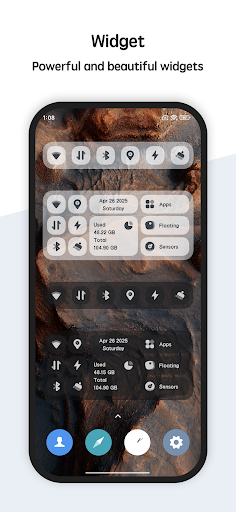
The most beautiful and powerful battery manager for android! You are able to monitor the battery information. Battery manager provides many kinds of tools. including: battery widget, desktop floating window, temperature monitor. You can monitor the ram, cpu and battery information very convenient. The detail features including: ★ Battery Monitor Show the curve of battery usage and temperature. Monitor the battery status, including: health, power status, voltage, level. ★ Temperature Monitor Battery manager will trigger an warning when cpu's or battery's temperature is too high, you can choose open or close the over heat alarm as your like. ★ Floating Window Floating window show the cpu temperature, battery temperature, ram usage real time, including: status bar floating window and desktop floating window. ★ Widget Support ram widget, cpu widget and battery widget. ★ Multi-Theme Battery manager is very beautiful and support multi-theme switching, you can choose the theme you like.

What Battery manager and monitor Is Used For

Battery manager and monitor appears to be a phone utility app focused on checking battery status and related device performance details. Based on the metadata, people may use it to view battery level, health, voltage, power status, and temperature in one place, along with basic monitoring for RAM and CPU usage. That makes it more of a system status tool than a battery saver app.

The app also seems designed for at-a-glance monitoring on Android phones through widgets and a floating window. The listed permissions suggest it may display information over other apps and adjust some system settings, which fits features like on-screen overlays and quick access panels. Users who want to keep an eye on overheating, battery drain patterns, or general device load may find it useful for routine checks rather than deep troubleshooting.

Common uses

  • Check battery level, health, voltage, and charging status
  • Monitor battery and CPU temperature trends
  • View RAM and CPU usage from a floating window
  • Use widgets for quick battery or system stats on the home screen
  • Get warnings when temperature rises too high
  • Switch themes for a different look and layout
  • Track device performance on an Android phone
Best for:
phone users system monitoring battery tracking widget users floating window tools

App Details

Package:
com.glgjing.thor
Category:
Tools
Developer:
System monitor tools lab - Cpu Ram Battery
Version:
11.10.3
Updated:
Feb 28, 2026
Min Android:
6.0
Age Rating:
Everyone
Contains Ads:
No
In-App Purchases:
No

Official Listing

  • Official listing available on Google Play
  • Package name: com.glgjing.thor
  • Age rating: Everyone

Explore More

Browse more apps in Tools or explore the Phone hub .

Related Tools Apps

F-Secure Mobile Security icon

F-Secure Mobile Security

Tools F-Secure Corporation

Antivirus, Virus Cleaner & Malware Scan | Mobile Security & Hacker Protection

Version 10.57-ff32089 17.9 MB ⭐ 4.20 100,000,000+ installs
AccuBattery icon

AccuBattery

Tools Digibites

Accu​Battery monitors battery health performance via science

Version 2.1.4 16.1 MB ⭐ 4.71 10,000,000+ installs

How to Download Battery manager and monitor

If this app is not hosted directly on APKApps official link, then for the safest and most up-to-date version, install it from its official Google Play listing.