Puzzles & Chaos: Frozen Castle icon

Phone

Puzzles & Chaos: Frozen Castle

Strategy 37GAMES ⭐ 4.40 10,000,000+
Version 1.88.00 Teen

Screenshots

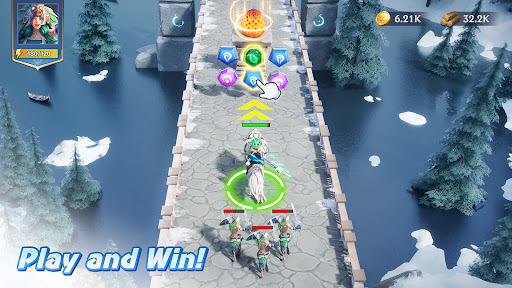
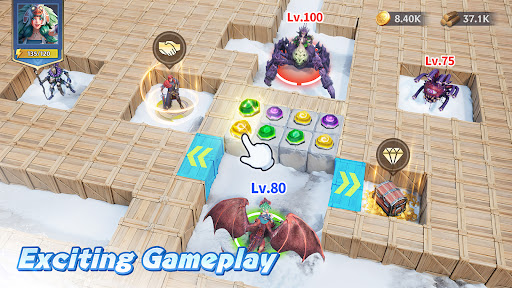
Puzzles & Chaos: Frozen Castle screenshot
Permissions Explained 8 permissions requested View details

This app requests 8 permissions. The table below explains what each permission may allow and what users should review before installing.

Status Permission What it means Why it may be used User safety note
ℹ️ Review View Wi Fi Connections view Wi-Fi connections This is an Android permission or app-specific permission requested by the app. The app may use this permission for features related to its category, device support, background behavior, storage, connectivity, or system integration. Review this permission before installing, especially if it does not match the app’s expected purpose.
ℹ️ Review View Network Connections view network connections This is an Android permission or app-specific permission requested by the app. The app may use this permission for features related to its category, device support, background behavior, storage, connectivity, or system integration. Review this permission before installing, especially if it does not match the app’s expected purpose.
ℹ️ Review Full Network Access full network access This is an Android permission or app-specific permission requested by the app. The app may use this permission for features related to its category, device support, background behavior, storage, connectivity, or system integration. Review this permission before installing, especially if it does not match the app’s expected purpose.
ℹ️ Review Run At Startup run at startup This is an Android permission or app-specific permission requested by the app. The app may use this permission for features related to its category, device support, background behavior, storage, connectivity, or system integration. Review this permission before installing, especially if it does not match the app’s expected purpose.
ℹ️ Review Control Vibration control vibration This is an Android permission or app-specific permission requested by the app. The app may use this permission for features related to its category, device support, background behavior, storage, connectivity, or system integration. Review this permission before installing, especially if it does not match the app’s expected purpose.
ℹ️ Review Prevent Device From Sleeping prevent device from sleeping This is an Android permission or app-specific permission requested by the app. The app may use this permission for features related to its category, device support, background behavior, storage, connectivity, or system integration. Review this permission before installing, especially if it does not match the app’s expected purpose.
ℹ️ Review Google Play License Check Google Play license check This is an Android permission or app-specific permission requested by the app. The app may use this permission for features related to its category, device support, background behavior, storage, connectivity, or system integration. Review this permission before installing, especially if it does not match the app’s expected purpose.
ℹ️ Review Receive Data From Internet receive data from Internet This is an Android permission or app-specific permission requested by the app. The app may use this permission for features related to its category, device support, background behavior, storage, connectivity, or system integration. Review this permission before installing, especially if it does not match the app’s expected purpose.

About Puzzles & Chaos: Frozen Castle

Puzzles & Chaos is a match-3 fantasy strategy game that tells an ancient legend of a Frozen Land. A once prosperous continent now lies frozen due to the bizarre magic of the undead. The humans, dragons, and other magical creatures who once lived here perished, escaped, or were displaced to desolate lands. As a warrior, you are expected to remove the frozen seal, awaken the dragon, and rebuild your homeland using your innate strategic talents. Game Features: 1. Match-3 Battles: Remember! Matching is the key! Match magic tiles to release hero skills. 2. Explore the Unknown: A huge map for you to explore! Visit the Seer's Hut before marching for a head start in resource gathering. 3. Make Strategic Deployments: To fight against the undead, powerful troops are required! Recruit heroes and train units to form a powerful squad. 4. Free Construction: Customize the layout of your castle as you wish. Buildings can be placed anywhere you want! 5. Unite With Allies: Cooperation enhances the fun! By creating or joining an alliance, you will be able to rally against foes and share resources with your allies. 6. Raise the Dragon: How can there be no dragons in a magical world? Put the unfathomable power of the dragon at your disposal! Claim your own Dragon's Egg today!

What Puzzles & Chaos: Frozen Castle Is Used For

Puzzles & Chaos: Frozen Castle is a phone game that appears to combine match-3 puzzle battles with fantasy strategy gameplay. Based on the metadata, players may use it to progress through a story set in a frozen world, where matching tiles triggers hero abilities while troops, heroes, and dragons are assembled to handle combat and expansion.

The app also seems designed for longer-term base-building and alliance play. Its network permissions suggest it connects online for features such as resource sharing, account or game data syncing, and other multiplayer-style interactions. The permissions to run at startup and prevent the device from sleeping may support background game services or ongoing connection handling while playing. Common use cases may include exploring the map, managing a castle layout, recruiting units, and taking part in team-based events or alliances on a mobile device.

Common uses

  • Play match-3 battles to activate character skills
  • Build and customize a castle layout
  • Explore a world map and gather resources
  • Recruit heroes, troops, and a dragon for strategy play
  • Join or create alliances for shared progression
  • Use as a phone game for short sessions or longer campaign play
Best for:
mobile strategy players match-3 fans base-building games fantasy game fans alliance play

App Details

Package:
com.global.pnck
Category:
Strategy
Developer:
37GAMES
Version:
1.88.00
Updated:
Mar 16, 2026
Min Android:
6.0
Age Rating:
Teen
Contains Ads:
No
In-App Purchases:
Yes

Official Listing

  • Official listing available on Google Play
  • Package name: com.global.pnck
  • Age rating: Teen

Explore More

Browse more apps in Strategy or explore the Phone hub .

Related Strategy Apps

Castle Clash: World Ruler icon

Castle Clash: World Ruler

Strategy IGG.COM

An 12-year-old classic creates a new chapter of glory

Version 4.3.1 556.0 MB ⭐ 4.40 100,000,000+ installs
Empires & Puzzles: Match-3 RPG icon

Empires & Puzzles: Match-3 RPG

Puzzle Small Giant Games

Discover Dragon Dawn, our biggest expansion. Powerful dragons await you!

Version 84.0.2 169.2 MB ⭐ 4.50 50,000,000+ installs
MythWars & Puzzles: RPG Match3 icon

MythWars & Puzzles: RPG Match3

Role Playing Karmagame HK Limited

Epic RPG puzzle game! Summon mythology heroes, conquer evil Titans!

Version 2.3.42.1 192.6 MB ⭐ 4.30 10,000,000+ installs
Call of Dragons icon

Call of Dragons

Strategy FARLIGHT
Version Varies with device ⭐ 4.40 10,000,000+ installs

How to Download Puzzles & Chaos: Frozen Castle

If this app is not hosted directly on APKApps official link, then for the safest and most up-to-date version, install it from its official Google Play listing.