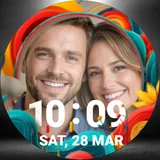
About Photo Frame Watch Face
Turn your smartwatch into a beautiful digital photo frame! 📸⌚ Make your smartwatch truly yours with the Photo Frame Watch Face. Why settle for standard backgrounds when you can carry your favorite memories, loved ones, pets, or breathtaking landscapes right on your wrist? Designed specifically for Wear OS devices, this elegant watch face lets you easily set any picture from your gallery as your watch background. Featuring a clean, modern digital time display and a stylish framing effect, it perfectly balances personalization with everyday functionality. ✨ Key Features: 🖼️ Custom Photo Backgrounds: Easily select any picture from your phone to display on your smartwatch. 🕒 Clear & Crisp Digital Time: Large, easy-to-read font showing the time (Hours:Minutes) so your photo doesn't obscure the essentials. 📅 Date Display: Conveniently shows the current Day, Date, and Month at a glance. 🎨 Elegant Frame Design: Features a subtle, stylish circular frame overlay that focuses the eye on your photo while keeping the watch face looking premium. 🔋 Battery Optimized: Designed to be lightweight and efficient so it won't drain your smartwatch battery. ⚙️ Easy Setup: A seamless, user-friendly process to crop, adjust, and apply your photo in seconds. Perfect for: -Couples wanting to keep their partner close. -Parents and grandparents showing off their kids. -Pet lovers wanting to see their furry friends all day. -Travelers displaying their favorite vacation snapshots. -Anyone who loves deep customization for their tech! Download the Photo Frame Watch Face today and start wearing your favorite moments!
What Photo Frame Watch Face Is Used For
Photo Frame Watch Face appears to be a Wear OS personalization app that lets users turn a smartwatch screen into a photo-based watch face. Based on the metadata, its main purpose is to display a chosen picture from the phone gallery on the watch, alongside a digital time readout and date information. That makes it commonly used by people who want a more personal-looking watch face instead of a standard design.
The app may be especially relevant for everyday smartwatch use, where the watch face needs to stay readable while still showing a custom image. The listed permissions for network access and preventing the device from sleeping suggest it may connect online for app functions and keep the watch face active as needed. Since it is described for Wear OS devices, it is best understood as a watch companion/personalization app rather than a general phone utility.
Common uses
- Set a custom photo as the smartwatch watch face background
- Show the time in a clear digital format on top of the image
- Display the current day, date, and month
- Use personal pictures such as family photos, pets, or travel shots
- Adjust and crop an image to fit the watch display
- Customize a Wear OS device with a more personal look
- Keep key time information visible while using a photo theme
App Details
Package:
com.gphoenix.photoframe
Developer:
Watch Faces by GPhoenix & Pixie Wacche
Version:
Varies with device
Min Android:
Varies with device
Age Rating:
Everyone
Contains Ads:
Yes
In-App Purchases:
No
Official Listing
-
Official listing available on
Google Play
-
Package name:
com.gphoenix.photoframe
-
Age rating:
Everyone
Related Personalization Apps
Personalization
•
Zedge
Discover millions of background wallpapers & ringtones or make your own with AI.
Version 9.14.2
55.5 MB
⭐ 4.70
500,000,000+ installs
Personalization
•
LBE Tech
Run multiple accounts of the same app on a single device
Version 4.0.9557
34.4 MB
⭐ 4.10
100,000,000+ installs
Personalization
•
Nexileap
6000+ Emojis, Custom Keyboard, Fonts, Themes, Genmoji AI Generator,Stickers,GIFs
Version 3.6.3.1
36.7 MB
⭐ 4.70
100,000,000+ installs
Personalization
•
Nebuchadnezzar DOO
Check Wallcraft Live 4D Wallpaper - 4k HD wallpapers & stunning 3D backgrounds!
Version Varies with device
29.6 MB
⭐ 4.60
100,000,000+ installs
Personalization
•
Delicate theme for Android App
Install our stylish keyboard with Neon Love Theme now!
Version 10.7.2.0323
33.2 MB
⭐ 4.60
100,000,000+ installs
Personalization
•
Battery Stats Saver
Ultimate Gallery Lock App - Hide Pictures, Videos and Lock Apps Instantly!
Version 2.1.12
24.6 MB
⭐ 4.60
100,000,000+ installs
How to Download Photo Frame Watch Face
If this app is not hosted directly on APKApps official link,
then for the safest and most up-to-date version, install it from its official Google Play listing.