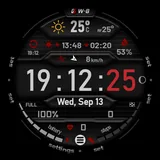
GS Weather 8 Watch Face icon

Phone

GS Weather 8 Watch Face

Weather GS Watchfaces ⭐ 4.20 1,000+
Version 2.5.5 Everyone

Screenshots

GS Weather 8 Watch Face screenshot
Permissions Explained 9 permissions requested View details

This app requests 9 permissions. The table below explains what each permission may allow and what users should review before installing.

Status Permission What it means Why it may be used User safety note
ℹ️ Review Approximate Location (network Based) approximate location (network-based) This is an Android permission or app-specific permission requested by the app. The app may use this permission for features related to its category, device support, background behavior, storage, connectivity, or system integration. Review this permission before installing, especially if it does not match the app’s expected purpose.
ℹ️ Review Precise Location (gps And Network Based) precise location (GPS and network-based) This is an Android permission or app-specific permission requested by the app. The app may use this permission for features related to its category, device support, background behavior, storage, connectivity, or system integration. Review this permission before installing, especially if it does not match the app’s expected purpose.
ℹ️ Review Body Sensors (like Heart Rate Monitors) body sensors (like heart rate monitors) This is an Android permission or app-specific permission requested by the app. The app may use this permission for features related to its category, device support, background behavior, storage, connectivity, or system integration. Review this permission before installing, especially if it does not match the app’s expected purpose.
ℹ️ Review View Network Connections view network connections This is an Android permission or app-specific permission requested by the app. The app may use this permission for features related to its category, device support, background behavior, storage, connectivity, or system integration. Review this permission before installing, especially if it does not match the app’s expected purpose.
ℹ️ Review Full Network Access full network access This is an Android permission or app-specific permission requested by the app. The app may use this permission for features related to its category, device support, background behavior, storage, connectivity, or system integration. Review this permission before installing, especially if it does not match the app’s expected purpose.
ℹ️ Review Run At Startup run at startup This is an Android permission or app-specific permission requested by the app. The app may use this permission for features related to its category, device support, background behavior, storage, connectivity, or system integration. Review this permission before installing, especially if it does not match the app’s expected purpose.
ℹ️ Review Control Vibration control vibration This is an Android permission or app-specific permission requested by the app. The app may use this permission for features related to its category, device support, background behavior, storage, connectivity, or system integration. Review this permission before installing, especially if it does not match the app’s expected purpose.
ℹ️ Review Prevent Device From Sleeping prevent device from sleeping This is an Android permission or app-specific permission requested by the app. The app may use this permission for features related to its category, device support, background behavior, storage, connectivity, or system integration. Review this permission before installing, especially if it does not match the app’s expected purpose.
ℹ️ Review Google Play License Check Google Play license check This is an Android permission or app-specific permission requested by the app. The app may use this permission for features related to its category, device support, background behavior, storage, connectivity, or system integration. Review this permission before installing, especially if it does not match the app’s expected purpose.

About GS Weather 8 Watch Face

GS Weather 8 is an advanced weather watch face for Wear OS smartwatches with unique features and extreme customization, fully translated into 17 languages. After installing, please take a moment and launch the quick guide found in the watchface settings menu, to better understand the watchface functions. It is necessary to install this app on your mobile for the watchface to function properly. Please make sure to install it there first. A phone app is needed for this watchface to function properly (get phone battery percentage and intercommunicate with the app below) This app acts as a service so you won't find it in your app launcher. Please make sure to install the mobile version first. The watch face can be controlled from your phone (a separate application needs to be installed on your phone). This gives you the ability to control all watch face settings, backup and restore customizations, and receive notifications from the watch face when the battery drops to the level you have set, or your heart rate bpm reaches the limit you have set. Download the Android companion app here https://play.google.com/store/apps/details?id=com.gs.watchfaces The watch face has 2 main screens in which it shows all the information. The time, weather (chart) screen. It also has an additional chart showing tides. Tides are disabled by default, please enable tides from the watch face general settings if you need them. Check the tap guide and/or quick guide to see how to get to each one of them. Please take note that the weather info is only "shown" on the watch face, the data is provided by openweathermap.org. I do not have any responsibility for the weather conditions the watch face shows. Tides info is taken from worldtides.info and as their disclaimer states: “NO GUARANTEES ARE MADE ABOUT THE CORRECTNESS OF THIS DATA. You may not use it if anyone or anything could come to harm as a result of using it (e.g., for navigational purposes)”. For any inquiries or problems, you may have, please contact me on social media or send me an email to mailto:[email protected]. I will be more than happy to assist you and hear your thoughts.

What GS Weather 8 Watch Face Is Used For

GS Weather 8 Watch Face appears to be a Wear OS watch face app designed for showing time and weather information on a smartwatch. Based on the metadata, it also includes a tide chart option, multiple customization settings, and multilingual support, so it may be used by people who want a more information-rich watch face rather than a simple clock display.

The app is described as needing a companion phone app to work properly. That phone-side service may be used to sync settings, show phone battery percentage, manage backups and restores, and send alerts when battery or heart-rate limits are reached. Because it requests location, network, body sensor, startup, vibration, and sleep-related permissions, it appears to rely on location and device data to support weather display, notifications, and continuous watch-face behavior. The weather data is shown on the watch face rather than acting as a full weather app, so it seems best suited for users who want weather and status details at a glance on their smartwatch.

Common uses

  • Display time and current weather on a Wear OS watch face
  • Show weather charts and an optional tides chart
  • Customize watch-face settings from the companion phone app
  • Back up and restore watch-face customizations
  • Receive alerts for battery level or heart-rate thresholds
  • Use phone battery and sensor data to support watch-face features
  • Keep the watch face active with background service behavior
Best for:
Wear OS users Smartwatch customization Weather at a glance Companion phone app users Large-screen quick status

App Details

Package:
com.gs.watchface.weather8
Category:
Weather
Developer:
GS Watchfaces
Version:
2.5.5
Updated:
Dec 5, 2025
Min Android:
Varies with device
Age Rating:
Everyone
Contains Ads:
No
In-App Purchases:
No

Official Listing

  • Official listing available on Google Play
  • Package name: com.gs.watchface.weather8
  • Age rating: Everyone

Explore More

Browse more apps in Weather or explore the Phone hub .

Related Weather Apps

1Weather Forecasts & Radar icon

1Weather Forecasts & Radar

Weather OneLouder Apps

Hyperlocal Forecasts, Live Radar, Severe Weather alerts & Homescreen Widgets

Version 12.4.1 81.5 MB ⭐ 4.30 100,000,000+ installs
The Weather Channel - Radar icon

The Weather Channel - Radar

Weather The Weather Channel

Prepare for severe weather with notifications, future radar, and live alerts.

Version 15.18.0 85.2 MB ⭐ 4.70 100,000,000+ installs
Weather & Radar Forecast icon

Weather & Radar Forecast

Weather WetterOnline

Local forecast, alerts, rain, snow and wind radar, air quality & weather widget

Version Varies with device 67.7 MB ⭐ 4.70 100,000,000+ installs
AccuWeather: Weather Radar icon

AccuWeather: Weather Radar

Weather AccuWeather

Your local weather forecast, storm tracker, radar maps & live weather news

Version Varies with device 46.1 MB ⭐ 3.50 100,000,000+ installs
Weather icon

Weather

Weather OneLouder Apps
Version 0.7.5.0 ⭐ 4.70 50,000,000+ installs

How to Download GS Weather 8 Watch Face

If this app is not hosted directly on APKApps official link, then for the safest and most up-to-date version, install it from its official Google Play listing.