Calendar Pro for Wear OS icon

Phone

Calendar Pro for Wear OS

Productivity Thomas Otero ⭐ 4.20 5,000+
Version 6.2.1 Everyone

Screenshots

Calendar Pro for Wear OS screenshot
Permissions Explained 6 permissions requested View details

This app requests 6 permissions. The table below explains what each permission may allow and what users should review before installing.

Status Permission What it means Why it may be used User safety note
ℹ️ Review Read Calendar Events Plus Confidential Information read calendar events plus confidential information This is an Android permission or app-specific permission requested by the app. The app may use this permission for features related to its category, device support, background behavior, storage, connectivity, or system integration. Review this permission before installing, especially if it does not match the app’s expected purpose.
ℹ️ Review Add Or Modify Calendar Events And Send Email To Guests Without Owners' Knowledge add or modify calendar events and send email to guests without owners' knowledge This is an Android permission or app-specific permission requested by the app. The app may use this permission for features related to its category, device support, background behavior, storage, connectivity, or system integration. Review this permission before installing, especially if it does not match the app’s expected purpose.
ℹ️ Review View Network Connections view network connections This is an Android permission or app-specific permission requested by the app. The app may use this permission for features related to its category, device support, background behavior, storage, connectivity, or system integration. Review this permission before installing, especially if it does not match the app’s expected purpose.
ℹ️ Review Run At Startup run at startup This is an Android permission or app-specific permission requested by the app. The app may use this permission for features related to its category, device support, background behavior, storage, connectivity, or system integration. Review this permission before installing, especially if it does not match the app’s expected purpose.
ℹ️ Review Control Vibration control vibration This is an Android permission or app-specific permission requested by the app. The app may use this permission for features related to its category, device support, background behavior, storage, connectivity, or system integration. Review this permission before installing, especially if it does not match the app’s expected purpose.
ℹ️ Review Prevent Device From Sleeping prevent device from sleeping This is an Android permission or app-specific permission requested by the app. The app may use this permission for features related to its category, device support, background behavior, storage, connectivity, or system integration. Review this permission before installing, especially if it does not match the app’s expected purpose.

About Calendar Pro for Wear OS

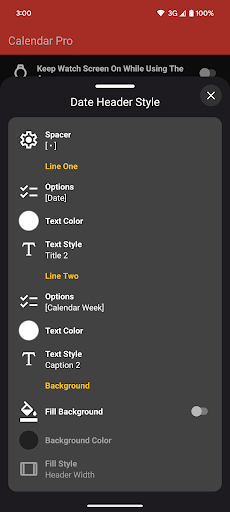
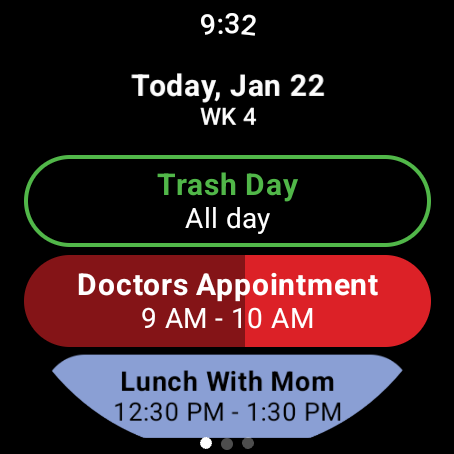
Calendar Pro is a fully customizable calendar app that syncs all the calendars from your phone to your Wear OS watch. App Features • The next 12 months of events are synced to your watch • Add, edit, and delete events using your watch • View details about event • Customizable month calendar with event indicators • Customizable Agenda • Month calendar Tile with event indicators • Agenda Tile • Week Tile • Next Event Tile • Next Event watch complication • Multiple theme colors • Support for Google calendar, Outlook calendar [¹], Samsung calendar[²], DAVx⁵, and ICSx⁵ • No subscription! One price unlocks all features Month Calendar & Tile Customizations • Background colors • Month/Year format and color • Today indicator styling • Per day of week styling • Show calendar weeks with style • Event indicator shape • Scaling options Agenda Customizations • Multiple date header styles • Options for calendar week and in days • Date header text color and background color • Multiple text style for event chips • Dim finished events today • Show progress as background for currently ongoing events • Cross out finished events today • Outline all-day events Next Event Complication • Support for short and long text complications • Hide/Show Icon • Select what to show on title and text sections of the complication • Select which calendars to show • Can show currently ongoing events, next event today, and future events • Set what happens when tapping the complication Agenda Tile • Shows up to 6 events[³] • Text style options • Shows currently ongoing events, next events today and future events This app requires that BOTH the watch app and phone app be installed! [1] Outlook app must be installed and Sync calendars must be toggled on in the Outlook app settings. [2] Samsung calendar only supported on Samsung phones. [3] Depending on font scale size and selected options.

What Calendar Pro for Wear OS Is Used For

Calendar Pro for Wear OS appears to be a productivity app for viewing and managing calendar events on a Wear OS watch while syncing data from the paired Android phone. Based on the metadata, it is designed for people who want quick access to schedules on their wrist, including upcoming events, daily agendas, and monthly views. It supports multiple calendar sources such as Google Calendar, Outlook, Samsung Calendar, DAVx5, and ICSx5, so it may be useful for users who keep calendars in different services.

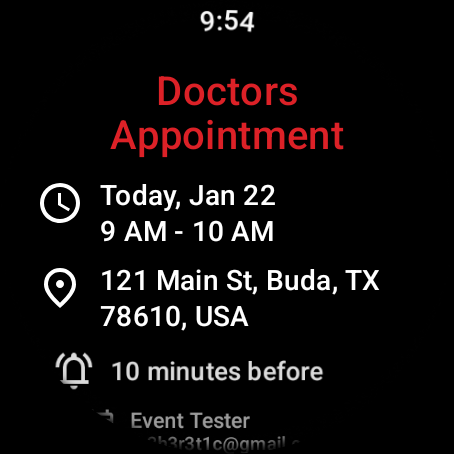
The app also seems focused on watch-based event management. Users may be able to add, edit, and delete events from the watch, view event details, and use tiles or complications to see the next event or agenda at a glance. The available customization options suggest it is intended for users who want to tailor the calendar display, theme colors, and event indicators to their preferences. Because the permissions include calendar access, event modification, and running at startup, it is built to integrate closely with calendar data and keep watch displays updated.

Common uses

  • Syncs phone calendars to a Wear OS watch
  • Shows upcoming events in month and agenda views
  • Lets users manage events from the watch
  • Provides tiles and complications for quick schedule checks
  • Supports multiple calendar providers and formats
  • Offers customization for colors, layouts, and event indicators
  • Useful for keeping a calendar visible without opening the phone
Best for:
Wear OS users Calendar tracking Quick schedule checks Watch-based productivity Personal calendar management

App Details

Package:
com.h3r3t1c.prowearcalendar
Category:
Productivity
Developer:
Thomas Otero
Version:
6.2.1
Updated:
Jan 14, 2026
Min Android:
Varies with device
Age Rating:
Everyone
Contains Ads:
No
In-App Purchases:
No

Official Listing

  • Official listing available on Google Play
  • Package name: com.h3r3t1c.prowearcalendar
  • Age rating: Everyone

Explore More

Browse more apps in Productivity or explore the Phone hub .

Related Productivity Apps

DigiCal icon

DigiCal

Productivity Digibites

Schedule your agenda with the #1 calendar app & month widget for Google Calendar

Version 2.3.0 17.4 MB ⭐ 4.49 10,000,000+ installs
ByssWeather icon

ByssWeather

Weather byss mobile

Weather radar and forecast watch faces for Wear OS

Version 2.7.7.7 38.1 MB ⭐ 3.98 1,000,000+ installs

How to Download Calendar Pro for Wear OS

If this app is not hosted directly on APKApps official link, then for the safest and most up-to-date version, install it from its official Google Play listing.