Handy Library - Book Organizer icon

Phone

Handy Library - Book Organizer

Books & Reference Bookshare Co., Ltd ⭐ 4.00 500,000+
Version 3.0.0 Everyone

Screenshots

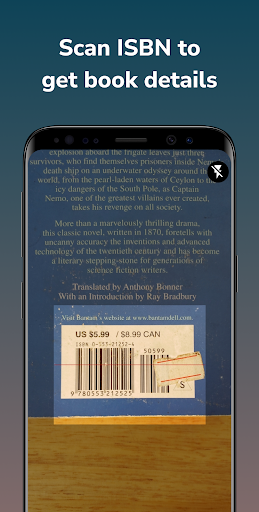
Handy Library - Book Organizer screenshot
Permissions Explained 11 permissions requested View details

This app requests 11 permissions. The table below explains what each permission may allow and what users should review before installing.

Status Permission What it means Why it may be used User safety note
ℹ️ Review Read The Contents Of Your Usb Storage read the contents of your USB storage This is an Android permission or app-specific permission requested by the app. The app may use this permission for features related to its category, device support, background behavior, storage, connectivity, or system integration. Review this permission before installing, especially if it does not match the app’s expected purpose.
ℹ️ Review Modify Or Delete The Contents Of Your Usb Storage modify or delete the contents of your USB storage This is an Android permission or app-specific permission requested by the app. The app may use this permission for features related to its category, device support, background behavior, storage, connectivity, or system integration. Review this permission before installing, especially if it does not match the app’s expected purpose.
ℹ️ Review Take Pictures And Videos take pictures and videos This is an Android permission or app-specific permission requested by the app. The app may use this permission for features related to its category, device support, background behavior, storage, connectivity, or system integration. Review this permission before installing, especially if it does not match the app’s expected purpose.
ℹ️ Review View Wi Fi Connections view Wi-Fi connections This is an Android permission or app-specific permission requested by the app. The app may use this permission for features related to its category, device support, background behavior, storage, connectivity, or system integration. Review this permission before installing, especially if it does not match the app’s expected purpose.
ℹ️ Review View Network Connections view network connections This is an Android permission or app-specific permission requested by the app. The app may use this permission for features related to its category, device support, background behavior, storage, connectivity, or system integration. Review this permission before installing, especially if it does not match the app’s expected purpose.
ℹ️ Review Full Network Access full network access This is an Android permission or app-specific permission requested by the app. The app may use this permission for features related to its category, device support, background behavior, storage, connectivity, or system integration. Review this permission before installing, especially if it does not match the app’s expected purpose.
ℹ️ Review Run At Startup run at startup This is an Android permission or app-specific permission requested by the app. The app may use this permission for features related to its category, device support, background behavior, storage, connectivity, or system integration. Review this permission before installing, especially if it does not match the app’s expected purpose.
ℹ️ Review Control Vibration control vibration This is an Android permission or app-specific permission requested by the app. The app may use this permission for features related to its category, device support, background behavior, storage, connectivity, or system integration. Review this permission before installing, especially if it does not match the app’s expected purpose.
ℹ️ Review Prevent Device From Sleeping prevent device from sleeping This is an Android permission or app-specific permission requested by the app. The app may use this permission for features related to its category, device support, background behavior, storage, connectivity, or system integration. Review this permission before installing, especially if it does not match the app’s expected purpose.
ℹ️ Review Google Play License Check Google Play license check This is an Android permission or app-specific permission requested by the app. The app may use this permission for features related to its category, device support, background behavior, storage, connectivity, or system integration. Review this permission before installing, especially if it does not match the app’s expected purpose.
ℹ️ Review Receive Data From Internet receive data from Internet This is an Android permission or app-specific permission requested by the app. The app may use this permission for features related to its category, device support, background behavior, storage, connectivity, or system integration. Review this permission before installing, especially if it does not match the app’s expected purpose.

About Handy Library - Book Organizer

📚 Handy Library: The Ultimate Library and Bookshelf Organizer Handy Library is not just an app; it's a comprehensive solution for managing any book collection. Whether you're a passionate reader with an extensive home library, a teacher managing a class library, or a librarian overseeing a school or community library, Handy Library makes cataloging and organizing books a breeze. Note: This is a library management app, NOT AN EBOOK READER. **Enjoy cataloging your first 100 books for FREE!** 🔍 Sophisticated yet User-Friendly Book Management: + Efficient Cataloging: Quickly add books to your bookcase or library by scanning their ISBNs. + Diverse Library Types: Ideal for personal bookshelves, academic environments, religious institutions, and small community libraries. + Synchronized Bookshelves: Seamlessly align your physical bookshelves and virtual bookshelves for perfect organization. + TBR Bookshelf Organizer: Streamline your 'To Be Read' collection with our intuitive TBR bookshelf or tagging system. + Book Tracker: Record your completed reads, current engagements, and loaned books with ease. 🌈 Versatile for Various Library Setups: + Home Library: Create a beautifully organized personal reading space. + Class Library, School Library: Catalog and track books efficiently, making them easily accessible to students. + Community Libraries, Book Clubs: Easily organize community libraries with features for tracking book lending and returns. + Comic Collection: Perfect for comic enthusiasts, Handy Library offers specialized features for cataloging and organizing comic books, making it easy to find your favorite issues and keep track of your growing collection. 🔑 Key Features for Enhanced Library Management: + Add books to your library catalog through ISBN scanning, online searches, or manual entries. + Customize with personal notes for each book and share interesting finds with friends. + Advanced sorting and filtering to maintain and organize your library. + Keep track of borrowed and lent books with reminders. + Compile wish lists for future reading endeavors. 📈 Advanced Library Management Tools: + Utilize powerful filters for efficient organization. + Access detailed statistics to understand your library's composition. + Export and import library data in ZIP, XLS or CSV file format for backup or transfer. 🌐 Rich Book Data from Renowned Sources: Integrates with leading databases like Goodreads, Amazon, Google Books, and OpenLibrary for comprehensive book information. 💰 Pricing: - Get Started for Free: Start managing up to 100 books at no cost with our free version. - Upgrade to Premium for Unlimited Access: Unlock unlimited book management with a single purchase. Lifetime access to all features, on any Android device tied to your Google account. 🎲 Beyond Books - Manage Diverse Collections: Extend the app's functionality to catalog items like comics, mangas, magazines, CD-DVD, and sheet music, making it a versatile tool for various collection types. 📖…

What Handy Library - Book Organizer Is Used For

Handy Library - Book Organizer appears to be a phone app for cataloging and managing book collections. Based on the metadata, it is meant for people who want to keep track of physical books rather than read ebooks in the app itself. Common uses may include organizing a home bookshelf, managing a class or school library, and keeping records for small community collections or book clubs.

The app description suggests it can help users add books through ISBN scanning, online lookup, or manual entry, then sort them into shelves or tags. It may also be used to track books that are currently being read, finished, loaned out, or added to a wish list. Permissions such as camera access, storage access, and network access fit those use cases because the app may need to scan book barcodes, save library data, and fetch book details from online sources.

Common uses

  • Catalog physical books by ISBN, search, or manual entry
  • Organize home, school, class, or community libraries
  • Track books you are reading, have finished, or have lent out
  • Manage TBR lists, wish lists, and book tags
  • Add notes and sort books with filters and shelves
  • Use it on a phone for everyday book-collection tracking
Best for:
book collectors home library owners teachers and librarians book clubs comic collectors

App Details

Package:
com.handylibrary.main
Developer:
Bookshare Co., Ltd
Version:
3.0.0
Updated:
Dec 17, 2025
Min Android:
7.0
Age Rating:
Everyone
Contains Ads:
No
In-App Purchases:
Yes

Official Listing

  • Official listing available on Google Play
  • Package name: com.handylibrary.main
  • Age rating: Everyone

Explore More

Browse more apps in Books & Reference or explore the Phone hub .

Related Books & Reference Apps

How to Download Handy Library - Book Organizer

If this app is not hosted directly on APKApps official link, then for the safest and most up-to-date version, install it from its official Google Play listing.