Construction Master Pro Calc icon

Phone

Construction Master Pro Calc

Tools Calculated Industries ⭐ 4.70 100,000+
Version 10.20.8 4.0 MB Everyone

Screenshots

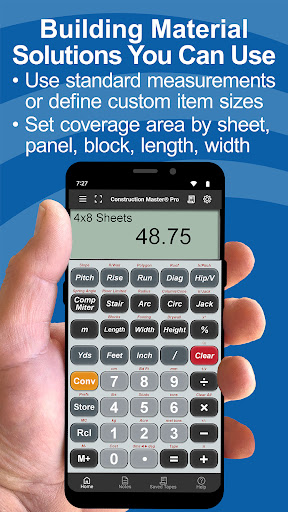
Construction Master Pro Calc screenshot
Permissions Explained 10 permissions requested View details

This app requests 10 permissions. The table below explains what each permission may allow and what users should review before installing.

Status Permission What it means Why it may be used User safety note
⚠️ Sensitive Modify external storage android.permission.WRITE_EXTERNAL_STORAGE Allows the app to write or modify files in shared device storage. Used for saving downloads, media files, exports, edited documents, backups, or cached content. Sensitive permission. Make sure file access matches the app’s purpose.
⚠️ Sensitive Read phone state android.permission.READ_PHONE_STATE Allows the app to access phone status and device-related information. Used for call handling, carrier services, device identification, account security, or playback interruption handling. Sensitive permission. Review whether the app has a clear phone-related reason.
Common Internet access android.permission.INTERNET Allows the app to open network connections and communicate with online services. Commonly used for streaming, syncing, login, ads, analytics, downloads, cloud features, and app updates. Common permission. Review the app’s behavior if it does not appear to need online access.
ℹ️ Review Access Wifi State android.permission.ACCESS_WIFI_STATE This is an Android permission or app-specific permission requested by the app. The app may use this permission for features related to its category, device support, background behavior, storage, connectivity, or system integration. Review this permission before installing, especially if it does not match the app’s expected purpose.
Common View network status android.permission.ACCESS_NETWORK_STATE Allows the app to check whether the device is connected to Wi-Fi, mobile data, or another network. Often used to avoid loading content when offline or to adjust loading based on connection quality. Generally low risk by itself.
ℹ️ Review Keep device awake android.permission.WAKE_LOCK Allows the app to prevent the device from sleeping while a task is running. Used for media playback, downloads, navigation, alarms, calls, or long-running background tasks. Review battery usage if the app keeps the device awake too often.
ℹ️ Review System Alert Window android.permission.SYSTEM_ALERT_WINDOW This is an Android permission or app-specific permission requested by the app. The app may use this permission for features related to its category, device support, background behavior, storage, connectivity, or system integration. Review this permission before installing, especially if it does not match the app’s expected purpose.
⚠️ Sensitive Read external storage android.permission.READ_EXTERNAL_STORAGE Allows the app to read files from shared device storage. Used by media players, file managers, backup apps, editors, upload tools, and document apps. Sensitive permission. Review carefully if the app does not need access to files or media.
⚠️ Sensitive Approximate location android.permission.ACCESS_COARSE_LOCATION Allows the app to access an approximate device location. Used for weather, local content, regional features, nearby services, or location-based settings. Sensitive permission. Review whether the app needs location access.
⚠️ Sensitive Precise location android.permission.ACCESS_FINE_LOCATION Allows the app to access the device’s precise location when granted by the user. Used for maps, navigation, local recommendations, weather, rideshare, nearby devices, or location-based content. Sensitive permission. Grant only when location access matches the app’s purpose.

About Construction Master Pro Calc

FREE Try Before You Buy trial, your Google account is not charged by Google during the free trial. Optimize efficiency in all your projects with Construction Master Pro, the feet-inch-fraction construction calculator. Construction Master Pro combines two applications: Construction Master Pro & Construction Master Pro Trig. Both feature a comprehensive User’s Guide and targeted help functions. Developed with the core engine used in advanced construction calculator models, ensuring reliable performance for construction mathematics. WHY IT'S A MUST-HAVE TOOL • Powerful built-in solutions make it ideal for completing layouts, plans, bids, and estimates. • Work in and convert between all common building dimensional formats US & Metric. • Built-in right angle functions simplify square-ups, rafters, slopes, and more. • Full trigonometric functions. BUILT-IN SOLUTIONS: Dimensional Math and Conversions • Feet-Inch-Fraction, Inch Fraction, Yards • Decimal Feet and Inches (10ths, 100ths) • Preset Fractions (1/2" through 1/64") • D:M:S, Decimal Degree Entry and Conversions • Full Metric Function (m, cm, mm) Right Angle Solutions • Complete Right Angle/Rafter Calculations • Pitch Key (Slope and Grade) • Rise, Run, Diagonal/Common Rafter Keys • Regular and Irregular Hip/Valley & Jack Rafter Keys • Rafter Cutting Angles (Plumb, Cheek and Level Cuts) • Stair Layouts (including – Riser Limit, Stairwell Opening, Headroom, Floor Thickness) • Rake-Wall (including Arched) AREA AND VOLUME SOLUTIONS • Square and Cubic • Roof – Bundles, Squares, 4x8 Sheets, Pitch, Plan Area • Drywall, Siding and Paneling 4x8, 4x9 and 4x12 • Column/Cone Area and Volume • Basic & Advanced Circular Calculations • Weight per Volume Conversions • Length, Width and Height Keys • Blocks, Footings SPECIAL FUNCTIONS • Trigonometric Function Keys: Sine, Cosine, Tangent, Arcsine, Arccosine, Arctangent • Board Feet • Studs: Find number On-center • User-Definable Preferences • Cost per Unit (total costs based on unit price) • Equal-Sided Polygon • Compound Miters • Crown Angle • Advanced Paperless Tape for all functions • 4 Memories APP-ENHANCED FEATURES • NEW! Optional Fast Fractions - dedicated keys to speed and simplify how you enter common fractions. • NEW! Project Notes - Create shareable text or voice-to-text notes and lists. Set up folders by project or client. • Entry Editing Backspace Key – enable with Legacy Mode or double-tap the display. • Context-sensitive Help - press and hold any function key for Help text, diagrams, or videos. • Ability to Save and Share calculations and outputs (e.g., cut lists) to File or others on your crew. SUBSCRIPTION INFORMATION The first seven days are free. Subscriptions offered will automatically renew at the end of the chosen period. Upon purchase confirmation and completion of the free trial, payment will be charged to your Google Play account. The subscription will automatically renew unless the subscription is canceled in your Play Store account…

What Construction Master Pro Calc Is Used For

Construction Master Pro Calc appears to be a construction-focused calculator app for phone use. Based on the metadata, it is designed to help with dimensional math in feet, inches, fractions, metric units, and decimal formats, which is useful when working on layouts, estimates, and material calculations. The app combines standard construction calculator functions with a separate trigonometric mode, so it may be used for jobs that involve right angles, slopes, rafters, stairs, and other measurement-heavy tasks.

It also appears to support area, volume, and material-count calculations such as roof sheets, drywall, siding, board feet, studs, and circular or polygon-based measurements. The listed permissions suggest it may use internet access for app-related features, storage for saving or sharing data, and location access for functions that could relate to site context or related tools, though the metadata does not explain those uses in detail. Overall, this seems aimed at users who regularly translate building measurements into practical job-site numbers.

Common uses

  • Converting between feet-inch-fraction, decimal, and metric measurements
  • Calculating slopes, rafters, stairs, and other right-angle construction values
  • Estimating area and volume for roofs, drywall, siding, and similar materials
  • Working out board feet, studs, footings, and other job-site quantities
  • Using trigonometric functions for measurement-based calculations
  • Storing or referencing values with calculator memory and paperless tape features
  • Handling construction math on a phone while on the job or in the field
Best for:
contractors carpenters builders estimators job-site use

App Details

Package:
com.hydrix.laurene
Category:
Tools
Developer:
Calculated Industries
Version:
10.20.8
Updated:
Jan 15, 2026
Min Android:
12
Age Rating:
Everyone
Contains Ads:
No
In-App Purchases:
Yes

Official Listing

  • Official listing available on Google Play
  • Package name: com.hydrix.laurene
  • Age rating: Everyone

Explore More

Browse more apps in Tools or explore the Phone hub .

Related Tools Apps

How to Download Construction Master Pro Calc

If this app is not hosted directly on APKApps official link, then for the safest and most up-to-date version, install it from its official Google Play listing.