About aRDP Pro: Secure RDP Client
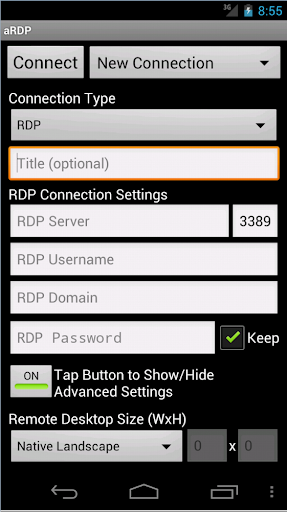
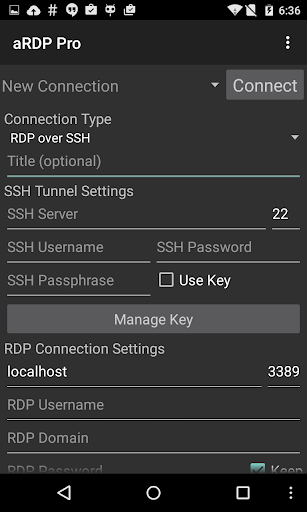
Connect to your computers from anywhere without network configuration! Sign up for the free Morpheusly Beta by visiting www.morpheusly.com to Download and Get Started Welcome to the best open-source RDP client in the world! Need aRDP on iOS or Mac OS X? Now available at https://apps.apple.com/ca/app/ardp-pro/id1620745523 Thank you for supporting my work and open-source software by donating! You are ensuring the continued development of the project, and rewarding Google for creating the Android platform that we all love. Release notes: https://github.com/iiordanov/remote-desktop-clients/blob/master/bVNC/CHANGELOG-aRDP Older versions: https://github.com/iiordanov/remote-desktop-clients/releases Report bugs: https://github.com/iiordanov/remote-desktop-clients/issues If you have questions, please ask on the forum instead of in a review for everybody's benefit: https://groups.google.com/forum/#!forum/bvnc-ardp-aspice-opaque-remote-desktop-clients Check out bVNC Pro, my VNC Viewer as well https://play.google.com/store/apps/details?id=com.iiordanov.bVNC See below for setup instructions on enabling RDP on Windows. Current known issues: - May not work for accounts with no password, please let me know if it works. - May not work for users with Cyrillic letters in the user name, please let me know if it works. aRDP is a secure, SSH capable, open source Remote Desktop Protocol client that uses the excellent FreeRDP library and parts of aFreeRDP. Its features include: - Remote desktop control of computers running any version of Windows except Windows 10 Home. Install a VNC server for Windows 10 Home and use bVNC - RDP File support in Pro version - Full Ubuntu 22.04+ support - Remote desktop control of Linux computers with xrdp installed - Master password - MFA/2FA SSH authentication - Sound redirection - RDP Gateway Support - SDcard redirection - Console mode - Fine control over remote desktop session styling - Multi-touch control over the remote mouse. One finger tap left-clicks, two-finger tap right-clicks, and three-finger tap middle-clicks - Right and middle-dragging if you don't lift the first finger that tapped - Scrolling with a two-finger drag - Pinch-zooming - Force Landscape, Immersive Mode, Keep Screen Awake options in Main Menu - Dynamic resolution changes, allowing you to reconfigure your desktop while connected, and control over virtual machines from BIOS to OS - Full rotation support. Use the central lock rotation on your device to disable rotation - Multi-language support - Full mouse support on Android 4.0+ - Full desktop visibility even with soft keyboard extended - SSH tunneling for added security or to reach machines behind a firewall. - UI Optimizations for different screen sizes (for tablets and smartphones) - Samsung multi-window support - SSH public/private (pubkey) support - Importing encrypted/unencrypted RSA keys in PEM format, unencrypted DSA keys in PKCS#8 format - Automatic connection session saving - Zoomable, Fit to Screen…
What aRDP Pro: Secure RDP Client Is Used For
aRDP Pro: Secure RDP Client appears to be an Android remote desktop app for connecting to computers from another location. Based on the metadata, it is intended for Remote Desktop Protocol (RDP) sessions, which means people may use it to view and control a Windows PC or a Linux machine with an xrdp server installed. The app category and description suggest it is aimed at productivity and remote work, especially when you need access to a computer without being physically in front of it.
The listed permissions and features point to common remote-session needs such as network communication, audio handling, and device vibration feedback. The app also mentions SSH-capable connections, gateway support, multi-factor authentication, sound redirection, and touch controls for remote mouse input, so it may be used by users who want more flexible remote administration or desktop access from a phone. Based on the metadata, it seems especially relevant for people managing work machines, home computers, or Linux desktops while away from them.
Common uses
- Connect to a Windows or Linux desktop remotely from an Android phone
- Access a computer session without changing local network settings, according to the description
- Use touch gestures to control the remote mouse and zoom the desktop view
- Handle remote audio redirection and audio-related session behavior
- Work with SSH-based authentication, MFA/2FA, and RDP gateway setups
- Save or open RDP connection files in the Pro version
- Use it for remote administration, troubleshooting, or accessing work files
App Details
Package:
com.iiordanov.aRDP
Developer:
Iordan Iordanov (Undatech)
Version:
v6.3.3
Updated:
Mar 29, 2026
Min Android:
5.0
Age Rating:
Everyone
Contains Ads:
No
In-App Purchases:
No
Official Listing
-
Official listing available on
Google Play
-
Package name:
com.iiordanov.aRDP
-
Age rating:
Everyone
Related Productivity Apps
Productivity
•
datronicsoft Technology GmbH
Multi Monitor Remote Desktop. Screen share, mirror and extend. USB, WiFi and LAN
Version 2.1.10
3.4 MB
⭐ 4.58
5,000,000+ installs
Productivity
•
TeamViewer
Get instant remote assistance for your device
Version 15.53.459
47.7 MB
⭐ 4.45
50,000,000+ installs
Productivity
•
RealVNC Limited
Remotely control a desktop anywhere in the world from your Android device!
Version 1.2.6.109857
4.6 MB
⭐ 4.00
5,000,000+ installs
Tools
•
C. Ghisler
Android version of the desktop file manager Total Commander (www.ghisler.com).
Version 3.50d
2.7 MB
⭐ 3.94
10,000,000+ installs
Business
•
NextApp, Inc.
No ads. No annoyances. No tracking. Manage your files. Retain your privacy.
Version 9.0.1.2
10.7 MB
⭐ 3.78
10,000,000+ installs
Business
•
AnyDesk Software GmbH
Remote access from anywhere. Fast and secure. All operating systems and devices
Version 7.1.0
20.4 MB
⭐ 2.64
50,000,000+ installs
How to Download aRDP Pro: Secure RDP Client
If this app is not hosted directly on APKApps official link,
then for the safest and most up-to-date version, install it from its official Google Play listing.