OptoExpert: AI Lens Measure icon

Phone

OptoExpert: AI Lens Measure

Medical ds.optometry ⭐ 1.40 100,000+
Version Varies with device Everyone

Screenshots

OptoExpert: AI Lens Measure screenshot
Permissions Explained 6 permissions requested View details

This app requests 6 permissions. The table below explains what each permission may allow and what users should review before installing.

Status Permission What it means Why it may be used User safety note
ℹ️ Review Read The Contents Of Your Usb Storage read the contents of your USB storage This is an Android permission or app-specific permission requested by the app. The app may use this permission for features related to its category, device support, background behavior, storage, connectivity, or system integration. Review this permission before installing, especially if it does not match the app’s expected purpose.
ℹ️ Review Modify Or Delete The Contents Of Your Usb Storage modify or delete the contents of your USB storage This is an Android permission or app-specific permission requested by the app. The app may use this permission for features related to its category, device support, background behavior, storage, connectivity, or system integration. Review this permission before installing, especially if it does not match the app’s expected purpose.
ℹ️ Review Take Pictures And Videos take pictures and videos This is an Android permission or app-specific permission requested by the app. The app may use this permission for features related to its category, device support, background behavior, storage, connectivity, or system integration. Review this permission before installing, especially if it does not match the app’s expected purpose.
ℹ️ Review View Network Connections view network connections This is an Android permission or app-specific permission requested by the app. The app may use this permission for features related to its category, device support, background behavior, storage, connectivity, or system integration. Review this permission before installing, especially if it does not match the app’s expected purpose.
ℹ️ Review Full Network Access full network access This is an Android permission or app-specific permission requested by the app. The app may use this permission for features related to its category, device support, background behavior, storage, connectivity, or system integration. Review this permission before installing, especially if it does not match the app’s expected purpose.
ℹ️ Review Prevent Device From Sleeping prevent device from sleeping This is an Android permission or app-specific permission requested by the app. The app may use this permission for features related to its category, device support, background behavior, storage, connectivity, or system integration. Review this permission before installing, especially if it does not match the app’s expected purpose.

About OptoExpert: AI Lens Measure

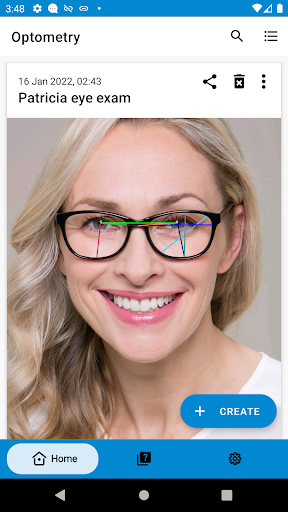
The professional optometry measurement app with AI-assisted pin placement — built for opticians, optometrists, and ophthalmology professionals. Measure everything you need for a glasses order — PD, fitting height, progressive values, and more — directly from a photo of the patient wearing the frame. AI face detection places measurement pins automatically, so you get accurate results in seconds instead of minutes. HOW IT WORKS 1. Take a photo of the patient in the frame 2. Calibrate using the known lens width — or let AI estimate lens edges 3. AI detects face landmarks and places pins automatically — drag to fine-tune 4. Get all your measurements instantly AI-ASSISTED MEASUREMENTS OptoExpert uses on-device face detection to automatically locate pupils, bridge, and lens edges. AI places your measurement pins with one tap — then drag to fine-tune for perfect accuracy. AI also estimates lens edges during calibration, saving time on every exam. All processing happens on your device — no data leaves your phone. SINGLE-VISION MEASUREMENTS • Pupillary distance (PD) — monocular left & right • Bridge width (DBL) • Lens width / eye size (A measurement) • Lens height (B measurement) • Minimum blank size — auto-calculated from shared points • Pupil to bottom of lens (left & right) • Pupil to bridge center (left & right) • Effective diameter (ED) PROGRESSIVE LENS MEASUREMENTS • Vertex distance • Pantoscopic tilt • Frame wrap / inclination angle BUILT FOR OPTICAL PROFESSIONALS • Guided workflow with floating pin labels and coach marks • Auto-calculated measurements reduce manual steps • Save and revisit patient exams • Export results as PDF to share with labs • No ads — a professional tool, not a consumer gimmick • Works offline WHY OPTICIANS AND OPTOMETRISTS CHOOSE OPTOEXPERT Traditional pupilometers, pd meters, and rulers are slow and inconsistent. iPad-based measurement systems from Essilor and Zeiss cost $50–100/month plus hardware. OptoExpert gives you AI-powered digital eye measurements from any Android phone for a fraction of the cost. PRICING Free to try with your first 2 eye exams. $4.99/month for unlimited optometry measurements. Used by independent opticians, optometrists, and ophthalmology professionals worldwide as a digital AI pupilometer for eye exam measurements, pd measurement, lens fitting, and progressive lens ordering.

What OptoExpert: AI Lens Measure Is Used For

OptoExpert: AI Lens Measure appears to be a medical measurement app for optical professionals on Android phones. Based on the metadata, it is designed to help opticians, optometrists, and ophthalmology staff capture eye and frame measurements from a photo of a patient wearing glasses. Common uses may include preparing prescription eyewear orders, checking fitting details, and recording exam measurements more quickly than with manual tools.

The app seems focused on optometry workflows rather than general consumer use. It includes measurement tasks such as pupillary distance, bridge width, lens width and height, and progressive-lens-related angles and distances. The camera-related permission fits its photo-based workflow, while storage access may support saving exam files or exporting reports. Network permissions are listed too, but the description says the processing happens on-device and that results can be saved or exported from the phone. It may be useful in clinics or optical shops that want a mobile tool for documenting patient measurements, reviewing exams, or sharing PDF results with labs.

Common uses

  • Measure PD and other eyewear fitting values from patient photos
  • Record single-vision and progressive lens measurements
  • Use on a phone in clinic or optical shop settings
  • Save and revisit patient exams for later review
  • Export measurement results as PDF for sharing
  • Work offline for local measurement tasks
  • Use camera access for photo-based eye and frame analysis
Best for:
optometrists opticians ophthalmology staff phone app clinical measurement

App Details

Package:
com.js.mini.eyeexamapp
Category:
Medical
Developer:
ds.optometry
Version:
Varies with device
Min Android:
Varies with device
Age Rating:
Everyone
Contains Ads:
No
In-App Purchases:
Yes

Official Listing

  • Official listing available on Google Play
  • Package name: com.js.mini.eyeexamapp
  • Age rating: Everyone

Explore More

Browse more apps in Medical or explore the Phone hub .

Related Medical Apps

My Heart: Blood Pressure Log icon

My Heart: Blood Pressure Log

Medical Klimaszewski Szymon

Your portable blood pressure tracker. Record, monitor, and analyze BP anytime.

Version Google-7.4.0 11.8 MB ⭐ 4.20 10,000,000+ installs
Meds & Pill Reminder MyTherapy icon

Meds & Pill Reminder MyTherapy

Medical MyTherapy

Our health app helps with a medication reminder, pill counter & mood tracker

Version 3.259.3 85.7 MB ⭐ 4.60 5,000,000+ installs
Anatomy 3D Atlas icon

Anatomy 3D Atlas

Medical Catfish Animation Studio

Learn human anatomy interactively

Version 7.0.6 10.7 MB ⭐ 4.20 5,000,000+ installs

How to Download OptoExpert: AI Lens Measure

If this app is not hosted directly on APKApps official link, then for the safest and most up-to-date version, install it from its official Google Play listing.