WhatWeather - Weather Station icon

Phone

WhatWeather - Weather Station

Weather kolov.com ⭐ 4.30 500,000+

Turn your outdated device into a weather station and give it a second life

Version Varies with device 13.4 MB Everyone

Screenshots

WhatWeather - Weather Station screenshot
Permissions Explained 13 permissions requested View details

This app requests 13 permissions. The table below explains what each permission may allow and what users should review before installing.

Status Permission What it means Why it may be used User safety note
Common Internet access android.permission.INTERNET Allows the app to open network connections and communicate with online services. Commonly used for streaming, syncing, login, ads, analytics, downloads, cloud features, and app updates. Common permission. Review the app’s behavior if it does not appear to need online access.
⚠️ Sensitive Precise location android.permission.ACCESS_FINE_LOCATION Allows the app to access the device’s precise location when granted by the user. Used for maps, navigation, local recommendations, weather, rideshare, nearby devices, or location-based content. Sensitive permission. Grant only when location access matches the app’s purpose.
⚠️ Sensitive Approximate location android.permission.ACCESS_COARSE_LOCATION Allows the app to access an approximate device location. Used for weather, local content, regional features, nearby services, or location-based settings. Sensitive permission. Review whether the app needs location access.
ℹ️ Review Alarm Permission Set Alarm com.android.alarm.permission.SET_ALARM This is an Android permission or app-specific permission requested by the app. The app may use this permission for features related to its category, device support, background behavior, storage, connectivity, or system integration. Review this permission before installing, especially if it does not match the app’s expected purpose.
ℹ️ Review Receive Boot Completed android.permission.RECEIVE_BOOT_COMPLETED This is an Android permission or app-specific permission requested by the app. The app may use this permission for features related to its category, device support, background behavior, storage, connectivity, or system integration. Review this permission before installing, especially if it does not match the app’s expected purpose.
ℹ️ Review Schedule Exact Alarm android.permission.SCHEDULE_EXACT_ALARM This is an Android permission or app-specific permission requested by the app. The app may use this permission for features related to its category, device support, background behavior, storage, connectivity, or system integration. Review this permission before installing, especially if it does not match the app’s expected purpose.
ℹ️ Review System Alert Window android.permission.SYSTEM_ALERT_WINDOW This is an Android permission or app-specific permission requested by the app. The app may use this permission for features related to its category, device support, background behavior, storage, connectivity, or system integration. Review this permission before installing, especially if it does not match the app’s expected purpose.
ℹ️ Review Write Settings android.permission.WRITE_SETTINGS This is an Android permission or app-specific permission requested by the app. The app may use this permission for features related to its category, device support, background behavior, storage, connectivity, or system integration. Review this permission before installing, especially if it does not match the app’s expected purpose.
ℹ️ Review Keep device awake android.permission.WAKE_LOCK Allows the app to prevent the device from sleeping while a task is running. Used for media playback, downloads, navigation, alarms, calls, or long-running background tasks. Review battery usage if the app keeps the device awake too often.
Common View network status android.permission.ACCESS_NETWORK_STATE Allows the app to check whether the device is connected to Wi-Fi, mobile data, or another network. Often used to avoid loading content when offline or to adjust loading based on connection quality. Generally low risk by itself.
ℹ️ Review Foreground Service android.permission.FOREGROUND_SERVICE This is an Android permission or app-specific permission requested by the app. The app may use this permission for features related to its category, device support, background behavior, storage, connectivity, or system integration. Review this permission before installing, especially if it does not match the app’s expected purpose.
ℹ️ Review Vending Billing com.android.vending.BILLING This is an Android permission or app-specific permission requested by the app. The app may use this permission for features related to its category, device support, background behavior, storage, connectivity, or system integration. Review this permission before installing, especially if it does not match the app’s expected purpose.
ℹ️ Review Com Kolov Weatherstation Dynamic Receiver Not Exported Permission com.kolov.weatherstation.DYNAMIC_RECEIVER_NOT_EXPORTED_PERMISSION This is an Android permission or app-specific permission requested by the app. The app may use this permission for features related to its category, device support, background behavior, storage, connectivity, or system integration. Review this permission before installing, especially if it does not match the app’s expected purpose.

About WhatWeather - Weather Station

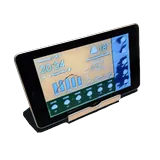
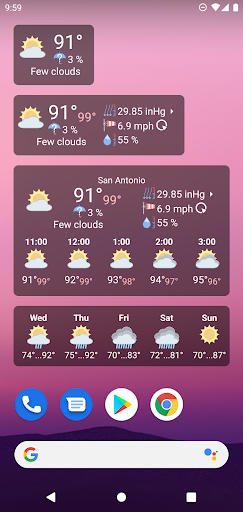
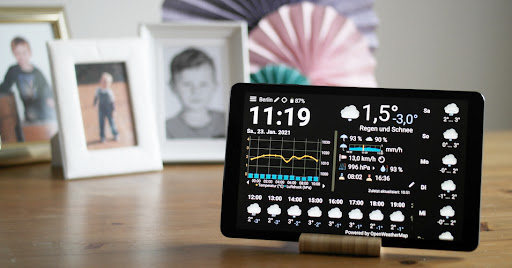
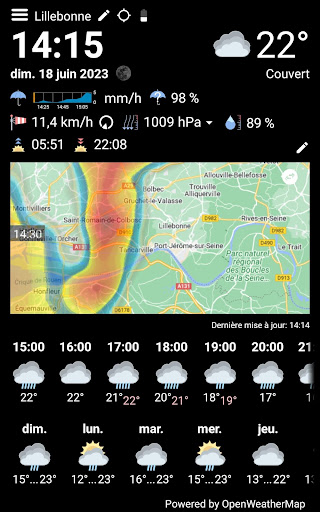
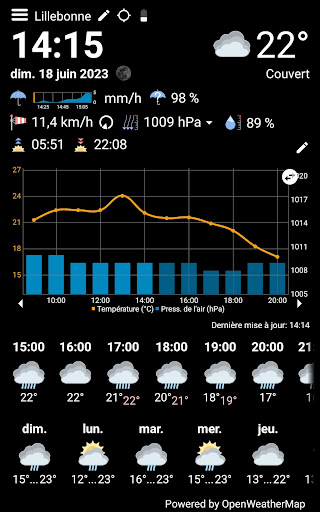
Use your old Android phone or tablet as a weather station. All you need is to install this app. The display stays always on and the content is automatically updated. You can see the current weather, hourly forecasts, daily forecasts and the weather history for up to 3 days at a glance - absolutely free and without annoying ads. Following additional features can be purchased within the app: * Free choice of numerous weather data providers: OpenWeatherMap, Weather API, DWD, NOAA, Visual Crossing and WeatherFlow * Optional integration with your private weather station via Netatmo, Weather Underground or WeatherFlow * More frequent automatic refresh * Minutely rain forecast * Precipitation radar * Display can be automatically dimmed/switched off * Icons differentiating cloud cover and amount of rain and snow * Moon phase * Feels-like temperature * History graph always filled * Additional values: rain probability and intensity, cloud cover, dew point, UV index, ozone and visibility in a popup window * Variable intervals for hourly forecasts and history * Switchable full screen FAQ What is this app good for? The initial idea was to revive old tablets, that are still working, but became too slow or too insecure because of the old Android version. Usually these tablets are still good enough to run WhatWeather. How long can I use the app for free? As long as you wish. It offers a basic set of features and can be upgraded with in-app purchases. What is WhatWeather Pro? WhatWeather Pro has become obsolete since WhatWeather provides the same features as an in-app purchase. You no longer have to install a separate app. Do I have to purchase upgrades for each device separately? No. Your in-app purchases are eligible for all devices assigned to your Google account. Do you offer 24/7 support? We give our best to check e-mails daily and to answer your requests. Why is feature XY missing? To contact us is a better idea, than to write a 1-star review. Give us a chance to put it on the list or to explain, why we don't want to implement it. There is much empty space on the screen, why don't you fill it up with bigger font or additional data? There is one layout, that has to fit all the different aspect ratios, time and date formats, languages and optional data, that you can turn on and off. Our reference is an old Google Nexus 7. We are improving the layout continuously, but it will possibly never fit your particular device perfectly. WhatWeather asks for the GPS permission. What do you use it for? The weather data providers need your position. WhatWeather tries to locate your device automatically. If you reject the permission or turn off the device's location service, you have to enter the location manually. There are no personal data besides the coordinates, language and app version submitted to the backend server. Icons from https://icons8.com were used in this app.

What WhatWeather - Weather Station Is Used For

WhatWeather - Weather Station appears to be an app for turning an older Android phone or tablet into a dedicated weather display. Based on the metadata, it is commonly used as a wall-style or desk-style weather station that stays on and updates automatically, making it useful for devices that are no longer ideal for everyday use but still work well enough for a fixed display role.

The app is focused on showing weather information at a glance, including current conditions, hourly and daily forecasts, and recent weather history. The listed permissions suggest it needs internet access and location access to provide local weather data, and it also uses boot, alarm, and wake-related permissions to keep the display and updates running on a schedule. It may also support more advanced weather sources and optional in-app upgrades, but the basic use case is simply repurposing an Android device as a weather screen for home, office, or bedside placement.

Common uses

  • Display current weather on an old Android phone or tablet
  • Check hourly and daily forecasts at a glance
  • Use a spare device as a dedicated weather station
  • Keep weather information visible with an always-on screen
  • View recent weather history on the device
  • Use location permissions for local weather data
  • Enable optional paid features for more detailed weather sources and updates
Best for:
old phone display tablet weather station home weather screen always-on device weather at a glance

App Details

Package:
com.kolov.weatherstation
Category:
Weather
Developer:
kolov.com
Version:
Varies with device
Updated:
Sep 11, 2025
Min Android:
Varies with device
Age Rating:
Everyone
Contains Ads:
No
In-App Purchases:
Yes

Official Listing

  • Official listing available on Google Play
  • Package name: com.kolov.weatherstation
  • Age rating: Everyone

Explore More

Browse more apps in Weather or explore the Phone hub .

Related Weather Apps

1Weather Forecasts & Radar icon

1Weather Forecasts & Radar

Weather OneLouder Apps

Hyperlocal Forecasts, Live Radar, Severe Weather alerts & Homescreen Widgets

Version 12.4.1 81.5 MB ⭐ 4.30 100,000,000+ installs
The Weather Channel - Radar icon

The Weather Channel - Radar

Weather The Weather Channel

Prepare for severe weather with notifications, future radar, and live alerts.

Version 15.18.0 85.2 MB ⭐ 4.70 100,000,000+ installs
Weather & Radar Forecast icon

Weather & Radar Forecast

Weather WetterOnline

Local forecast, alerts, rain, snow and wind radar, air quality & weather widget

Version Varies with device 67.7 MB ⭐ 4.70 100,000,000+ installs
AccuWeather: Weather Radar icon

AccuWeather: Weather Radar

Weather AccuWeather

Your local weather forecast, storm tracker, radar maps & live weather news

Version Varies with device 46.1 MB ⭐ 3.50 100,000,000+ installs
Weather icon

Weather

Weather OneLouder Apps
Version 0.7.5.0 ⭐ 4.70 50,000,000+ installs

How to Download WhatWeather - Weather Station

If this app is not hosted directly on APKApps official link, then for the safest and most up-to-date version, install it from its official Google Play listing.