Signal Detector Pro icon

Phone

Signal Detector Pro

Tools Lefan Co., Ltd. ⭐ 4.60 5,000+
Version 1.10.96 Everyone

Screenshots

Signal Detector Pro screenshot
Permissions Explained 13 permissions requested View details

This app requests 13 permissions. The table below explains what each permission may allow and what users should review before installing.

Status Permission What it means Why it may be used User safety note
ℹ️ Review Approximate Location (network Based) approximate location (network-based) This is an Android permission or app-specific permission requested by the app. The app may use this permission for features related to its category, device support, background behavior, storage, connectivity, or system integration. Review this permission before installing, especially if it does not match the app’s expected purpose.
ℹ️ Review Precise Location (gps And Network Based) precise location (GPS and network-based) This is an Android permission or app-specific permission requested by the app. The app may use this permission for features related to its category, device support, background behavior, storage, connectivity, or system integration. Review this permission before installing, especially if it does not match the app’s expected purpose.
ℹ️ Review Read Phone Status And Identity read phone status and identity This is an Android permission or app-specific permission requested by the app. The app may use this permission for features related to its category, device support, background behavior, storage, connectivity, or system integration. Review this permission before installing, especially if it does not match the app’s expected purpose.
ℹ️ Review Record Audio record audio This is an Android permission or app-specific permission requested by the app. The app may use this permission for features related to its category, device support, background behavior, storage, connectivity, or system integration. Review this permission before installing, especially if it does not match the app’s expected purpose.
ℹ️ Review View Wi Fi Connections view Wi-Fi connections This is an Android permission or app-specific permission requested by the app. The app may use this permission for features related to its category, device support, background behavior, storage, connectivity, or system integration. Review this permission before installing, especially if it does not match the app’s expected purpose.
ℹ️ Review View Network Connections view network connections This is an Android permission or app-specific permission requested by the app. The app may use this permission for features related to its category, device support, background behavior, storage, connectivity, or system integration. Review this permission before installing, especially if it does not match the app’s expected purpose.
ℹ️ Review Pair With Bluetooth Devices pair with Bluetooth devices This is an Android permission or app-specific permission requested by the app. The app may use this permission for features related to its category, device support, background behavior, storage, connectivity, or system integration. Review this permission before installing, especially if it does not match the app’s expected purpose.
ℹ️ Review Access Bluetooth Settings access Bluetooth settings This is an Android permission or app-specific permission requested by the app. The app may use this permission for features related to its category, device support, background behavior, storage, connectivity, or system integration. Review this permission before installing, especially if it does not match the app’s expected purpose.
ℹ️ Review Change Network Connectivity change network connectivity This is an Android permission or app-specific permission requested by the app. The app may use this permission for features related to its category, device support, background behavior, storage, connectivity, or system integration. Review this permission before installing, especially if it does not match the app’s expected purpose.
ℹ️ Review Connect And Disconnect From Wi Fi connect and disconnect from Wi-Fi This is an Android permission or app-specific permission requested by the app. The app may use this permission for features related to its category, device support, background behavior, storage, connectivity, or system integration. Review this permission before installing, especially if it does not match the app’s expected purpose.
ℹ️ Review Full Network Access full network access This is an Android permission or app-specific permission requested by the app. The app may use this permission for features related to its category, device support, background behavior, storage, connectivity, or system integration. Review this permission before installing, especially if it does not match the app’s expected purpose.
ℹ️ Review Prevent Device From Sleeping prevent device from sleeping This is an Android permission or app-specific permission requested by the app. The app may use this permission for features related to its category, device support, background behavior, storage, connectivity, or system integration. Review this permission before installing, especially if it does not match the app’s expected purpose.
ℹ️ Review Google Play License Check Google Play license check This is an Android permission or app-specific permission requested by the app. The app may use this permission for features related to its category, device support, background behavior, storage, connectivity, or system integration. Review this permission before installing, especially if it does not match the app’s expected purpose.

About Signal Detector Pro

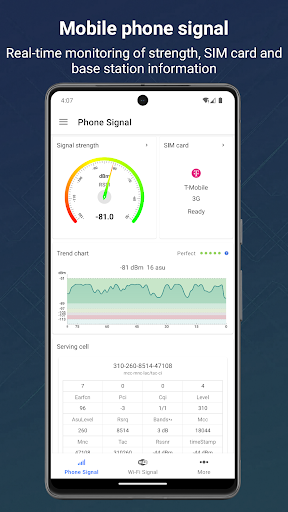
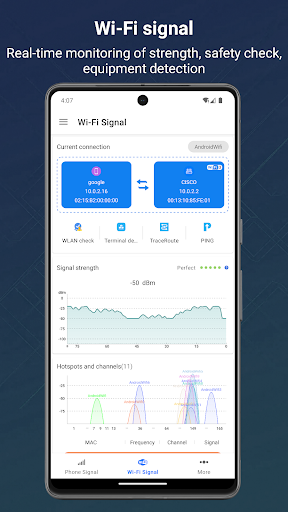
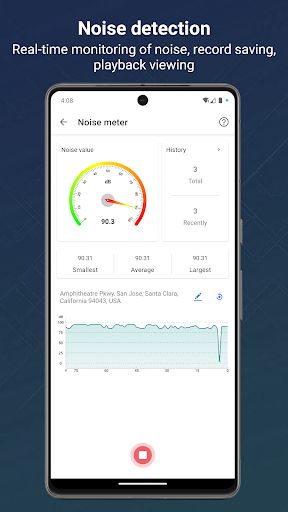
✨All-round signal assistant: One-click monitoring of multi-dimensional signals such as mobile phones, WiFi, Bluetooth, satellites (GPS), magnetic fields, etc., to help you quickly locate the best signal source and optimize the connection experience. ✯Mobile phone ✯Base station ✯wifi ✯Bluetooth ✯Satellite ✯Magnetic field ✯Speed ✯Noise 【Function introduction】 1.Mobile phone signal monitoring: Real-time tracking and display of mobile phone signal strength, one-click query of SIM card status and operator details. In-depth exploration of base station services, including current service cells, neighboring cells and network location areas (LAC), tracking areas (TAC), cell identification (CI) and other advanced information, to help you fully understand the mobile phone network environment and optimize signal reception quality. 2.WIFI signal monitoring: Real-time detection of signal strength, display of key information such as MAC, channel, IP, rate, etc., detection of security, and listing of connected devices to help you easily manage the network. 3. Satellite signal: real-time tracking of satellite signals, obtaining satellite information, including nationality name (US GPS, China Beidou, EU Galileo, Russia GLONASS, Japan Quasi-Zenith Satellite System, India IRNSS), number of satellites, real-time satellite location, availability, longitude and latitude, address and other information. 4. Bluetooth signal: real-time detection of Bluetooth signal strength, obtaining information such as the current connected Bluetooth MAC address. Query paired list, scan and discover nearby Bluetooth devices and other functions. 5. Sensor information: obtain all available sensor devices on the device, and read their current value, power, accuracy and other related data in real time. And used for practical applications, such as thermometer, compass, brightness meter, barometer and other actual measurements. 6. Speed tracking: display the device moving speed (km/h, mph, speed knots optional), direction and number of satellite connections to ensure accurate navigation and positioning. 7. Magnetic field monitoring: real-time monitoring of magnetic field strength, and setting threshold automatic alarm. 8. Route tracking: Query the complete path from your current Internet IP to the target website IP, covering the IP address, number of hops, delay time and internal and external network status of each hop server along the way. One-click insight into the entire network, helping to accurately evaluate and improve the current network quality. 9. PING test: Evaluate the quality of network connection, accurately test the accessibility of the target network IP, and monitor the packet loss rate, network delay and jitter in real time. Support detailed test log records, so that network problems can be found, and help quickly locate and solve network failures. 10. Realize the real-time noise detection function, which can continuously monitor the environmental noise value, and support the…

What Signal Detector Pro Is Used For

Signal Detector Pro appears to be a phone utility app for checking and comparing different kinds of signal-related data on an Android device. Based on the metadata, it focuses on mobile network, Wi‑Fi, Bluetooth, GPS/satellite, and sensor readings in one place, which may make it useful for users who want a detailed view of connection quality and device signals.

Common uses may include checking cellular signal strength, reviewing SIM or network details, viewing nearby or connected Wi‑Fi information, and scanning Bluetooth devices. The app also appears to include satellite status, speed, and magnetic field monitoring, plus access to sensor data that could support simple measurements like compass, brightness, or barometer-style readings. Permissions such as location, Wi‑Fi/network access, Bluetooth access, and phone status fit these diagnostic and monitoring functions. It may be most relevant for troubleshooting connectivity, understanding signal conditions, or using the phone as a general signal and sensor monitor rather than for everyday casual use.

Common uses

  • Monitor mobile signal strength and network details
  • Check Wi‑Fi status, connection data, and nearby devices
  • View Bluetooth signal and paired-device information
  • Inspect GPS and satellite reception details
  • Read device sensor values for compass or environment-style checks
  • Track movement speed and direction using location data
  • Review magnetic field readings and related signal measurements
Best for:
phone users signal monitoring network troubleshooting sensor checks location tracking tech utilities

App Details

Package:
com.lefan.signal.vip
Category:
Tools
Developer:
Lefan Co., Ltd.
Version:
1.10.96
Updated:
Mar 21, 2026
Min Android:
5.1
Age Rating:
Everyone
Contains Ads:
No
In-App Purchases:
No

Official Listing

  • Official listing available on Google Play
  • Package name: com.lefan.signal.vip
  • Age rating: Everyone

Explore More

Browse more apps in Tools or explore the Phone hub .

Related Tools Apps

ZUMIMALL icon

ZUMIMALL

Business Shenzhen Junan Technology Co., Ltd

Version 6.0.1 ⭐ 4.60 100,000+ installs
Opensignal icon

Opensignal

Tools Opensignal.com

Network coverage map, Internet & WiFi, signal & video streaming speed test

Version 7.66.4-1 9.6 MB ⭐ 4.20 10,000,000+ installs

How to Download Signal Detector Pro

If this app is not hosted directly on APKApps official link, then for the safest and most up-to-date version, install it from its official Google Play listing.