LOBSTR: Buy XLM & Crypto icon

Phone

LOBSTR: Buy XLM & Crypto

Finance LOBSTR Stellar Wallet ⭐ 4.60 1,000,000+
Version 13.6.1 Everyone

Screenshots

LOBSTR: Buy XLM & Crypto screenshot
Permissions Explained 13 permissions requested View details

This app requests 13 permissions. The table below explains what each permission may allow and what users should review before installing.

Status Permission What it means Why it may be used User safety note
ℹ️ Review Find Accounts On The Device find accounts on the device This is an Android permission or app-specific permission requested by the app. The app may use this permission for features related to its category, device support, background behavior, storage, connectivity, or system integration. Review this permission before installing, especially if it does not match the app’s expected purpose.
ℹ️ Review Read Your Contacts read your contacts This is an Android permission or app-specific permission requested by the app. The app may use this permission for features related to its category, device support, background behavior, storage, connectivity, or system integration. Review this permission before installing, especially if it does not match the app’s expected purpose.
ℹ️ Review Approximate Location (network Based) approximate location (network-based) This is an Android permission or app-specific permission requested by the app. The app may use this permission for features related to its category, device support, background behavior, storage, connectivity, or system integration. Review this permission before installing, especially if it does not match the app’s expected purpose.
ℹ️ Review Precise Location (gps And Network Based) precise location (GPS and network-based) This is an Android permission or app-specific permission requested by the app. The app may use this permission for features related to its category, device support, background behavior, storage, connectivity, or system integration. Review this permission before installing, especially if it does not match the app’s expected purpose.
ℹ️ Review Take Pictures And Videos take pictures and videos This is an Android permission or app-specific permission requested by the app. The app may use this permission for features related to its category, device support, background behavior, storage, connectivity, or system integration. Review this permission before installing, especially if it does not match the app’s expected purpose.
ℹ️ Review View Wi Fi Connections view Wi-Fi connections This is an Android permission or app-specific permission requested by the app. The app may use this permission for features related to its category, device support, background behavior, storage, connectivity, or system integration. Review this permission before installing, especially if it does not match the app’s expected purpose.
ℹ️ Review View Network Connections view network connections This is an Android permission or app-specific permission requested by the app. The app may use this permission for features related to its category, device support, background behavior, storage, connectivity, or system integration. Review this permission before installing, especially if it does not match the app’s expected purpose.
ℹ️ Review Full Network Access full network access This is an Android permission or app-specific permission requested by the app. The app may use this permission for features related to its category, device support, background behavior, storage, connectivity, or system integration. Review this permission before installing, especially if it does not match the app’s expected purpose.
ℹ️ Review Run At Startup run at startup This is an Android permission or app-specific permission requested by the app. The app may use this permission for features related to its category, device support, background behavior, storage, connectivity, or system integration. Review this permission before installing, especially if it does not match the app’s expected purpose.
ℹ️ Review Control Vibration control vibration This is an Android permission or app-specific permission requested by the app. The app may use this permission for features related to its category, device support, background behavior, storage, connectivity, or system integration. Review this permission before installing, especially if it does not match the app’s expected purpose.
ℹ️ Review Prevent Device From Sleeping prevent device from sleeping This is an Android permission or app-specific permission requested by the app. The app may use this permission for features related to its category, device support, background behavior, storage, connectivity, or system integration. Review this permission before installing, especially if it does not match the app’s expected purpose.
ℹ️ Review Read Google Service Configuration read Google service configuration This is an Android permission or app-specific permission requested by the app. The app may use this permission for features related to its category, device support, background behavior, storage, connectivity, or system integration. Review this permission before installing, especially if it does not match the app’s expected purpose.
ℹ️ Review Receive Data From Internet receive data from Internet This is an Android permission or app-specific permission requested by the app. The app may use this permission for features related to its category, device support, background behavior, storage, connectivity, or system integration. Review this permission before installing, especially if it does not match the app’s expected purpose.

About LOBSTR: Buy XLM & Crypto

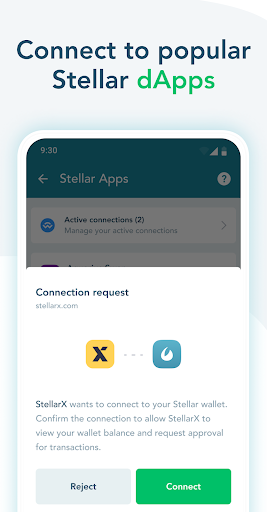
LOBSTR is a leading platform for managing Stellar Lumens and other assets issued on the Stellar network. Discover new tokens, hold, send and trade any asset, track prices and stay up to date with markets all in one simple and secure app. Why should you try out LOBSTR? ACCESSIBLE AND USER FRIENDLY LOBSTR wallet is designed to be intuitively accessible for every user. Whether you’re just starting with Stellar for the first time or are an active network user, the simple interface and helpful tips make it easy for everyone to get on board. Create an account and receive your first funds in a matter of minutes. BUY LUMENS AND OTHER CRYPTO Use VISA or Mastercard to purchase Stellar Lumens (XLM) directly from your LOBSTR account fast, secure and with low fees. Visit our website to shop BTC, ETH, USDT and other crypto assets at a fair price. SEND AND RECEIVE TOKENS INSTANTLY Receive, request and send tokens from your friends and family quickly and securely with only a few taps. Use QR codes and memorable email-like addresses to transfer anchored USD, BTC and other tokens anywhere in the world with close to no fees. KEEP TRACK OF YOUR PORTFOLIO Discover and add assets from the carefully curated list or add any custom asset you would like. Invest in your favorites, discover new buying opportunities and keep track of asset balances in your preferred quote currency any time of day, anywhere. Manage your asset portfolio, view asset details and market stats, track the latest prices with our charts and see how your portfolio performs over time. TRADE ON STELLAR EXCHANGE Trade thousands of market pairs with direct access to Stellar Decentralized Exchange (SDEX) right at your fingertips. Buy, sell and track your orders on the go with an easy-to-use interface, dynamic charts, real-time price updates, market history and push notifications for status updates. Set price alerts with a single tap to be notified when the market moves and stay up to date on the latest prices and trends. DEPOSIT AND WITHDRAW Deposit multiple crypto and fiat assets directly from your bank account or another chain including US Dollar, Euro, Bitcoin, Ether and Mexican Peso. Easily convert your deposit to another asset and withdraw in just a matter of minutes. SECURITY AND TRUST Your security is very important to us, and we are taking advanced security measures to protect your assets and personal information. On top of that, various security options are available to every user looking to safeguard their funds. Require a passcode or Face ID confirmation every time you open the app or make a transfer, enable IP confirmation and view the access history, configure two-factor authentication or enable multisig for the advanced protection. MULTISIGNATURE PROTECTION Configure multisignature protection right inside your LOBSTR wallet in a few easy steps with LOBSTR Vault integration. Verify the details of outgoing transactions, approve or reject and be fully confident in the security of your crypto.

What LOBSTR: Buy XLM & Crypto Is Used For

LOBSTR: Buy XLM & Crypto appears to be a mobile wallet and trading app centered on the Stellar network. Based on the metadata, people commonly use it to manage Stellar Lumens (XLM) and other Stellar-based assets, check balances, track portfolio performance, and review market prices from a phone.

The app also seems intended for day-to-day crypto activity such as sending and receiving tokens, requesting funds, scanning QR codes, and using address-style identifiers for transfers. Its finance category and network-related permissions suggest it needs internet access to update prices, sync account activity, and process transactions. Permissions like contacts, location, camera, and startup-related access may support features such as address book integration, location-aware services, QR scanning, or quick access after reopening the app.

For users who follow crypto markets, the app may also be used to view charts, monitor order activity, set price alerts, and trade assets through the Stellar decentralized exchange. It appears aimed at phone use, so it is likely most practical for managing assets on the go rather than on a large screen.

Common uses

  • Manage Stellar Lumens (XLM) and other assets on the Stellar network
  • Send, receive, and request tokens from a phone
  • Scan QR codes for faster transfer actions
  • Track balances, charts, and portfolio performance
  • Watch price changes and set alerts for market moves
  • Trade assets through Stellar exchange features
  • Use internet-connected account tools for syncing and updates
Best for:
crypto holders stellar users mobile trading portfolio tracking phone app

App Details

Package:
com.lobstr.client
Category:
Finance
Developer:
LOBSTR Stellar Wallet
Version:
13.6.1
Updated:
Mar 23, 2026
Min Android:
7.0
Age Rating:
Everyone
Contains Ads:
No
In-App Purchases:
Yes

Official Listing

  • Official listing available on Google Play
  • Package name: com.lobstr.client
  • Age rating: Everyone

Explore More

Browse more apps in Finance or explore the Phone hub .

Related Finance Apps

Blockchain icon

Blockchain

Finance Blockchain.com

Most Secure Crypto Platform

Version 202405.1.0 94.2 MB ⭐ 3.87 10,000,000+ installs

How to Download LOBSTR: Buy XLM & Crypto

If this app is not hosted directly on APKApps official link, then for the safest and most up-to-date version, install it from its official Google Play listing.